Swap PIP option like in iMovie??

How do you swap your PIP video/image with the main storyline for a given timeframe. I cannot believe such a simple function in iMovie is not easily done in FCPX and I cannot find anything on the Internet about it. Please help!

Posted on Apr 12, 2020 10:28 AM

Reply
11 replies

Apr 12, 2020 12:59 PM in response to mflorant

I made this template a long time ago:

https://youtu.be/w0kyqSJTa98

Still works, but uses a drop zone. Drop Zones do not "carry over" any audio, so you have to re-sync audio if using it in the PiP. You might be better served using an effect that doesn't separate audio.


Also, drop zone behavior has changed since those days! They no longer loop and you don't have to cut up and match clips to the default length of the title effect. (There may be issues with cropping if you use different aspect ratios than 16:9).


All drop zones start playing at the beginning of the clip in which they are used. To make that even worse, they start playing from the first frame you select. There are techniques you can use to get around these issues.


You can use the technique used in this video:

https://youtu.be/s5Adn3ZhDKU

to create a compound clip that syncs to your use, then Detach Audio from the compound clip to help sync any audio you need to use if necessary.


If you need help installing: https://fcpxtemplates.com/installing-plugins-for-fcpx/


Apr 13, 2020 10:55 AM in response to mflorant

As Fox said, the difficulty in drop zones has to do with selecting the correct part of the clip.

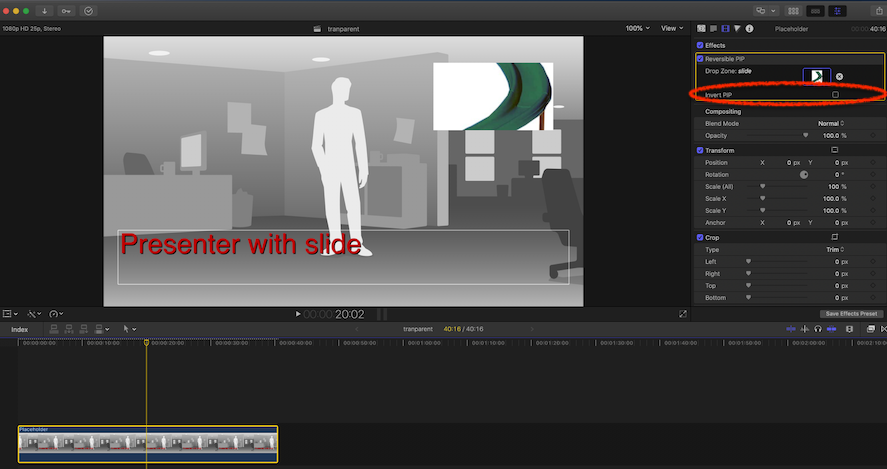
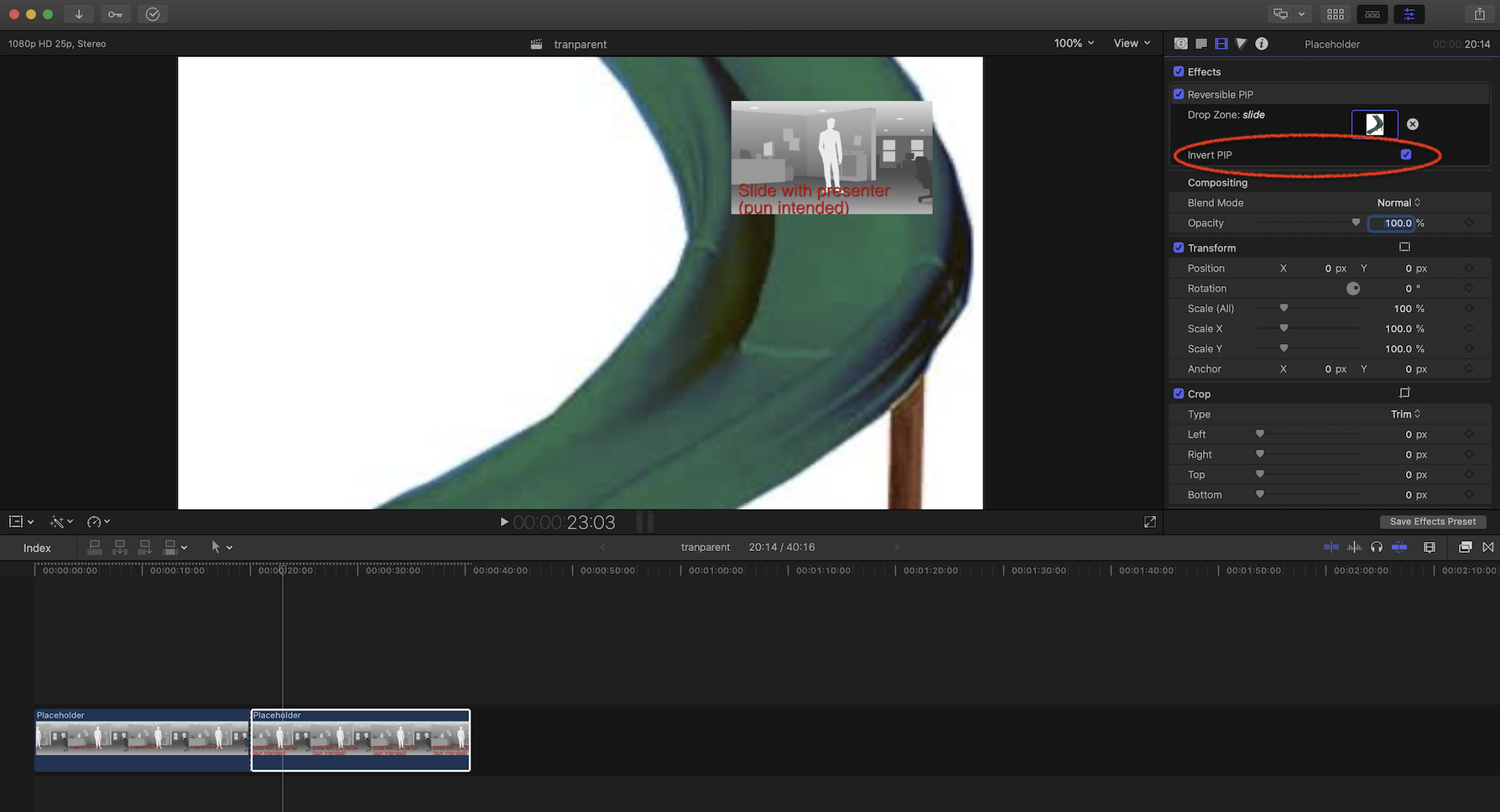
But if the content of the drop zone is to be a still image, then this is not a problem, and one can easily create a "Reversible PIP" effect.


I did just that and it works fine. You put the main clip on the timeline, add this effect and select the content of the drop zone.

There is an "Invert PIP" checkbox that works just as you would expect.


If you want to switch positions between the main clip and the drop zone, just blade the clip and change the status of the checkbox where appropriate.


I just did this as a Motion exercise, and did not publish several parameters, so if you feel this may be useful, let me know, and I will touch it up a bit and make it available.


Apr 14, 2020 3:43 AM in response to mflorant

Well, I am bit busy at the moment but just to see if the general idea suits you, I have made my work-in-progress effect available.


I have placed it in my drop box and I will keep available for a little while.


https://www.dropbox.com/s/lfjl30iviw9nsp8/Reversible%20PIP.zip?dl=0


As I said, it is not finished - needs the ability to move the PIP elsewhere, publish the pan and scale, and such, but what it alreay does is the reversing bit :-)

Apr 12, 2020 11:09 PM in response to mflorant

Did you **try** my PiP effect? There should be a download link in the description. Drop Zones have changed since that (ancient) video. If you have still graphics (no audio) load them into the drop zone then switch with the main storyline. The main storyline will play through the PiP effect (**with** audio!) while the still graphic is the "background" (whole screen size). All you need to do is add a new PiP HD title for every graphic change and switch the Switch Layer parameter to swap the positions. Actually, just set up the first one, then option-drag a duplicate out to the next position and change the drop zone image...


Hard to explain. Just try it. If you run into trouble, get back with me.

Apr 12, 2020 10:19 PM in response to mflorant

PiP is only a basic function of TV sets, very much like closed captioning. It's a special effect in video. It's easy enough to accomplish in FCPX - just place your clip over the storyline then use Transform > Scale All down to about 25-33% and Transform > Position X/Y to place it. If you need a border, there's a Simple Border effect available. There's just not a lot of "call" for it from professional video editors, so, Apple didn't build it in, OR..., they expect you to be able to build what you need with Motion (the two apps are rather "joined at the hip"). It's more a feature that iMovie users like to have and they don't have the option of building it with a Motion-for-iMovie-like app.

Apr 12, 2020 10:27 PM in response to fox_m

I guess I'm not being clear in what I'm asking. I understand how to do picture a picture in FCPX what I want is to be able to swap the main storyline to the PiP for the duration of the graphic. what's frustrating me is the fact that you can accomplish this and iMovie by just selecting transform and swap but FCPX does not have that swap option.

this is what I'm trying to accomplish: I have a 45-minute video of someone speaking and then I have different graphics that pop up at different points of the video. when the graphic comes up I would like to have that in the main screen while the speaker is continuing to talk in the picture in picture. The problem I'm having in FCPX is swapping the layers between the image and the picture and picture and the main storyline.

This thread has been closed by the system or the community team. You may vote for any posts you find helpful, or search the Community for additional answers.

Swap PIP option like in iMovie??

Welcome to Apple Support Community
A forum where Apple customers help each other with their products. Get started with your Apple Account.

