New iPhone SE can't turn on after software update

Hi all,


I just received my new iPhone SE and I was so stoked! I went through the setup process and before I could even get to a homescreen it requested I let the software update. So I accepted the software update and waited for it to finish. After the download was completed the phone shut down and I've not been able to turn it on since.


Has this happened to anyone else? What do I do?

iPhone SE

Posted on Apr 24, 2020 8:48 AM

Reply
Question marked as Top-ranking reply

Posted on Apr 24, 2020 10:03 AM

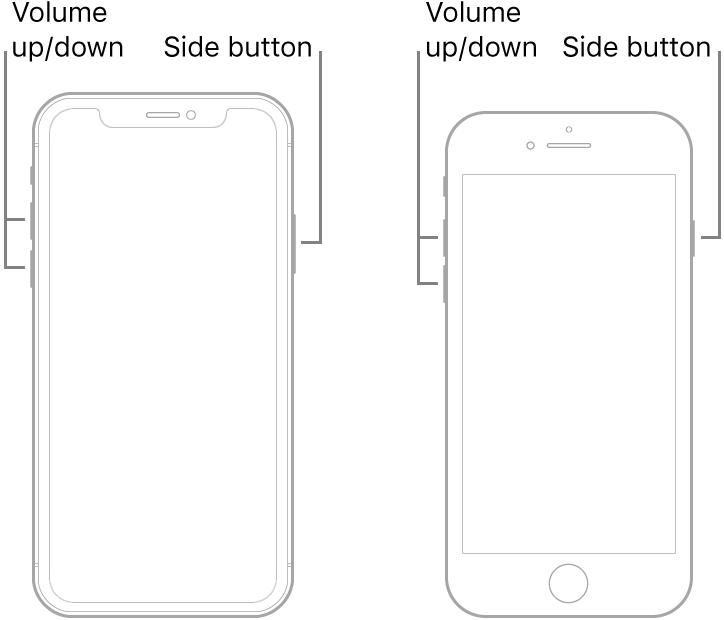
Force restart iPhone - Apple Support


  1. Press and quickly release the volume up button.
  2. Press and quickly release the volume down button.
  3. Press and hold the side button.
  4. When the Apple logo appears, release the button.


Note: If iPhone still doesn’t turn on, or if it gets stuck during start up, see the Apple Support article If your iPhone, iPad, or iPod touch won’t turn on or is frozen.

5 replies
Question marked as Top-ranking reply

Apr 24, 2020 10:03 AM in response to Pigru

Force restart iPhone - Apple Support


  1. Press and quickly release the volume up button.
  2. Press and quickly release the volume down button.
  3. Press and hold the side button.
  4. When the Apple logo appears, release the button.


Note: If iPhone still doesn’t turn on, or if it gets stuck during start up, see the Apple Support article If your iPhone, iPad, or iPod touch won’t turn on or is frozen.

Apr 24, 2020 5:14 PM in response to Pigru

update: my roommate received her phone today too and the same thing happened.

after half an hour on the phone with apple support and multiple hours of restoring to factory settings over and over the phone works now.


how to: turn on itunes, connect the phone, to ‘volume up, volume down, hold power’. You may need to do it multiple times. It worked for neither of us on the first go.

you need an original apple cable, i tried using a different data-capable one first, but couldn’t get a response from the phone.


eventually and error message will pop up in itunes, click ‘restore’. You might get the same error message multiple times, just keep clicking restore.

it’ll take 1-2 hours to download the update to the phone and get it installed.

i had to restore again after that. Then i could finally turn my phone on.


Apr 24, 2020 5:00 PM in response to Aldredb

If your iPhone, iPad, or iPod touch won't turn on or is frozen - Apple Support


Did you read the above, if your phone starts but gets stuck try to put it in Recovery Mode, it explains how to do it.


If it does not start up you have to Contact Apple Support


To be fair to the original poster you should start your own post here because every time we post back and forth they get an email...https://discussions.apple.com/community/iphone/using_iphone

Just type your question in the Search or ask a question box near the top of the page

This thread has been closed by the system or the community team. You may vote for any posts you find helpful, or search the Community for additional answers.

New iPhone SE can't turn on after software update

Welcome to Apple Support Community
A forum where Apple customers help each other with their products. Get started with your Apple Account.