Problems With WORD Files Created on PC when Read on MAC

I have migrated from PC to MAC.

When I try opening Word files created on my PC on my MAC the layout, spacing Police etc are not respected.

The version of Word used on the PC and MAC are the same (Office 365).

The problem arises when opening on my MacBook - when printing (the same printer is used for the PC and the MAC) what is printed is what I see on the screen.

Any idea, help.

Thanks

MacBook Pro 15", macOS 10.15

Posted on May 14, 2020 4:57 AM

Reply
Question marked as Top-ranking reply

Posted on May 15, 2020 11:13 AM

My italicized comment was simply to look in MS Word's Preferences to see if there is a setting in there that may help. You might consider that fonts installed in MS Windows, or by MS Word on Windows, may be different, at least in age, than their equivalent named font on macOS.


Drop your fonts into your /Users/yourname/Library/Fonts folder. The System will recognize them immediately (if compatible), as this is one of the three standard font installation locations. On Catalina, the operating system is on a read only partition, so your local user Font location is the only choice.

12 replies
Question marked as Top-ranking reply

May 15, 2020 11:13 AM in response to garfCAngers

My italicized comment was simply to look in MS Word's Preferences to see if there is a setting in there that may help. You might consider that fonts installed in MS Windows, or by MS Word on Windows, may be different, at least in age, than their equivalent named font on macOS.


Drop your fonts into your /Users/yourname/Library/Fonts folder. The System will recognize them immediately (if compatible), as this is one of the three standard font installation locations. On Catalina, the operating system is on a read only partition, so your local user Font location is the only choice.

May 14, 2020 5:52 AM in response to garfCAngers

Review Word on Mac's Preferences for any potential configuration there that may remedy the issue. Otherwise, its a Microsoft product, and I suggest you read/participate in a Microsoft forum dedicated to Mac users of Word.


Also, ensure that your Office 365 on Mac is kept current (I believe you are doing this), as well as the currency of Catalina updates.


Although I had read that Microsoft is now using a consolidated source code pool for Mac and Windows, the libraries that are used to build the Office suite for Window 10, or macOS Catalina, are obviously different in how the final product displays documents to the end user. The inherent DPI are different for one thing, and how kerning is done in Windows libraries, will certainly be different that how it is done using Cocoa Text library on macOS.

May 20, 2020 10:01 AM in response to garfCAngers

What is weird is when I look up the document on PC Word proposes the full family of this font…

That is even more irritating! And again, unfortunately, typical of MS and the Mac. While they have brought feature parity of the Windows and Mac versions of Office closer together than they ever have been in the past, they still aren't the same.


True story. Back some years (during the Office X days, I think), the Mac division of Office was still completely separate from the engineers who developed the Windows version. The Mac division would have to start with the Windows code and port it to Mac. But they also had some leeway to make improvements. However, not too much. When they had written some very nice features and added them to the Mac version, Bill Gates himself came down to their offices and told them to remove it. "Any new features will be in the Windows version, first." Yeah. Great move, Bill. Stifle innovation instead of using it in both versions.

especially that this is a Microsoft Font if I'm not mistaken.

You are correct. It is.

By the look of things the best thing for me appears to open my original Word document (generated on PC) in Pages and to save as a PDF.

I would have to agree that's where you appear to be stuck.

May 19, 2020 1:33 PM in response to Kurt Lang

Forgot to add:

Just checked up and the whole list of the Bahnschrift fonts are in the Fonts folder.

There shouldn't be a "whole list". It's only one font that provides every typeface. When I downloaded the font to check on it, this is what was in the .zip file:


BAHNSCHRIFT 1.TTF

BAHNSCHRIFT 2.TTF

BAHNSCHRIFT 3.TTF

BAHNSCHRIFT 4.TTF

BAHNSCHRIFT 5.TTF

BAHNSCHRIFT 6.TTF

BAHNSCHRIFT 7.TTF

BAHNSCHRIFT 8.TTF

BAHNSCHRIFT 9.TTF

BAHNSCHRIFT 10.TTF

BAHNSCHRIFT 11.TTF

BAHNSCHRIFT 12.TTF

BAHNSCHRIFT 13.TTF

BAHNSCHRIFT 14.TTF

BAHNSCHRIFT.TTF


Basically, someone thought because there were 15 typefaces, there must be 15 different fonts. Wrong! They're all identical and you only need one of them.

May 19, 2020 11:50 AM in response to garfCAngers

Microsoft has bundled their Fonts into the Apps themselves (likely to make it App Store friendly, and not have to give the Fonts away for free). I wonder if they do not load any of the System fonts?

Kurt Lang is the local font guru. Hopefully he'll see this and possibly give you some advice. He has a website dedicated to font management in the various versions of macOS.


May 20, 2020 8:59 AM in response to Kurt Lang

Thanks for your reply. You are correct , when I copied and imported the .ttf file from Windows on the PC there was only one file.

What I meant by '... whole list of Bahnschrift Fonts ..' was that in Pages and 'Livre de Fonts (Book of Police?)' the complete Bahnschrift family is present and proposed as opposed to Word where there is no roll down menu just one Bahnschrift entry. It is possible to generate a 'condensed' version by going into the 'Advanced Parameters' Pane when selecting text in the document but it is not the same.

What is the zip file you mention with the whole list of Fonts?

Thanks for your help

May 19, 2020 11:10 AM in response to VikingOSX

Just checked up and the whole list of the Bahhnschrift Fonts are in the Fonts folder. They whole list are available for use on Pages documents but not with Word - if I open a Word Document in Pages I even get the document to display at almost 100% similar.

It has been suggested from another user on the French language site that this was a change that occurred when switching from Mojave to Catalina - apparently in Mojave the whole spectrum of the Bahnschrift Fonts are available for use in Word.

Thanks for your help.

May 19, 2020 12:11 PM in response to garfCAngers

The problem is Bahhnschrift is a variable OpenType font. Office does not understand this structure yet and only shows one available face, as does Quark XPress 2018.


Pages and the Adobe CC 2020 suite (Photoshop, Illustrator, InDesign) do recognize the entire variable set.


You see these kinds options with variable fonts in apps that can work with them. You choose a basic starting point (regular, bold, etc) and you can then change the weight and width of that font on the fly.


May 20, 2020 9:24 AM in response to garfCAngers

What I meant by '... whole list of Bahnschrift Fonts ..' was that in Pages and 'Livre de Fonts (Book of Police?)' the complete Bahnschrift family is present and proposed as opposed to Word where there is no roll down menu just one Bahnschrift entry.

This statement and your screen shots are correct. Office 365 has no idea yet how to handle variable OpenType fonts and shows you only one typeface. There is no fix. Microsoft will have to get a clue and update their apps.


While I use, and prefer Office (and must have it to ensure I can correctly open client provided documents), this is typical of MS being way behind every other professional product. Variable OpenType originated in 2016. And yet here we are four years later and Office still doesn't know what they are. This on top of being - quite literally - the only apps I know of that still can't dynamically keep track of fonts being enabled/disabled while the apps are open. Any change you make in that regard and you must close the Office apps and relaunch them in order for them to display their font lists correctly. Why is this still "normal" for these apps?

It is possible to generate a 'condensed' version by going into the 'Advanced Parameters' Pane when selecting text in the document but it is not the same.

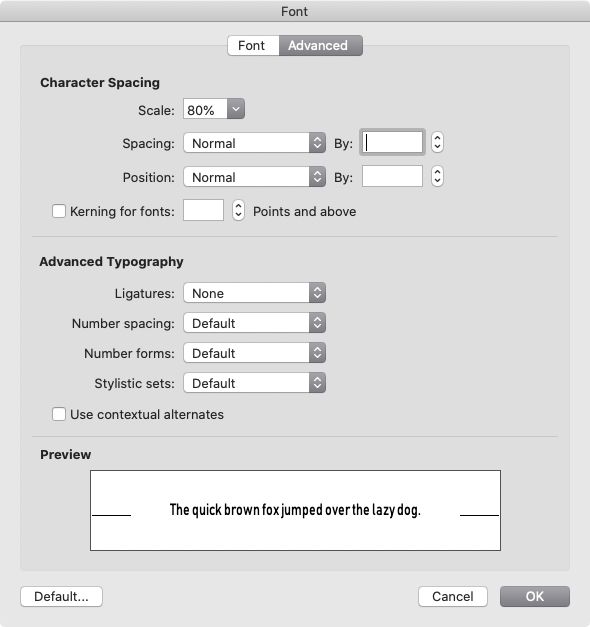
In Office? Sort of. Here's Bahnschrift in Word 365, 16 point text.

You can modify that in some limited ways. Here I scaled the sentence 80% (Command+D) to make a semi-fake condensed version.



What is the zip file you mention with the whole list of fonts?

That was just a result of doing a search online for the font to download it and see what was going on. I got it from here:


https://www.cufonfonts.com/font/bahnschrift


The .zip file that downloaded from there resulted in the unnecessary pile of .ttf fonts.

May 20, 2020 9:45 AM in response to Kurt Lang

Well thanks for looking into this matter for me.

What is weird is when I look up the document on PC Word proposes the full family of this Font - especially that this is a Microsoft Font if I'm not mistaken.

By the look of things the best thing for me appears to open my original Word document (generated on PC) in Pages and to save as a PDF. I have to guarantee that any document I modify on my MAC when it's sent back out to Word users on PC hasn't undergone any Font/layout changes.

Regards

Gary

This thread has been closed by the system or the community team. You may vote for any posts you find helpful, or search the Community for additional answers.

Problems With WORD Files Created on PC when Read on MAC

Welcome to Apple Support Community
A forum where Apple customers help each other with their products. Get started with your Apple Account.
