How do I download my iPhone 5c (10.3.3) content onto a new iPhone SE 2nd generation?

How does one transfer the data, including all photos, wallpapers, etc. of a still in use (AT&T) IPhone 5c (iOS 10) onto a New, blank 2020 iPhone SE (iOS 13), carrier also AT&T?

iPhone 5c, iOS 10

Posted on May 24, 2020 8:26 PM

Reply
Question marked as Top-ranking reply

Posted on May 26, 2020 10:53 AM

Hello KLEarbur,


Welcome to Apple Support Communities!


I understand from your question that you would like to transfer information from your old phone to your new phone. I can certainly help you with this!


What you will want to do is first back up your old phone. This will save all of your information to either iCloud or a backup on your computer. After the backup has been complete, you will want to restore form the backup onto your new phone which involves reverting your new phone back to the initial setup process. Guides to all of these steps are linked below:

How to back up your iPhone, iPad, and iPod touch

Set up your iPhone, iPad, or iPod touch


Restore or transfer your information and data
If you have an iCloud or iTunes backup, or an Android device, you can restore or transfer your data from your old device to your new device.
If you don't have a backup or another device, select Don't Transfer Apps & Data.
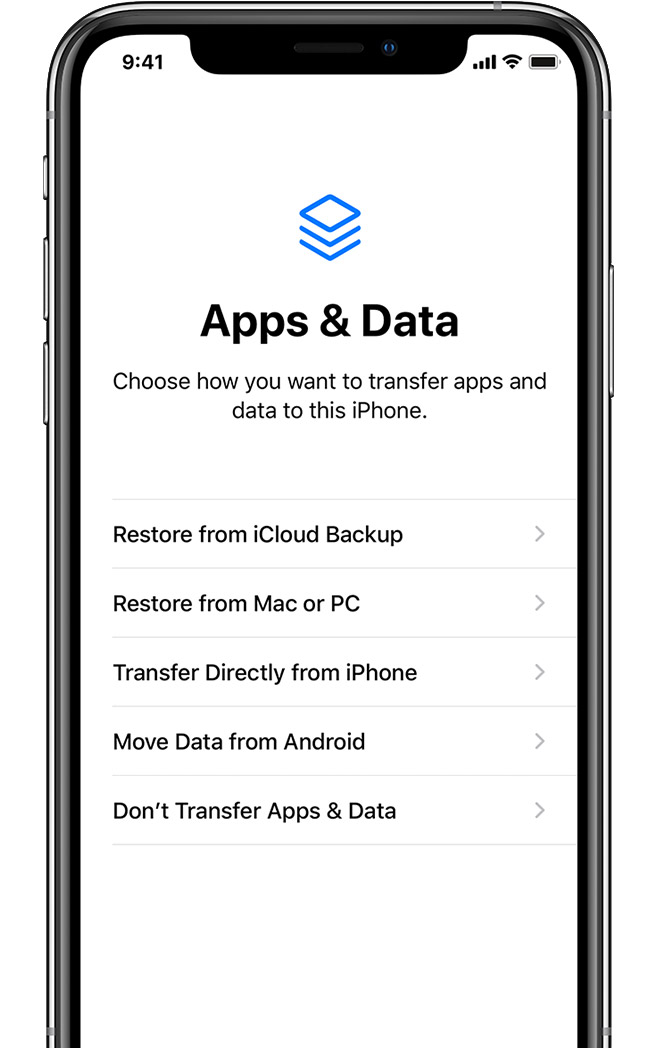


At this point (step 5) in the setup process, you will want to choose 'Restore from iCloud Backup'


I hope this is able to resolve your issue. If you have any more questions or this does not resolve your issue, please reach back out on the thread!


Cheers.

2 replies
Question marked as Top-ranking reply

May 26, 2020 10:53 AM in response to KLEarbur

Hello KLEarbur,


Welcome to Apple Support Communities!


I understand from your question that you would like to transfer information from your old phone to your new phone. I can certainly help you with this!


What you will want to do is first back up your old phone. This will save all of your information to either iCloud or a backup on your computer. After the backup has been complete, you will want to restore form the backup onto your new phone which involves reverting your new phone back to the initial setup process. Guides to all of these steps are linked below:

How to back up your iPhone, iPad, and iPod touch

Set up your iPhone, iPad, or iPod touch


Restore or transfer your information and data
If you have an iCloud or iTunes backup, or an Android device, you can restore or transfer your data from your old device to your new device.
If you don't have a backup or another device, select Don't Transfer Apps & Data.


At this point (step 5) in the setup process, you will want to choose 'Restore from iCloud Backup'


I hope this is able to resolve your issue. If you have any more questions or this does not resolve your issue, please reach back out on the thread!


Cheers.

This thread has been closed by the system or the community team. You may vote for any posts you find helpful, or search the Community for additional answers.

How do I download my iPhone 5c (10.3.3) content onto a new iPhone SE 2nd generation?

Welcome to Apple Support Community
A forum where Apple customers help each other with their products. Get started with your Apple Account.