
I cannot import photos using the Apple SD card reader with my SE 2 iPhone?
I cannot import photos using the Apple SD card reader with my SE 2 iPhone? Is there a setting change I must make, or something else wrong?
iPhone SE
I cannot import photos using the Apple SD card reader with my SE 2 iPhone? Is there a setting change I must make, or something else wrong?
iPhone SE
Hello, Star_Rover.
Thank you for using Apple Support Communities.
I understand you're unable to import photos from your SD card reader. I'd like to help. Take a look at this article, there is some great information and steps to help you if you can't import: Import photos using Apple camera adapters
You may also check to make sure to allow USB Accessories in your settings: Using USB accessories with iOS 11.4.1 and later
"Allow access to USB accessories
You can allow your iOS device to always access USB accessories, for example, if you use a USB assistive device to enter your passcode on your locked iPhone. Many assistive devices will automatically turn on the setting to allow USB devices the first time they’re connected.
If you don’t connect to USB accessories regularly, you might need to turn on this setting manually.
In Settings, go to Face ID & Passcode or Touch ID & Passcode, and turn on USB Accessories under Allow Access When Locked.
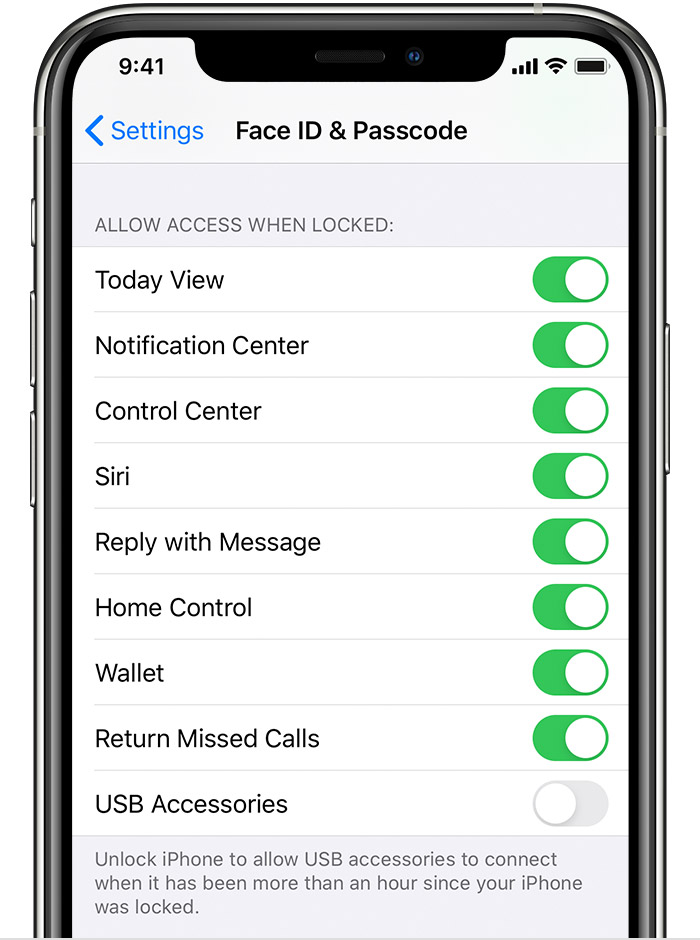
When the USB Accessories setting is off, as in the image above, you might need to unlock your iOS device to connect USB accessories".
Keep me updated.
Cheers!
Hello, Star_Rover.
Thank you for using Apple Support Communities.
I understand you're unable to import photos from your SD card reader. I'd like to help. Take a look at this article, there is some great information and steps to help you if you can't import: Import photos using Apple camera adapters
You may also check to make sure to allow USB Accessories in your settings: Using USB accessories with iOS 11.4.1 and later
"Allow access to USB accessories
You can allow your iOS device to always access USB accessories, for example, if you use a USB assistive device to enter your passcode on your locked iPhone. Many assistive devices will automatically turn on the setting to allow USB devices the first time they’re connected.
If you don’t connect to USB accessories regularly, you might need to turn on this setting manually.
In Settings, go to Face ID & Passcode or Touch ID & Passcode, and turn on USB Accessories under Allow Access When Locked.
When the USB Accessories setting is off, as in the image above, you might need to unlock your iOS device to connect USB accessories".
Keep me updated.
Cheers!
I cannot import photos using the Apple SD card reader with my SE 2 iPhone?

