
Iphone XR not working
When i go to turn my iphone XR on it says support.apple.com/iphone/restore and i dont have an apple laptop and i cant get it to restore i just want it back to working condition doesn't have to have my stuff on it
When i go to turn my iphone XR on it says support.apple.com/iphone/restore and i dont have an apple laptop and i cant get it to restore i just want it back to working condition doesn't have to have my stuff on it
Force restart iPhone - Apple Support ⬅︎ TRY THIS, and if it does not work try Recovery Mode because if you can't get it to start properly then you have to have it serviced by Apple which you might not want to do and might not be an option right now...
Force restart an iPhone with Face ID, iPhone SE (2nd generation), iPhone 8, or iPhone 8 Plus
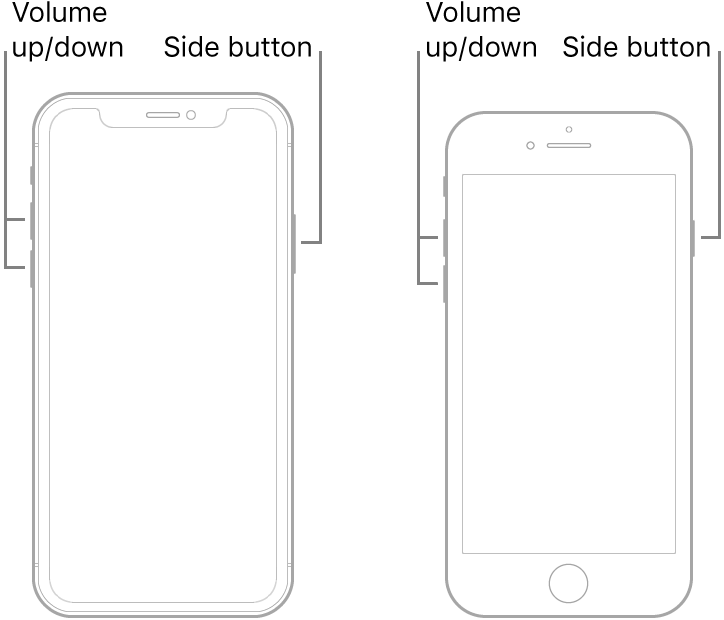
Note: If iPhone still doesn’t turn on, or if it gets stuck during start up, see the Apple Support article If your iPhone, iPad, or iPod touch won’t turn on or is frozen.
Recovery Mode... the full info is in the above link...⬆︎ the short info is below...⬇︎
Connect your device to a computer. On a Mac with macOS Catalina 10.15, open Finder. On a Mac with macOS Mojave 10.14 or earlier, or on a PC, open iTunes.
Press and hold both the Home and the Top (or Side) buttons at the same time. Keep holding them until you see the recovery mode screen.
Force restart iPhone - Apple Support ⬅︎ TRY THIS, and if it does not work try Recovery Mode because if you can't get it to start properly then you have to have it serviced by Apple which you might not want to do and might not be an option right now...
Force restart an iPhone with Face ID, iPhone SE (2nd generation), iPhone 8, or iPhone 8 Plus
Note: If iPhone still doesn’t turn on, or if it gets stuck during start up, see the Apple Support article If your iPhone, iPad, or iPod touch won’t turn on or is frozen.
Recovery Mode... the full info is in the above link...⬆︎ the short info is below...⬇︎
Connect your device to a computer. On a Mac with macOS Catalina 10.15, open Finder. On a Mac with macOS Mojave 10.14 or earlier, or on a PC, open iTunes.
Press and hold both the Home and the Top (or Side) buttons at the same time. Keep holding them until you see the recovery mode screen.
Iphone XR not working
