My Iphone X is stuck on the restore screen

My Iphone X is stuck on the restore screen it wont update when i try to. Is there a way to save my phone data. I dont care if i have to get a new phone to put the data onto if getting the data off causes it to break. I care more about the photos on my phone then the actual phone. I may have to try to mail it to the apple store. Any help or ideas are most welcome.

iPhone X, iOS 13

Posted on Jun 2, 2020 1:24 PM

Reply
Question marked as Top-ranking reply

Posted on Jun 2, 2020 4:53 PM

Force restart iPhone - Apple Support ⬅︎ TRY THIS, and if it does not work try Recovery Mode because if you can't get it to start properly then you have to have it serviced by Apple which you might not want to do and might not be an option right now...


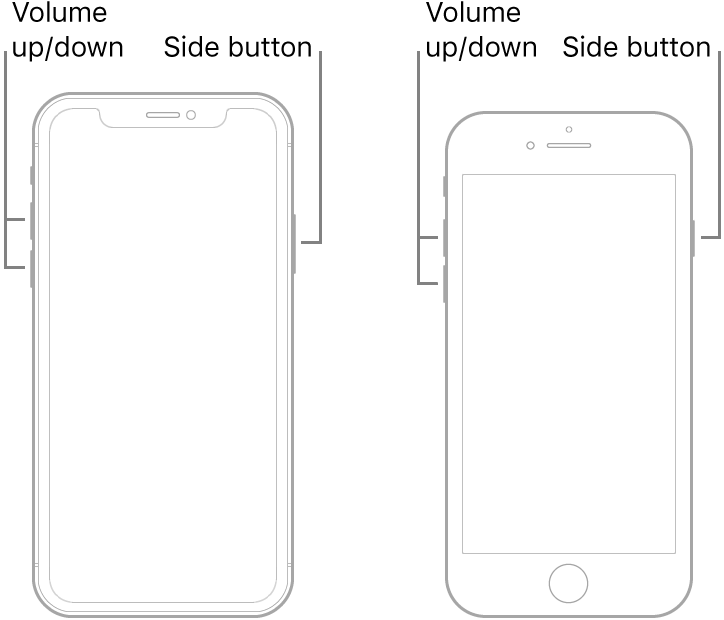
Force restart an iPhone with Face ID, iPhone SE (2nd generation), iPhone 8, or iPhone 8 Plus

  1. Press and quickly release the volume up button.
  2. Press and quickly release the volume down button.
  3. Press and hold the side button.
  4. When the Apple logo appears, release the button.
Note: If iPhone still doesn’t turn on, or if it gets stuck during start up, see the Apple Support article If your iPhone, iPad, or iPod touch won’t turn on or is frozen.


Recovery Mode... the full info is in the above link...⬆︎ the short info is below...⬇︎


Connect your device to a computer. On a Mac with macOS Catalina 10.15, open Finder. On a Mac with macOS Mojave 10.14 or earlier, or on a PC, open iTunes.


Press and quickly release the Volume Up button. Press and quickly release the Volume Down button. Then, press and hold the Side button until you see the recovery mode screen.


It sometimes takes a few tries to get Recovery Mode...Once you get into Recovery Mode then your phone will be recognized...


1 reply
Question marked as Top-ranking reply

Jun 2, 2020 4:53 PM in response to Nick0419

Force restart iPhone - Apple Support ⬅︎ TRY THIS, and if it does not work try Recovery Mode because if you can't get it to start properly then you have to have it serviced by Apple which you might not want to do and might not be an option right now...


Force restart an iPhone with Face ID, iPhone SE (2nd generation), iPhone 8, or iPhone 8 Plus

  1. Press and quickly release the volume up button.
  2. Press and quickly release the volume down button.
  3. Press and hold the side button.
  4. When the Apple logo appears, release the button.

Note: If iPhone still doesn’t turn on, or if it gets stuck during start up, see the Apple Support article If your iPhone, iPad, or iPod touch won’t turn on or is frozen.


Recovery Mode... the full info is in the above link...⬆︎ the short info is below...⬇︎


Connect your device to a computer. On a Mac with macOS Catalina 10.15, open Finder. On a Mac with macOS Mojave 10.14 or earlier, or on a PC, open iTunes.


Press and quickly release the Volume Up button. Press and quickly release the Volume Down button. Then, press and hold the Side button until you see the recovery mode screen.


It sometimes takes a few tries to get Recovery Mode...Once you get into Recovery Mode then your phone will be recognized...

This thread has been closed by the system or the community team. You may vote for any posts you find helpful, or search the Community for additional answers.

My Iphone X is stuck on the restore screen

Welcome to Apple Support Community
A forum where Apple customers help each other with their products. Get started with your Apple Account.