Why didn’t backup my iCloud

Why did not backup my iPhone iCloud

iPhone XS Max

Posted on Jun 10, 2020 1:31 AM

Reply
Question marked as Top-ranking reply

Posted on Jun 10, 2020 1:33 AM

Automatically back up with iCloud Backup. To let iCloud automatically back up your device each day, here's what you need to do:


How to back up with iCloud
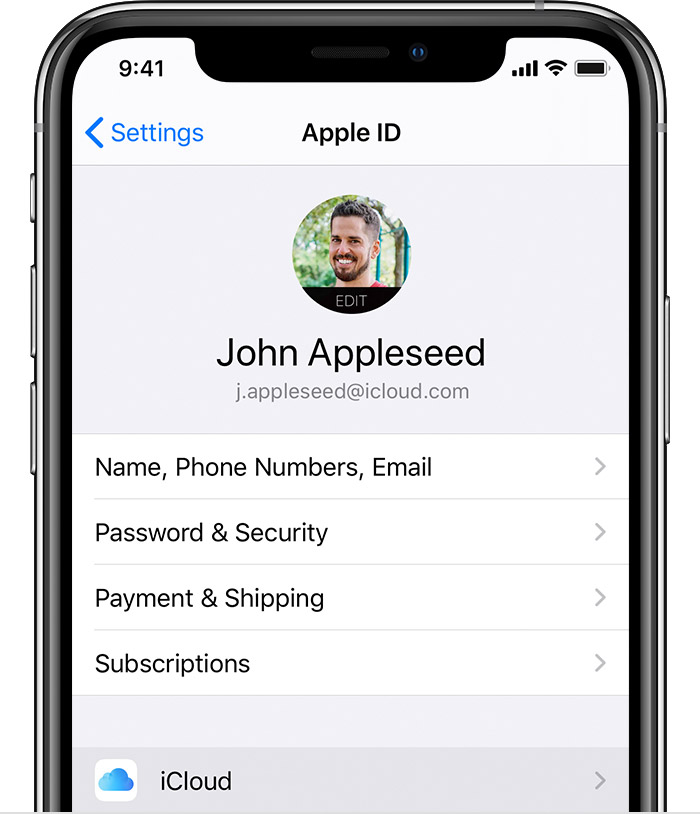
  1. Connect your device to a Wi-Fi network.
  2. Go to Settings > [your name], and tap iCloud.

  3. Tap iCloud Backup.
  4. Tap Back Up Now. Stay connected to your Wi-Fi network until the process completes.


You can check the progress and confirm the backup completed. Go to Settings > [your name] > iCloud > iCloud Backup. Under Back Up Now, you'll see the date and time of your last backup.

Get help making a backup or manage your available space in iCloud.


Automatically back up with iCloud Backup

To let iCloud automatically back up your device each day, here's what you need to do:

  • Make sure that iCloud Backup is turned on in Settings > [your name] > iCloud > iCloud Backup.
  • Connect your device to a power source.
  • Connect your device to a Wi-Fi network.
  • Make sure that your device's screen is locked.
  • Check that you have enough available space in iCloud for the backup. When you sign in to iCloud, you get 5GB of iCloud storage for free. If you need more iCloud storage, you can buy more from your iPhone, iPad, iPod touch, or Mac. Plans start at 50GB for $0.99 (USD) a month. Learn more about prices in your region.

1 reply
Question marked as Top-ranking reply

Jun 10, 2020 1:33 AM in response to pal134

Automatically back up with iCloud Backup. To let iCloud automatically back up your device each day, here's what you need to do:


How to back up with iCloud
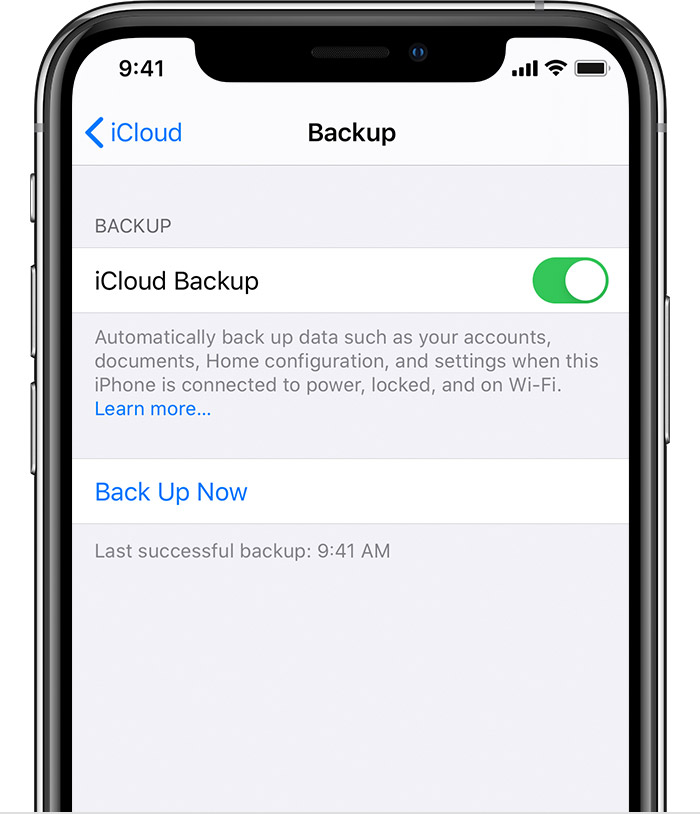
  1. Connect your device to a Wi-Fi network.
  2. Go to Settings > [your name], and tap iCloud.

  3. Tap iCloud Backup.
  4. Tap Back Up Now. Stay connected to your Wi-Fi network until the process completes.


You can check the progress and confirm the backup completed. Go to Settings > [your name] > iCloud > iCloud Backup. Under Back Up Now, you'll see the date and time of your last backup.

Get help making a backup or manage your available space in iCloud.


Automatically back up with iCloud Backup

To let iCloud automatically back up your device each day, here's what you need to do:

  • Make sure that iCloud Backup is turned on in Settings > [your name] > iCloud > iCloud Backup.
  • Connect your device to a power source.
  • Connect your device to a Wi-Fi network.
  • Make sure that your device's screen is locked.
  • Check that you have enough available space in iCloud for the backup. When you sign in to iCloud, you get 5GB of iCloud storage for free. If you need more iCloud storage, you can buy more from your iPhone, iPad, iPod touch, or Mac. Plans start at 50GB for $0.99 (USD) a month. Learn more about prices in your region.

This thread has been closed by the system or the community team. You may vote for any posts you find helpful, or search the Community for additional answers.

Why didn’t backup my iCloud

Welcome to Apple Support Community
A forum where Apple customers help each other with their products. Get started with your Apple Account.
