Hi there, P_Garvoa!
Thanks for reaching out to the Apple Support Communities! It sounds like you're not seeing the option to send money through Messages with Apple Pay. Check out this article to Send and receive money with Apple Pay. This will allow you to be sure you have Apple Pay set up properly along with ensuring the button is showing properly.
When you send money in the Messages app using Apple Pay, your Apple Cash card is used to pay first by default. If you want to use a debit card instead, you can send money directly from your debit card.
Watch a demo to see how you can send money on your devices, or use the steps below.
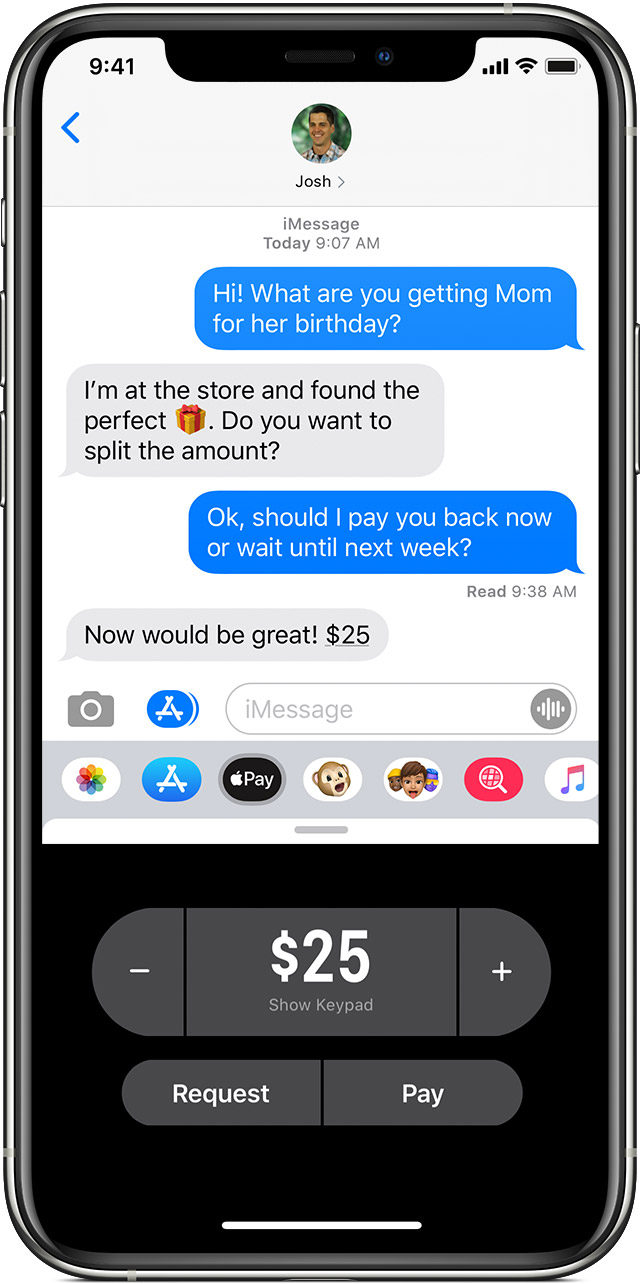
- Open the Messages app, then start a new conversation or tap an existing one.
- Tap the Apple Pay button
 . If you don't see the Apple Pay button, tap
  first.
 - Enter the amount you want to send.
- Tap Pay, then tap the send button
 to review or cancel the payment.
 - Confirm your payment with Face ID, Touch ID, or your passcode.
If the person you sent money to has not accepted the money yet, you can cancel the payment.
- Open the request in the Messages app.
- Tap the Apple Pay button and enter an amount.
- Tap Pay, then send your payment and confirm using Face ID, Touch ID, or your passcode.
To decline a request for money, just ignore the message."
If you continue to have an issue after following these steps, let us know.
Take care!


