
conect me to trap call
I’m getting private calls how do I find out who’s calling me
iPhone 7, iOS 13
I’m getting private calls how do I find out who’s calling me
iPhone 7, iOS 13
Hi there, dena299!
Thanks for reaching out to the Apple Support Communities! It sounds like you are getting calls from private numbers and would like to know who is calling you. At this time, it's not possible to find out who is calling from a number that has the caller ID set to private, however, you can stop the private calls from coming in by following the steps in this article to Detect and block spam phone calls:
"Turn on Silence Unknown Callers
With iOS 13, you can turn on Silence Unknown Callers to avoid getting calls from people you don’t know. This blocks phone numbers that you've never been in contact with and don’t have saved in your contacts list. If you’ve previously texted with someone using their phone number or if a person has shared their phone number with you in an email, a phone call from that number will go through.
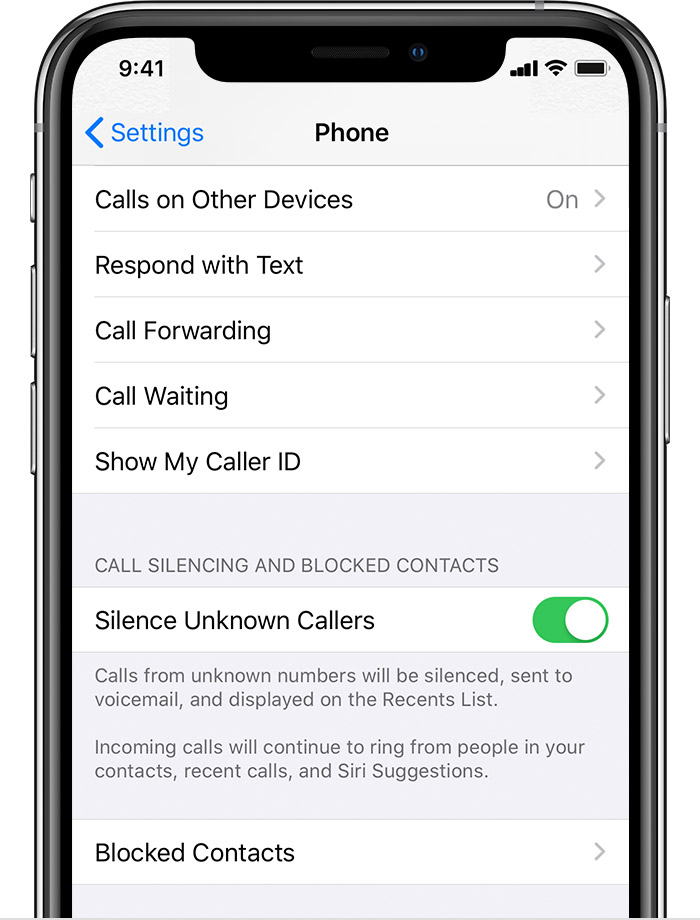
To turn on Silence Unknown Callers, go to Settings > Phone, scroll down, then select Silence Unknown Callers. Calls from unknown numbers are silenced and sent to your voicemail, and appear in your recent calls list.
Incoming calls will come through from people that are saved in your contacts list, recent calls list, and from Siri Suggestions to let you know who’s calling based on phone numbers included in your emails or text messages.
If an emergency call is placed, Silence Unknown Callers will be temporarily disabled for the next 24 hours to allow for your iPhone to be reached.
Before you turn on Silence Unknown Callers, make sure you have important contacts saved or you could miss a phone call that you don’t want to miss. The call will still go to voicemail and appear in your recent calls list, but you won’t get a notification when you get the call."
Have a nice day!
Hi there, dena299!
Thanks for reaching out to the Apple Support Communities! It sounds like you are getting calls from private numbers and would like to know who is calling you. At this time, it's not possible to find out who is calling from a number that has the caller ID set to private, however, you can stop the private calls from coming in by following the steps in this article to Detect and block spam phone calls:
"Turn on Silence Unknown Callers
With iOS 13, you can turn on Silence Unknown Callers to avoid getting calls from people you don’t know. This blocks phone numbers that you've never been in contact with and don’t have saved in your contacts list. If you’ve previously texted with someone using their phone number or if a person has shared their phone number with you in an email, a phone call from that number will go through.
To turn on Silence Unknown Callers, go to Settings > Phone, scroll down, then select Silence Unknown Callers. Calls from unknown numbers are silenced and sent to your voicemail, and appear in your recent calls list.
Incoming calls will come through from people that are saved in your contacts list, recent calls list, and from Siri Suggestions to let you know who’s calling based on phone numbers included in your emails or text messages.
If an emergency call is placed, Silence Unknown Callers will be temporarily disabled for the next 24 hours to allow for your iPhone to be reached.
Before you turn on Silence Unknown Callers, make sure you have important contacts saved or you could miss a phone call that you don’t want to miss. The call will still go to voicemail and appear in your recent calls list, but you won’t get a notification when you get the call."
Have a nice day!
conect me to trap call

