
can't activate my iPad2 after updating IOS
Hi Dear,
please see below message and advise how i can activate my iPad since i'm not able to use it
Hi Dear,
please see below message and advise how i can activate my iPad since i'm not able to use it
We are seeing an increased incidence of issues activating 9 year old iPad2 devices. If restart of your home router - or changing your DNS Server settings do not resolve the issue, you should directly contact Apple Support for assistance.
To restart you home router, disconnect power - then wait at least 30 seconds before restarting. When you router has rebooted (which may take several minutes), force-restart your iPad:
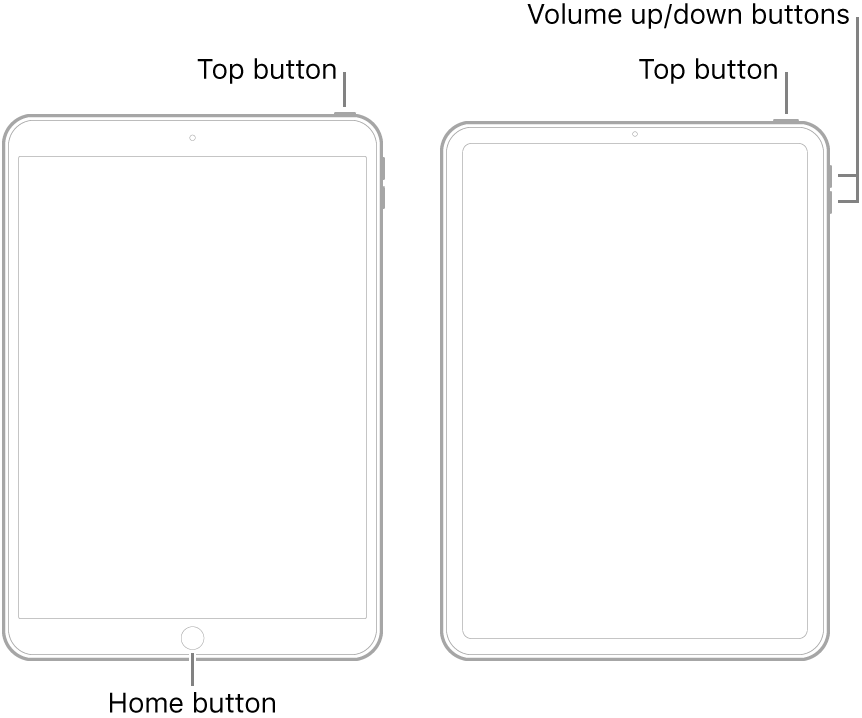
For recommended DNS servers (configured at your home router and/or your iPad), you might choose one of the following highly regarded Recursive DNS Providers (IPv4 and IPv6 addresses included below):
Quad9
9.9.9.9
149.112.112.112
2620:fe::fe
2620:fe::9
OpenDNS
208.67.222.222
208.67.220.220
2620:0:ccc::2
2620:0:ccd::2
Cloudflare+APNIC
1.1.1.1
1.0.0.1
2606:4700:4700::1111
2606:4700:4700::1001
Should it be necessary to escalate your issue to Apple Support, during the current exceptional global situation, the quickest route to engaging with Apple Support will be via the Contact Support link at top-right of this page.
We are seeing an increased incidence of issues activating 9 year old iPad2 devices. If restart of your home router - or changing your DNS Server settings do not resolve the issue, you should directly contact Apple Support for assistance.
To restart you home router, disconnect power - then wait at least 30 seconds before restarting. When you router has rebooted (which may take several minutes), force-restart your iPad:
For recommended DNS servers (configured at your home router and/or your iPad), you might choose one of the following highly regarded Recursive DNS Providers (IPv4 and IPv6 addresses included below):
Quad9
9.9.9.9
149.112.112.112
2620:fe::fe
2620:fe::9
OpenDNS
208.67.222.222
208.67.220.220
2620:0:ccc::2
2620:0:ccd::2
Cloudflare+APNIC
1.1.1.1
1.0.0.1
2606:4700:4700::1111
2606:4700:4700::1001
Should it be necessary to escalate your issue to Apple Support, during the current exceptional global situation, the quickest route to engaging with Apple Support will be via the Contact Support link at top-right of this page.
While this says for iPhone, the process is the same for iPad --> If you can't activate your iPhone - Apple Support
Do what the message says, Either try activating with iTunes on a computer, or wait and try agin later.
You can try a different Wifi network as well.
iTunes can't recognize the iPad
can't activate my iPad2 after updating IOS


