iphone8 warm, 126.6gb of 128gb sotrage used, v slow

Hi,


My iphone8 plus has the following symptoms:


iOS 13.5.1

Warm

V V slow

Not downloading apps

126.6gb of 128gb storage used


Can anyone suggest how to resolve this, and also what the cause may be?


Thanks for your help


iPhone 8 Plus

Posted on Jul 4, 2020 11:08 AM

Reply
Question marked as Top-ranking reply

Posted on Jul 8, 2020 12:49 PM

Greetings, Repurr!


Thanks for reaching out to the Apple Support Communities! It sounds like you have issues with your device being warm, not downloading apps, and being slow. Based on the storage information you provided, we suggest checking out this article About storage on your device and in iCloud. The slowness and inability to download apps could be due to the storage being full.


"Device storage

When you buy your iPhone, iPad, or iPod touch, it comes with a set storage capacity ranging from 16 to 512GB for iPhone16GB to 1TB for iPad, and 8 to 256GB for iPod touch. The music you buy, the apps you download, the photos you take, and all of the other content that you enjoy on your device uses its storage. And depending on the size of your capacity and how much content you have, your device can fill up and run out of storage. When your device is full, you can’t increase its storage. But you can free up space.
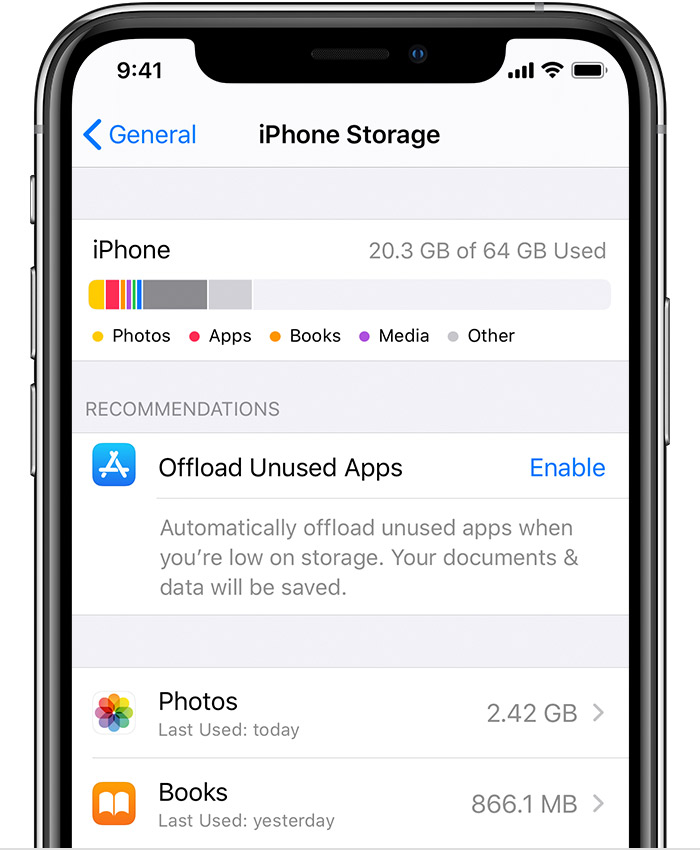
See how much storage you have

  1. Go to Settings.
  2. Tap General.
  3. Tap [device] Storage. 

You might see a list of recommendations for optimizing your device storage, followed by a list of installed apps and the amount of storage each one uses. Tap an app's name for more information about its storage.

If you're using iOS 10 or earlier, below Storage, tap Manage Storage to see which apps take up the most space.

Free up space on your device

You can make storage space available on your iPhone, iPad, or iPod touch when you use iCloud Photos and turn on Optimize Storage. Or you can remove content from your apps—like photos, music, and Podcasts—or delete the apps that you're not using."


For the issues with the iPhone being warm, check out this article with more information about Keeping iPhone, iPad, and iPod touch within acceptable operating temperatures. This article will give you information about when you can expect your device to be warmer than normal.


You can also check out this article If you can’t download or update apps on your iPhone or other Apple device for additional steps you can try for the issues with downloading apps.


Let us know the results and have a wonderful day!

1 reply
Question marked as Top-ranking reply

Jul 8, 2020 12:49 PM in response to Repurr

Greetings, Repurr!


Thanks for reaching out to the Apple Support Communities! It sounds like you have issues with your device being warm, not downloading apps, and being slow. Based on the storage information you provided, we suggest checking out this article About storage on your device and in iCloud. The slowness and inability to download apps could be due to the storage being full.


"Device storage

When you buy your iPhone, iPad, or iPod touch, it comes with a set storage capacity ranging from 16 to 512GB for iPhone16GB to 1TB for iPad, and 8 to 256GB for iPod touch. The music you buy, the apps you download, the photos you take, and all of the other content that you enjoy on your device uses its storage. And depending on the size of your capacity and how much content you have, your device can fill up and run out of storage. When your device is full, you can’t increase its storage. But you can free up space.

See how much storage you have

  1. Go to Settings.
  2. Tap General.
  3. Tap [device] Storage. 

You might see a list of recommendations for optimizing your device storage, followed by a list of installed apps and the amount of storage each one uses. Tap an app's name for more information about its storage.

If you're using iOS 10 or earlier, below Storage, tap Manage Storage to see which apps take up the most space.

Free up space on your device

You can make storage space available on your iPhone, iPad, or iPod touch when you use iCloud Photos and turn on Optimize Storage. Or you can remove content from your apps—like photos, music, and Podcasts—or delete the apps that you're not using."


For the issues with the iPhone being warm, check out this article with more information about Keeping iPhone, iPad, and iPod touch within acceptable operating temperatures. This article will give you information about when you can expect your device to be warmer than normal.


You can also check out this article If you can’t download or update apps on your iPhone or other Apple device for additional steps you can try for the issues with downloading apps.


Let us know the results and have a wonderful day!

This thread has been closed by the system or the community team. You may vote for any posts you find helpful, or search the Community for additional answers.

iphone8 warm, 126.6gb of 128gb sotrage used, v slow

Welcome to Apple Support Community
A forum where Apple customers help each other with their products. Get started with your Apple Account.