Facebook's Messenger call are not working in mobile date if the dual sim are enable (eSim & normal sim card)

FB messenger video calling are not work in my iPhone 11 dual sim (eSim/Normal sim card), its work only when I will disable one sim (either eSim or normal sim card). Also I contact apple support in my region and my network carriers and still I having the same problem and none of them fix.


Thanks for helping me out there.

iPhone 11, 13

Posted on Jul 6, 2020 1:47 AM

Reply
Question marked as Top-ranking reply

Posted on Jul 6, 2020 2:02 AM

Change your cellular data number

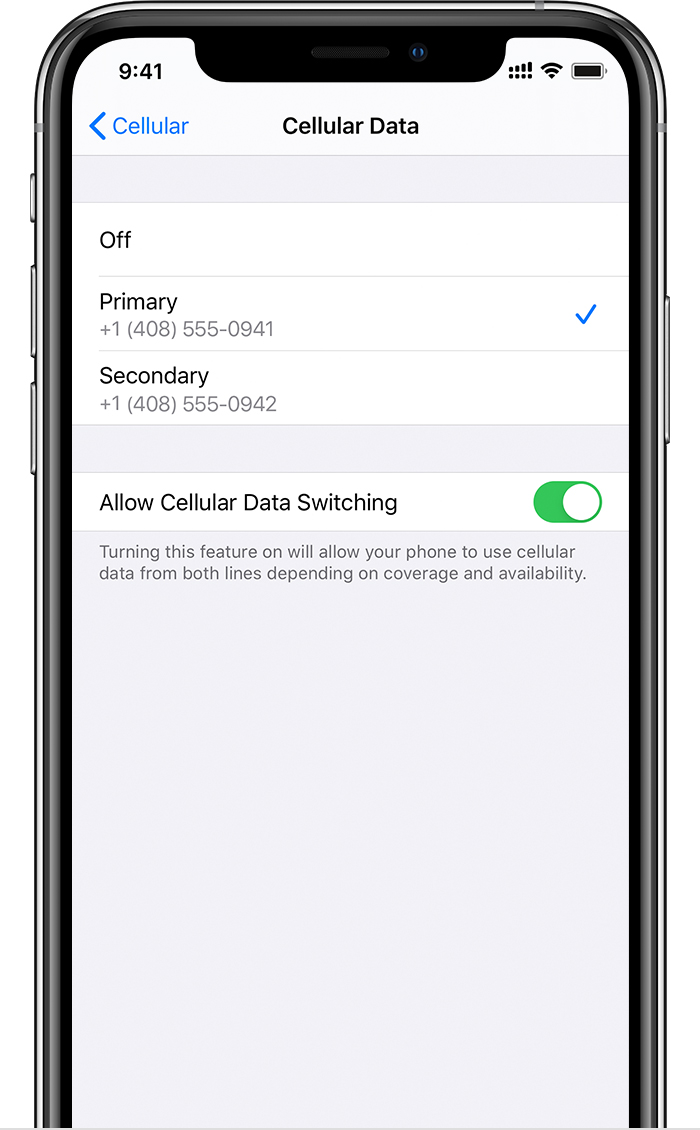
One number at a time can use cellular data. To change which number uses cellular data, follow these steps: 
  1. Go to Settings.
  2. Tap either Cellular or Mobile Data.
  3. Tap Cellular Data. 
  4. Tap the number you want to use cellular data. 


If you turn on Allow Cellular Data Switching, then while you're on a voice call on your voice-only number, that number automatically switches to use voice and data.* This lets you use both voice and data while on the call.

If you turn off Allow Cellular Data Switching and you're active on a voice number that isn't your designated cellular-data number, then cellular data won't work while you're on the call.


To turn on Allow Cellular Data Switching, follow these steps:

  1. Go to Settings.
  2. Tap either Cellular or Mobile Data.
  3. Tap Cellular Data.
  4. Turn on Allow Cellular Data Switching.


* Your data line switches automatically for the duration of your call. This cellular-data switching will not work if you are currently using Data Roaming. Check with your carrier for availability and to find out if additional fees apply.


2 replies
Question marked as Top-ranking reply

Jul 6, 2020 2:02 AM in response to gab81

Change your cellular data number

One number at a time can use cellular data. To change which number uses cellular data, follow these steps: 

  1. Go to Settings.
  2. Tap either Cellular or Mobile Data.
  3. Tap Cellular Data. 
  4. Tap the number you want to use cellular data. 


If you turn on Allow Cellular Data Switching, then while you're on a voice call on your voice-only number, that number automatically switches to use voice and data.* This lets you use both voice and data while on the call.

If you turn off Allow Cellular Data Switching and you're active on a voice number that isn't your designated cellular-data number, then cellular data won't work while you're on the call.


To turn on Allow Cellular Data Switching, follow these steps:

  1. Go to Settings.
  2. Tap either Cellular or Mobile Data.
  3. Tap Cellular Data.
  4. Turn on Allow Cellular Data Switching.


* Your data line switches automatically for the duration of your call. This cellular-data switching will not work if you are currently using Data Roaming. Check with your carrier for availability and to find out if additional fees apply.

This thread has been closed by the system or the community team. You may vote for any posts you find helpful, or search the Community for additional answers.

Facebook's Messenger call are not working in mobile date if the dual sim are enable (eSim & normal sim card)

Welcome to Apple Support Community
A forum where Apple customers help each other with their products. Get started with your Apple Account.