With iOS 13, both of your phone numbers can make and receive voice and FaceTime calls and send and receive messages using iMessage, SMS, and MMS. Your iPhone can use one cellular data network at a time.
Change your cellular data number
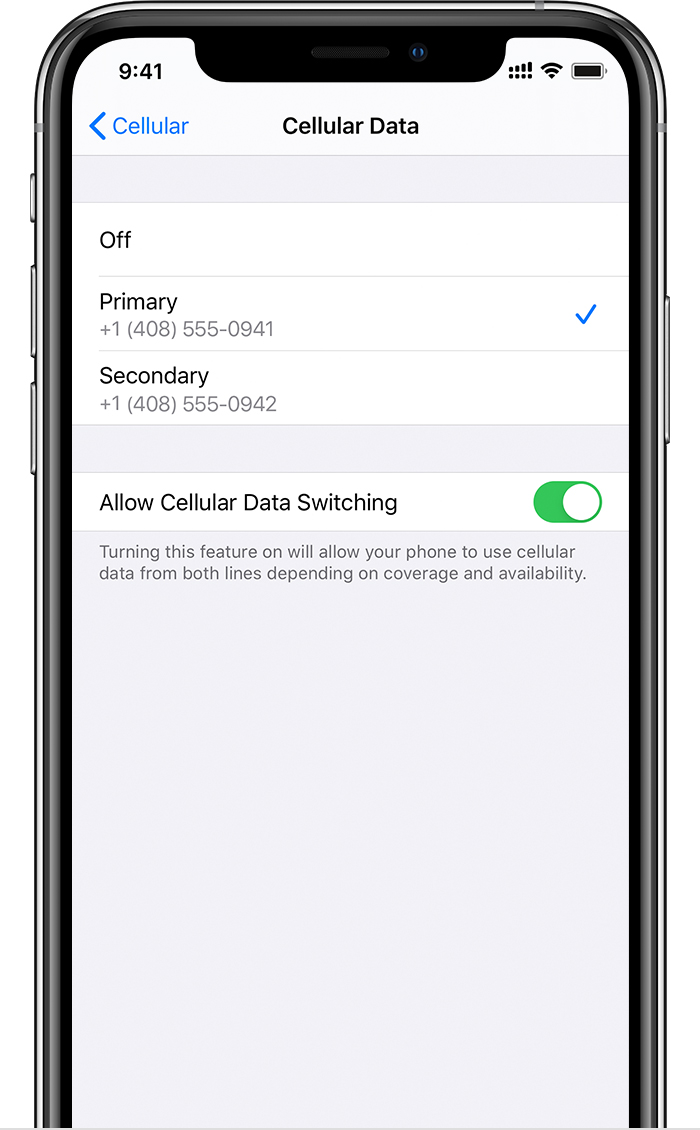
One number at a time can use cellular data. To change which number uses cellular data, follow these steps:
- Go to Settings.
- Tap either Cellular or Mobile Data.
- Tap Cellular Data.
- Tap the number you want to use cellular data.
If you turn on Allow Cellular Data Switching, then while you're on a voice call on your voice-only number, that number automatically switches to use voice and data.* This lets you use both voice and data while on the call.
If you turn off Allow Cellular Data Switching and you're active on a voice number that isn't your designated cellular-data number, then cellular data won't work while you're on the call.
To turn on Allow Cellular Data Switching, follow these steps:
- Go to Settings.
- Tap either Cellular or Mobile Data.
- Tap Cellular Data.
- Turn on Allow Cellular Data Switching.
* Your data line switches automatically for the duration of your call. This cellular-data switching will not work if you are currently using Data Roaming. Check with your carrier for availability and to find out if additional fees apply.

