"Apple Store" iOS app: login with another Apple-ID, how?

I'm guessing loads of other people have had this issue, but I haven't seen anyone comment on a solution. And Apple either don't know about it or simply don't care.


I have two Apple IDs: (due to legacy issues caused by Apple, so is unavoidable currently!)

  1. iCloud [and services]
  2. Stores [Apple Store/App Store]


The last update to the iOS "Apple Store" app seemingly insists on me using the same one for everything. Forcing users AFAICT to use their iCloud login A-ID for the login on the AS app.


There is no separate login for the app; it seemingly takes your iCloud A-ID login automatically as the only one you can use: WHY?? Arrgh!


Any solution around this?


iPhone 11 Pro Max, iOS 13

Posted on Jul 22, 2020 1:05 PM

Reply
Question marked as Top-ranking reply

Posted on Jul 22, 2020 1:35 PM

Neither of those are solutions to this issue, I'm afraid.


The point is, they have removed altogether a sign-in feature on the Apple Store iOS app.


Thus, if one wants to buy anything under their correct Stores A-ID (the A-ID they use for all hardware purchases), one simply cannot do so using the Apple Store iOS app.


The annoying consequences of this are you have to instead use a browser to purchase items on your iOS device using the A-ID you want to use (much more of a pain to enter stuff), and also you cannot simply and easily use the Apple Store iOS app anymore to check the status of your order either.


Who designs this stuff at Apple. Honestly bonkers!


12 replies
Question marked as Top-ranking reply

Jul 22, 2020 1:35 PM in response to Eric Root

Neither of those are solutions to this issue, I'm afraid.


The point is, they have removed altogether a sign-in feature on the Apple Store iOS app.


Thus, if one wants to buy anything under their correct Stores A-ID (the A-ID they use for all hardware purchases), one simply cannot do so using the Apple Store iOS app.


The annoying consequences of this are you have to instead use a browser to purchase items on your iOS device using the A-ID you want to use (much more of a pain to enter stuff), and also you cannot simply and easily use the Apple Store iOS app anymore to check the status of your order either.


Who designs this stuff at Apple. Honestly bonkers!


Jul 22, 2020 3:27 PM in response to jimthing

Yes. The Apple Store App explicitly states: "Your sign-in information is shared across the Apple Store app and iCloud. To sign out, go to Setting > [your name]."


I would say that this is a poor oversight. If the Apple Store App should have its "sign-in information" shared with anything, it should be with the iTunes & App Store.


Even better is to have it be its own.


However, I notice that they have "My Reservations", "My Orders", "My Devices", and "My Apple Services" (which includes "Apple Music" and "iCloud").


This directly conflicts with your *historical" segregation of

  1. iCloud [and services]
  2. Stores [Apple Store/App Store]


You can always provide Apple feedback on this.


There are also means whereby one can migrate iCloud services from one Apple ID to another. (Admittedly, it involves some work, and sufficient storage, somewhere. Media may be the most troublesome to migrate.)

Jul 22, 2020 2:31 PM in response to donv_the_ghost

NO – it's not that.


Check it yourself... You cannot use a different Apple ID for the Apple Store iOS app than the one you use for iCloud. It's not about downloading the Apple Store app itself, it's about logging into your Apple ID within the app to buy hardware within the app – it forces use of one's iCloud Apple ID only, and not the Apple ID one uses for hardware purchases.


Major problem for a LOT of users.

Jul 22, 2020 2:14 PM in response to jimthing

jimthing:


Have you gone to Settings->iTunes & App Store to change the Apple ID used for those?


Yes. Unlike the case with the App Store on Macs, or browsers, you are not presented with the full login dialogue that includes the Apple ID being used, each time you make a purchase.


However, you seem to indicate that you have a specific "Stores [Apple Store/App Store]" Apple ID you always wish to use.


So. Would this be an option?

Jul 22, 2020 4:02 PM in response to Halliday

" However, I notice that they have "My Reservations", "My Orders", "My Devices", and "My Apple Services" (which includes "Apple Music" and "iCloud"). "


I don't have My Apple Services in there. See:
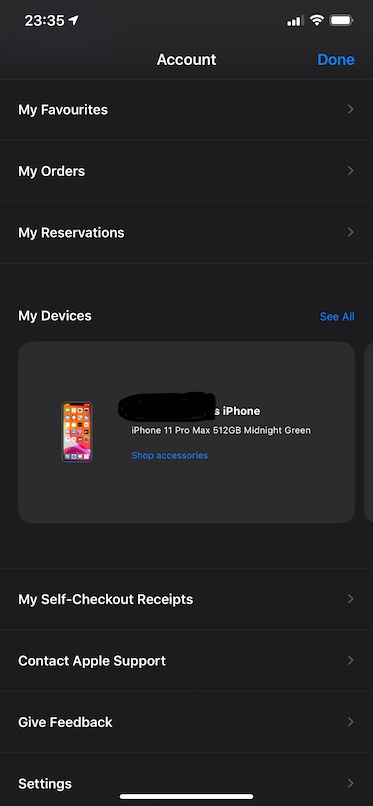

My Devices are correct, as they're obviously linked to my iCloud Apple ID. But no, the My Orders does NOT show my orders, nor does My Favourites show my favourites either. That's the point of failure within the app login at play.

------

What you said below is the EXACT issue we're all having:


" I would say that this is a poor oversight. If the Apple Store App should have its "sign-in information" shared with anything, it should be with the iTunes & App Store.


Even better is to have it be its own. "


iCloud Apple ID can be set, iTunes/App Store Apple ID can be set, but Apple Store Apple ID cannot be set. That's the major problem. And continues to be for the last two months since the last update to the Apple Store iOS app (the major change being introducing Dark Mode to it).


Feedback, mmm... as I said here:

https://forums.macrumors.com/posts/28699722


" NOTE: getsatisfaction.apple.com is a failure – there is literally nowhere on there to report it; all routes lead to "not our department" responses.


The only place I could attempt to report this was inside the Apple Store iOS app, itself!

(your name round symbol (top right corner) > Give Feedback > Take a quick survey) "


As a longterm experienced Apple user, I'm frankly shocked by such a bleeding obvious login oversight.


Jul 22, 2020 2:16 PM in response to jimthing

This sounds like your problem. See What to do when the Mac App Store shows a different Apple ID for software updates https://www.macworld.com/article/3267709/mac-app-store-apple-id.html. This document refers to a prior owner (use the discussion in it this is your situation), but is also applies to cases where a current owner's old Apple ID is the problem. The discussion below relates to the second possibility. 


Basically, If an app is purchased/downloaded using one Apple ID, then you can't update it with a second Apple ID. The app is inextricably linked to the first Apple ID. You'll have to delete if from the first Apple ID and purchase/download it again with the second Apple ID unless you set up family sharing (see below).


You can set up family sharing between the IDs to share purchases made with them. See:


Family Sharing  https://support.apple.com/en-us/HT201060


Set up Family Sharing https://support.apple.com/en-us/HT201088

Jul 22, 2020 2:25 PM in response to jimthing

No neither of those are the issue. See:

https://forums.macrumors.com/posts/28461632


A great many users are having this issue following the last update to the iOS Apple Store app. There appears to be absolutely no way to use your non-iCloud Apple ID to sign-in to the iOS Apple Store app anymore (nothing to do with the App Store or Mac App Store or Family Sharing: it's to do with simply logging into the iOS Apple Store app, where hardware purchases are made by users).


It's currently causing major issues for tens of thousands of users, at least.


This thread has been closed by the system or the community team. You may vote for any posts you find helpful, or search the Community for additional answers.

"Apple Store" iOS app: login with another Apple-ID, how?

Welcome to Apple Support Community
A forum where Apple customers help each other with their products. Get started with your Apple Account.
