Highlight color of Mac OS Mojave too light ...

Did anyone ever come across a sure-fire way to get this. I'm working on an iMac that has this exact same problem. Regardless of what I do with the Apple Color Picker (under the "Other" selection); any selection is very light. The individuals I'm working with have older eyes and it is barely perceptible with old and/or younger eyes.

iMac Line (2012 and Later)

Posted on Jul 28, 2020 11:10 AM

Reply
Question marked as Top-ranking reply

Posted on Jul 28, 2020 11:50 AM

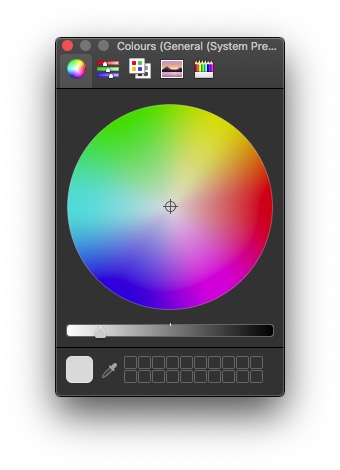
If you have the Colour Picker set to Colour Wheel you move the slider at the bottom to lighten or darken the colour you choose.


You probably have your macs brightness set too high. From the factory the brightness is set far too high and the colour temperature of the screen is too blue.


System Preferences> Displays Turn the brightness down to about a third, your eyes will adjust.

System Preferences> Displays> Colour> Calibrate.

Before pressing the Calibrate button hold down the option/ alt key.

This will bring up the Calibration Assistant, turn on expert mode press Continue.

Follow the instructions in each panel.

At one point you will be asked to select the Gamma, I run my mac on 2.2.

Then you will be asked to select the colour temperature try 6500k again

your eyes will quickly adjust and things will look natural.

this is widely accepted as 'normal' I run at 5500k as I work in photography and

am colour matching to printed material.

Give the new profile a name.

2 replies
Question marked as Top-ranking reply

Jul 28, 2020 11:50 AM in response to Bryan Forbes

If you have the Colour Picker set to Colour Wheel you move the slider at the bottom to lighten or darken the colour you choose.


You probably have your macs brightness set too high. From the factory the brightness is set far too high and the colour temperature of the screen is too blue.


System Preferences> Displays Turn the brightness down to about a third, your eyes will adjust.

System Preferences> Displays> Colour> Calibrate.

Before pressing the Calibrate button hold down the option/ alt key.

This will bring up the Calibration Assistant, turn on expert mode press Continue.

Follow the instructions in each panel.

At one point you will be asked to select the Gamma, I run my mac on 2.2.

Then you will be asked to select the colour temperature try 6500k again

your eyes will quickly adjust and things will look natural.

this is widely accepted as 'normal' I run at 5500k as I work in photography and

am colour matching to printed material.

Give the new profile a name.

This thread has been closed by the system or the community team. You may vote for any posts you find helpful, or search the Community for additional answers.

Highlight color of Mac OS Mojave too light ...

Welcome to Apple Support Community
A forum where Apple customers help each other with their products. Get started with your Apple Account.