Can I power my ts80 soldering iron through my Macbook Pro's USB-C ports?

The TS80P is a smart soldering iron powered by USB Type-C PD2.0/QC3.0 standard input.

Does this mean I can power it through the USB-C port of my Macbook Pro?

Alternatively can I use the charger?


https://www.banggood.com/TS80P-More-30W-Soldering-Iron-Station-OLED-USB-Type-C-Programable-Solder-Iron-Built-in-STM32-Chip-PD2_0-or-QC3_0-Standard-Input-p-1680934.html

MacBook Pro 13″, macOS 10.15

Posted on Aug 26, 2020 10:23 AM

Reply
10 replies

Aug 27, 2020 3:56 AM in response to Karim-at-birds

While I’d “feel better” to positively KNOW the spec’d “sourcing output” of the MBP’s internal power supplies ...


... Apple generally doesn’t skimp on hardware so it’s probably safe to assume that the power supplies; 1) Fully adhere to the USB PD specs, 2) Won’t attempt to do anything beyond their rating, and 3) Will always protect themselves.


FWIW, I’ve observed “both sides” of this MBP accepting a full 80+ W of input power.


During the recent output tests, I defInitely observed the initial low-rate ouput, followed by auto-negotiation to the higher VA level cited.


Also tried out “swapping sides” AND by adding and removing the 87W external power brick ... nothing significantly altered the 12-13W output charging.

Aug 27, 2020 11:48 AM in response to Karim-at-birds

Based on the power input, I'd say no. I'm pretty sure the USB-C ports are limited to 5V.


But its not like any damage can occur to the laptop.


If the soldering iron requires more power than the laptop can provide the laptop will simply not provide it. Its not like the soldering iron is going to be pumping current to the laptop. Its going to try to draw current from it.


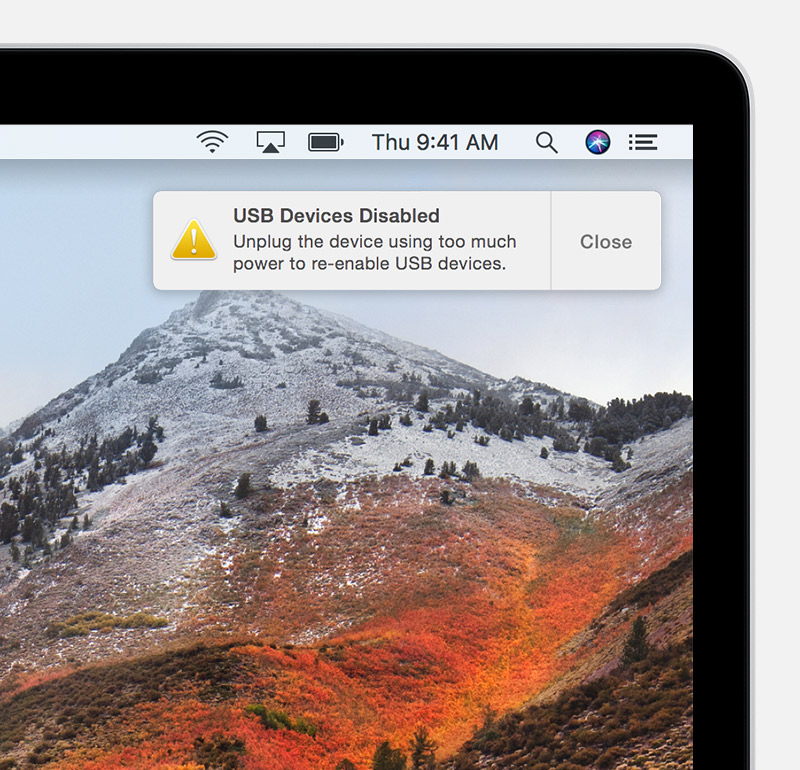
If the laptop cannot provide enough power it simply won't. It may issue a "This device requires too much power" message if that is the case.


See here: If a Mac accessory needs more power or is using too much power - Apple Support


Aug 27, 2020 11:54 AM in response to Karim-at-birds

As much as we like to help others, we are all end users like you, not Apple engineers. Apple have been very closed-mouth about any specs that are not published. I do not think you will get a definitive answer from the user base, and Apple won't answer this here in any official or other capacity.


When I worked in industry and did technical reviews of sales agreements to other manufacturers, I flagged any orders where our products were going to be used outside of their design and performance criteria. No sale.


I see Apple being in that position. If they are like 99 percent of manufacturers, they will not endorse the use of the products outside of certain boundaries. After all, sing a $3000 notebook computer as the power supply for a $90 soldering iron when there are so many other power options availanle strikes me as ludicrous.


Had this come across my engineering desk when I had to be the Disappointer-in-Chief, I would not approve that use. But I am not Apple.


Again, I have to repeat: you are not going to get an official answer here. The wise babowa has already recommended that you check with the tool's maker, and I whole-heartedly second that action. While you are talking to them, ask then if they guarantee to buy you a new MacBook Pro should their tool fry yours like a catfish filet.


Aug 26, 2020 6:54 PM in response to Karim-at-birds

I was intrigued by this question; while not an "authoritative" answer, it's at least a data point.


Using a USB-C VA meter, I measured my own MacBook Pro's charging rate of a deeply discharged iPhone Xs Max and a 2017, 10.5" iPad Pro.


An "official" Apple USB-C to Lightning 1m cable was used.


Both devices negotiated a charging rate of ≈12-13W @ ≈5 VDC.


Your mileage may vary w/ different devices.


Aug 27, 2020 1:45 PM in response to Karim-at-birds

I agree will all the other comments.


And while as field engineer with a seemingly self-growing toolbag which I’d ALWAYS like to lighten ...


... I’d think REAL HARD before plugging any high power device of unknown pedigree into my own pricy MBP.


The same mindset is why I use ONLY chargers purchased directly from Apple


... ti include my twin LG “USB-C Charging” 5K monitors which even then I verified w/ a USB Type-C VA meter due to a paranoia of overcharging.


This thread has been closed by the system or the community team. You may vote for any posts you find helpful, or search the Community for additional answers.

Can I power my ts80 soldering iron through my Macbook Pro's USB-C ports?

Welcome to Apple Support Community
A forum where Apple customers help each other with their products. Get started with your Apple Account.