Education on MAC Security and Privacy with Bitdefender

My computer has a pd subscription of Bitdefender Total Security Antivirus For MAC; After the Catalina update ver. 10.15.7, Bitdefender wants manual access granted to scan some important apps and areas on my devise.

  • Should I grant this?
  • Do I need this added protection for my MAC?
  • Why is the FireWall turned OFF?
  • Why is the FileVault turned OFF? Don't I want my HD encrypted to secure my data?
  • The following is an email sent to Bitdefender and their reply; What do they MEAN? And is this request for access to files the answer to protection?

THANK YOU Ahead for some education!!


On Sat, 1st Aug 2020 at 5:02 pm, Bogdan Giagu BD wrote:

Hello,


Thank you for your email.


We can assure you that until the new Mac OS will be updated, Bitdefender will release an automatic update and it will be fully compatible with your device.


https://www.bitdefender.com/consumer/support/answer/3779/


If you encounter any issues please contact us back and we will assist you to troubleshoot.


Have a nice day!


Kind Regards,

Bogdan G

Customer Support Engineer

https://www.bitdefender.com/consumer/support/

https://community.bitdefender.com/en/


On Sat, 1st Aug 2020 at 2:03 am, LearningR wrote:

WILL Bitdefender be updating their software to be compatible macOS Catalina? Please give me an answer!!


https://support.apple.com/en-us/HT210999 

About legacy system extensions
Some system extensions will not be compatible with a future version of macOS.
System extensions are a category of software that works in the background to extend the functionality of your Mac. Some apps install kernel extensions, which are a kind of system extension that works using older methods that aren't as secure or reliable as modern alternatives. Your Mac identifies these as legacy system extensions.
In 2019, Apple informed developers that macOS Catalina will be the last macOS to fully support legacy system extensions, and we've been working with developers to transition their software. By moving beyond these extensions, developers are helping to further modernize the Mac, improve its security and reliability, and enable more user-friendly software distribution methods. A final transition date has not yet been set.
Until the transition is complete, your Mac displays a message when a legacy system extension first loads, and again periodically while the extension remains in use. This gives you advance notice that existing software on your system loaded a system extension that will be incompatible with a future version of macOS:
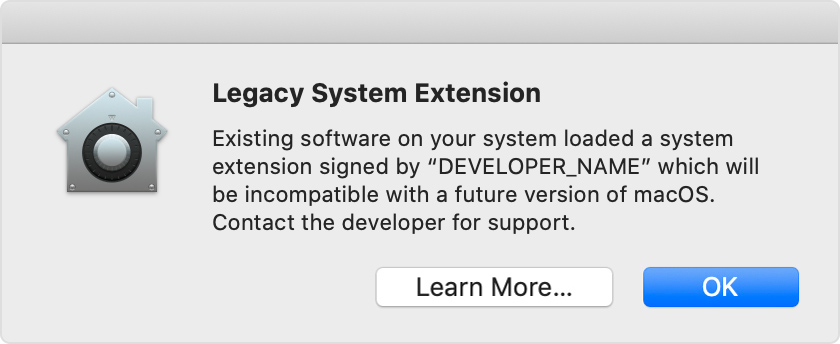
Legacy system extensions and the apps that rely on them continue to work today. But now is a good time to contact the developer to learn whether an updated version of their software is available or planned. The developer can also explain how to remove or disable the extension, and the consequences of doing so. 
Technical details for developers are available in Deprecated Kernel Extensions and System Extension Alternatives


MacBook Air

Posted on Oct 2, 2020 6:57 AM

Reply

Similar questions

3 replies

Oct 2, 2020 7:09 AM in response to LearningR

My computer has a pd subscription of Bitdefender Total Security Antivirus For MAC; After the Catalina update ver. 10.15.7, Bitdefender wants manual access granted to scan some important apps and areas on my devise.
• Should I grant this?

What you should do is get rid of it. There are no Mac viruses. None. There's nothing to detect. Any Trojan will go right past them. In short, all AV software is completely useless. The only thing they excel at is eating up system resources doing nothing useful.

Do I need this added protection for my MAC?

No.

Why is the FireWall turned OFF?

It's always off by default. If you have any type of cable or DSL router that includes a hardware firewall of its own (and virtually all of them do), then the Mac's firewall has nothing to do and there's no reason for it to be on.

Why is the FileVault turned OFF? Don't I want my HD encrypted to secure my data?

Because, again, that's simply the default. Turn it on if you want. It works to keep people out of your data if your device is stolen, or someone else turns your Mac on. They can't get at anything without knowing the password. But once you okay access to the desktop at startup, then anyone can walk up to your Mac and go through anything on it. It would be up to you to put the Mac into sleep mode, turn on the screen saver, or other method that would require re-entering the password if you walk away from it.

The following is an email sent to Bitdefender and their reply; What do they MEAN? And is this request for access to files the answer to protection?

That has to do with your last text. Apple is disallowing any third party vendor from using kernel extensions in the upcoming Big Sur. They all have to use a new method that does not tie directly to the OS kernel to function. That's all it means.


https://support.apple.com/en-us/HT210999

Oct 2, 2020 7:18 AM in response to LearningR

• My computer has a pd subscription of Bitdefender Total Security Antivirus For MAC; After the Catalina update ver. 10.15.7, Bitdefender wants manual access granted to scan some important apps and areas on my devise.
Should I grant this?

No, but that is only because you don't need Bitdefender.

Do I need this added protection for my MAC?

No.

Effective Defenses against Malware

Why is the FireWall turned OFF?

Because it is unnecessary. A firewall is a network management tool to prevent users and machines from accessing devices they should not have access to, like regular users should not have access to the Human Resources or Finance computers.

If you have a Network Address Translation (NAT) router distributing IP addresses to your devices, they are already behind a firewall in the router. Nothing outside of the router has any idea what is behind the router.

If you don't have anything checked off in the Sharing System preferences, there is no way in whether you are behind a firewall or not. If you need to enable several sharing services, and you need to connect to a public network, enabling the Firewall would be simpler than turning off the several Sharing services.

Why is the FileVault turned OFF? Don't I want my HD encrypted to secure my data?

You might want it encrypted, you might not need it. What state secrets do you have on your Mac? Since it is a mobile device, it would likely be a good idea to have it encrypted in case it is stolen. It it has a T2 chip, it is always encrypted.

The following is an email sent to Bitdefender and their reply; What do they MEAN? And is this request for access to files the answer to protection?

Because third-party developers are incompetent in the area of creating kernel extensions (hacks to the OS), Apple is cracking down on their use. Apple is planning a different process for accepting and installing kernel extensions in the next major OS release (Big Sur). At that time, any company that still thinks it needs to hack the OS will have to recode their extensions to work with the new OS. It has nothing to do with the access request.


Apple has hardened the privacy aspects in Catalina. It requires developers to ask your permission to access your data. The only data an app has access to is its own, unless it asks you permission to access the other stuff and you grant that access.

You are now seeing what apps were accessing without you knowing about it.

This thread has been closed by the system or the community team. You may vote for any posts you find helpful, or search the Community for additional answers.

Education on MAC Security and Privacy with Bitdefender

Welcome to Apple Support Community
A forum where Apple customers help each other with their products. Get started with your Apple Account.
