
New iPhone not receiving voicemails

My brand new phone is receiving voicemails, but they are not being delivered for 4-5 days. Can you help?


iPhone 11, iOS 14

Posted on Oct 26, 2020 7:31 AM

Reply
Question marked as Top-ranking reply

Posted on Oct 26, 2020 7:40 AM

Set up Visual Voicemail on your iPhone - Apple Support


Get help with Visual Voicemail

If you can't set up Visual Voicemail, contact your carrier to make sure that your plan supports the feature

If you need help, try these steps. Check your Visual Voicemail after each step:
  1. Make sure that you have the latest version of iOS.
  2. Check for a carrier-bundle update: Go to Settings > General > About. If an update is available, a message will ask you to update.
  3. To check your cellular network connection, try to call someone. 
  4. Make sure that you set up your voicemail. To check, dial your own phone number from your iPhone and leave yourself a message.
  5. Call your iPhone from another phone and try to leave yourself a voicemail.
  6. Go to the keypad and press and hold on the 1, or press the Call Voicemail button. This dials voicemail. Check if you have any missed messages.
  7. On the Voicemail screen, tap Greeting. Then change your greeting to either custom or default. 
  8. If you have more than one cellular plan on your iPhone, try switching to the other plan. Call the first number and try to leave a message.
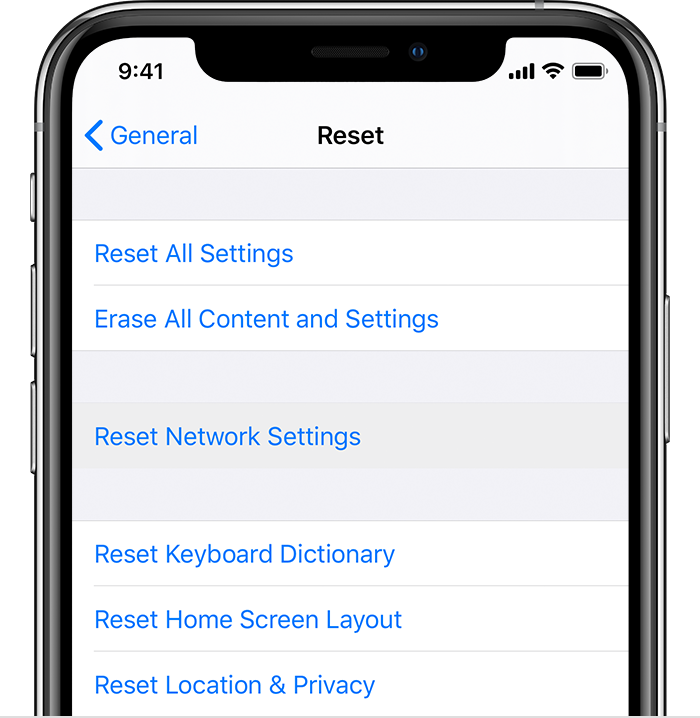
  9. Go to Settings > General > Reset and tap Reset Network Settings.


10. If you still need help, contact your carrier.


3 replies
Question marked as Top-ranking reply

Oct 26, 2020 7:40 AM in response to jjames2700

Set up Visual Voicemail on your iPhone - Apple Support


Get help with Visual Voicemail

If you can't set up Visual Voicemail, contact your carrier to make sure that your plan supports the feature

If you need help, try these steps. Check your Visual Voicemail after each step:

  1. Make sure that you have the latest version of iOS.
  2. Check for a carrier-bundle update: Go to Settings > General > About. If an update is available, a message will ask you to update.
  3. To check your cellular network connection, try to call someone. 
  4. Make sure that you set up your voicemail. To check, dial your own phone number from your iPhone and leave yourself a message.
  5. Call your iPhone from another phone and try to leave yourself a voicemail.
  6. Go to the keypad and press and hold on the 1, or press the Call Voicemail button. This dials voicemail. Check if you have any missed messages.
  7. On the Voicemail screen, tap Greeting. Then change your greeting to either custom or default. 
  8. If you have more than one cellular plan on your iPhone, try switching to the other plan. Call the first number and try to leave a message.
  9. Go to Settings > General > Reset and tap Reset Network Settings.


10. If you still need help, contact your carrier.


This thread has been closed by the system or the community team. You may vote for any posts you find helpful, or search the Community for additional answers.

New iPhone not receiving voicemails

Welcome to Apple Support Community
A forum where Apple customers help each other with their products. Get started with your Apple Account.
