My iMac keeps crashing

Hello,

So I have a 2011 iMac. for some reason multiple times per day I get the gray panic screen


"your computer restarted due to a issue press any key or wait to continue startup"


. I need help. This is my main work computer and I have lost multiple hours of work due to this. thank you in advanced.

MacBook Air 13″, macOS 10.12

Posted on Nov 20, 2020 5:05 PM

Reply

Similar questions

6 replies

Nov 20, 2020 5:13 PM in response to GavinDurbin

Download and run Etrecheck. Etrecheck is a diagnostic tool that was developed by one of the most respected users here in the ASC and recommended by Apple Support  to provide a snapshot of the system and help identify the more obvious culprits that can adversely affect a Mac's performance.


Copy the report
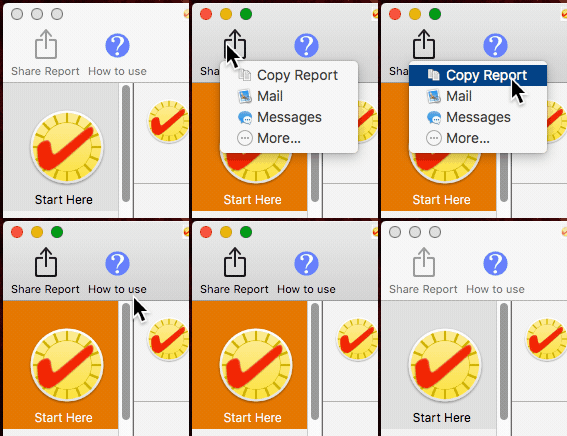


and use the Additional Text button to include the report in your reply.



IMPORTANT:

Before running Etrecheck assign Full Disk Access to Etrecheck in the Etrecheck's Privacy preference pane so that it can get additional information from the Console and log files for the report:


Also click and read the About info to further permit full disk access.
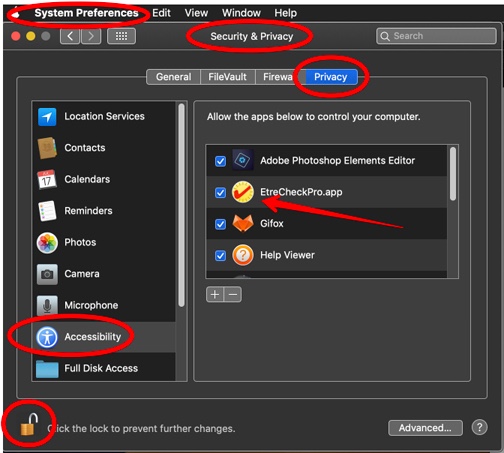


Then we can examine the report and see if we can determine what might be causing the problem.


Nov 22, 2020 8:20 PM in response to Old Toad

ok. this computer was set up a day before this post. I has a fresh install of macOS on it. the previous owner said that he was having issues like that whenever you try to do anything more than about 2 safari tabs and have Spotify open


after looking into some other stuff it seems like the cpu is constantly locked at 90% so I think that the cpu just can't handle a lot of other stuff. I guess that it is fine. I only got this computer to use to have discord running in the background and watching tv. I don't want to go thru wiping the drive and reinstalling right now. however thank you for the help! I have tried to reseat the ram. both sticks are showing up in the about my Mac page


Nov 22, 2020 9:36 AM in response to GavinDurbin

I don't see any of the usual suspects in the report. First order is to make sure you have a full and current backup of your boot drive either by using Time Machine or cloning your drive to an external HD using Carbon Copy Cloner.


Have you changed the location of the two memory chips in their slots? The report looks different from what I remember. Open the memory door and make sure the modules are firmly seated.


Run the Apple Hardware Test: How to use Apple Hardware Test on your Mac - Apple Support


Your model iMac is considered vintage by Apple and it might be having some hardware failure. To verify if it's hardware or software you would have to erase the drive (after making sure you have a backup of it) and installing just the system and no user files.


If the apps that came with the system crash then it's hardware related. If you don't experience any crasher then you know it's software related and will have to reinstall the 3rd party apps one at a time and test.

This thread has been closed by the system or the community team. You may vote for any posts you find helpful, or search the Community for additional answers.

My iMac keeps crashing

Welcome to Apple Support Community
A forum where Apple customers help each other with their products. Get started with your Apple Account.
