I would like to sell the TC and am not sure how to truly erase the drive so my data cannot be recovered by the new owner. Can I simply run one of the secure erase options in Disk Utility?
Run AirPort Utility (Finder > Applications > Utilities > AirPort Utility)
Select the Time Capsule
Click Edit in the smaller window that appears
Click the Disks tab at the top of the next window
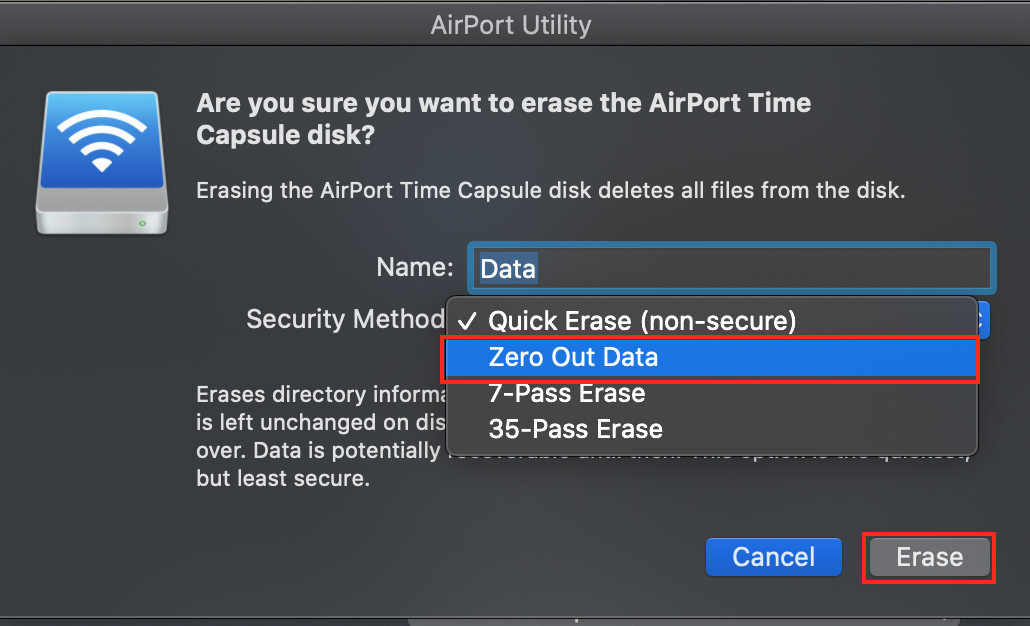
Click Erase
Click the Zero Out Data option.......which will likely take 8-12 hours or so depending on the size of the hard drive in the TC
If you have government secrets on the TC, for a more secure erase choose the 7 Pass option, which will run the Zero Out Data process 7 times and take 7 times as long
35 Pass is only for the most paranoid folks

When the process is complete and you are still in AirPort Utility
Click the Base Station menu item at the top of the screen
Select Restore Default Settings to erase all of your personal settings and get the TC back to original factory default settings

You can use AirPort Utility on the AirPort Express as well.
No Disk option there, just select the Base Station menu and then click on Restore Default Settings


