Problem with MacOS update 10.15.7 2020-001

Hello all,

I have an 2003 iMac, with 10.15.7 installed (Catalina) on an external SSD drive. The iMac boots on an external disk. Usually all security updates install correctly on the external SSD disk. For the last one, the installation seems ok, but the iMac reboots always on the internal HD. When I reboot on the external disk, the security updates seems not installed. I redo this operation multiple times, without success: the lastest update is proposed for installation, but when I do it, it does not install on the external disk...


What is happens ?

Thanks in advance


iMac 21.5″, macOS 10.13

Posted on Dec 15, 2020 4:42 AM

Reply
Question marked as Top-ranking reply

Posted on Dec 16, 2020 8:23 AM

Also had issues with this 10.15.7 2020-001 update. Here is what worked running an Imac 2013 from external SSD.


  • When starting the update, still on black screen, it had a brief reboot.
  • After that the Mac failed to load from SSD every time.
  • As my internal drive is a clone the Mac was only starting up with the internal disk, and not recognising the SSD as target disk.
  • Pressing option key wasn't working to select SSD disk.


What worked for me:

  1. I unplugged everything connected to the Mac and plugged my SSD in a different USB (the closest to the edge)
  2. Did a PRAM reset (once)
  3. Switched on, loud startup sound and the Mac loaded my internal drive with the clone, then I shut down after loading
  4. Switched on again and pressed option key (the SSD disk appeared)
  5. After loading the SSD I noticed the update was still pending on Systems Pref
  6. Shut down again
  7. Switched on again to check it would load from SSD, and it did!
  8. Performed the update with no problem after that


Hope this helps..

Similar questions

151 replies

Dec 15, 2020 9:22 AM in response to AugustinT06

...an update.


My iMac is configured with Mojave installed on the internal HD, and (had) Catalina installed on an external USB 3 SSD. I had been operating with this configuration for quite some time (months).


After applying the latest Catalina update, my iMac rebooted into Mojave, and absolutely refused to boot from the external SSD, even though it appeared as a System Startup Disk. After many failed attempts to restart, I erased the SSD and attempted a clean installation of Catalina. The installer proceeds right up until my iMac must restart to complete the installation. Then it restarts using my internal HD (Mojave).


It appears that booting from an external device has been comprimised by this update.

Dec 15, 2020 11:19 PM in response to AugustinT06

Same with me - late 2013 iMac Catalina 10.15.7 - boots from an external SSD - no OS on the internal disk but did have windows on a bootcamp disk. Unless I unplug all other disks from the USB3 ports except the SSd it boots to a windows error screen. if the External SSD is the only drive plugged in it boots normally. Even with the other drives plugged in, in the starup disk settings menu it only offers the external SSD. really not sure what is going on but this is rendering my imac unusable../

Dec 16, 2020 3:54 AM in response to fototypo

I managed to reset the NVRAM using the Terminal -- my iMac boots up in Mojave on the internal HD normally.


I erased my external USB 3 SSD, reformed it as HFS+ (journaled), GUID, and launched the latest Catalina installer (from S/W Update), and it began the installation process to the SSD.


However, when the iMac restarts to complete the installation, my iMac restarts in Mojave from the internal HD, and fails to complete the installation. Something is preventing the SSD from being recognized after startup. Once the desktop appears, the SSD shows up with the following, but doesn't complete the installation process:


Dec 17, 2020 5:04 AM in response to AugustinT06

I'm afraid we have to wait, I doubt anything will happen before next year. But I hope for a surprise for christmas ...


BTW my „fix“ seems pretty stable now, that is, I connect the SSD not directly to the iMac but via a USB hub (It's from icy box). This works even without the external power supply. When I plug the drive directly in the Mac again, it is not starting up, again. This is reproducible. Maybe give it a try, if possible.

Dec 17, 2020 5:32 AM in response to AugustinT06

Yes, but no luck with the direkt connection after that, either. I stopped further experiments after I got it running in this configuration to avoid things get worse again accidentally.


(BTW there're definitely other changes after the update regarding sleep/ USB. An age-old error with my wacom tablet not working after wake up from sleep is now solved and it works fine.

Could be a coincidence or not. It's a little weird such a late „minor“ update changes the system this much on a basic level ... I wouldn't be surprised if something happens after a mayor update, but a security patch crashing a mature system like catalina is ... not nice.)

Dec 17, 2020 7:13 AM in response to AugustinT06

Download the Security Update Package here: https://support.apple.com/kb/DL2067?viewlocale=en_CA&locale=en_CA


Remember to download this on the external drive and to set your external drive as the default startup disk.

View this support page on how to do that: https://support.apple.com/guide/mac-help/change-your-mac-startup-disk-mchlp1034/10.15/mac/10.15


If this doesn't work, try to use a keyboard with cable. Sometimes the wireless ones cause havoc.

Dec 17, 2020 10:31 AM in response to AugustinT06

Make sure you have set the external drive as the default in System Preferences. See the apple support page I linked to see how to set the default boot option.


What I recommend you do is first re-install Catalina on the disk. Re-installing DOES NOT ERASE YOUR MAC. It just replaces system files and removes security updates released after the release of 10.15.7. To do that download the full Catalina installer from here: https://apps.apple.com/us/app/macos-catalina/id1466841314?mt=12

Then launch the installer and select the external drive that you are booting Catalina from - MAKE SURE you select the correct disk - or it will upgrade Mojave on your internal disk to Catalina. It will install and restart your computer. Then try updating again by following the below steps:


  1. Download the update (either from the package or Software Update in Sys Prefs)
  2. Wait for it to install and then asks you to restart
  3. DO NOT restart - shut down computer MANUALLY and then turn it back on
  4. Hold option key to MANUALLY go to the external disk where the update needs to be
  5. See if you get that White Apple logo like you do when you startup, with a little bar that says some minutes remaining. EXAMPLE:
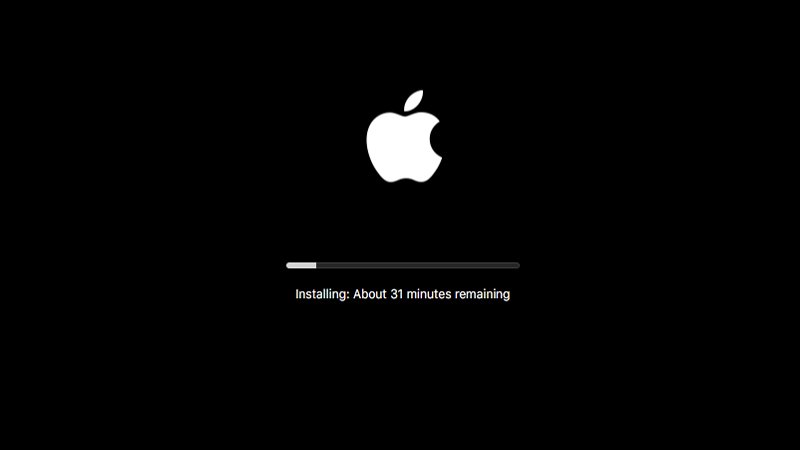


If you don't get the bar and logo described above, that means there is something wrong and the update isn't even working when downloading/installing before the restart. If you get the logo and status bar with the time remaining as described in step 5, and it stills shows in Software Update that the update needs to be installed, then it might just be a weird bug and takes a while to recognize that the update was successfully installed.


Let me know if there is any problem EVEN after doing what I described.


Hope this helps.


Cheers, Jack

Dec 17, 2020 11:35 AM in response to jacksunders

Of course I have set manually the external SSD drive as the default boot disk.

I did your steps, in step 5, the white apple bar does not appear. The OS boots on the version without the update. However, something strange appears: when I typed ALT during the boot sequence, a new file system appears, it is related the update software listed as one of the possible booting disks. I do not know what it means.


Dec 17, 2020 12:13 PM in response to AugustinT06

Well, can you explain what you mean by


...when I typed ALT during the boot sequence, a new file system appears, it is related the update software listed as one of the possible booting disks.

I'm not quite sure when you say new file system appears. Can you explain? I'll try to help.


If you don't see the white bar, and it goes to the internal drive, I think the system is kind of confused. Instead of restarting, try to install the update, shut down, and then type alt and select the external SSD manually.


Cheers, Jack

Dec 17, 2020 12:21 PM in response to jacksunders

That FS was labeled "Install MacOS". I did again the experiment, and selected that "Install MacOS" FS at boot, it installed the update correctly on my external SSD disk. Then I booted on the external disk correctly, but after trying multiple combinations with the USB ports: on some USB ports, the external SSD disk was not detected on boot time.


Now it seems that the update is correctly installed on my external SSD disk. It was a hard job to get it work :)

This thread has been closed by the system or the community team. You may vote for any posts you find helpful, or search the Community for additional answers.

Problem with MacOS update 10.15.7 2020-001

Welcome to Apple Support Community
A forum where Apple customers help each other with their products. Get started with your Apple Account.
