Big Sur 11.1 - 30hz External Monitor on 2019 MacBook Pro

I just upgraded to Big Sur 11.1 and noticed that my monitor seemed very laggy. Turns out that my external 4K monitor is running at 30hz on Thunderbolt 3.


What gives? I saw some posts saying that they were having problems on Beta software.

Posted on Dec 23, 2020 5:41 PM

Reply
Question marked as Top-ranking reply

Posted on Jan 25, 2021 9:03 PM

Sorry for the late reply. It's fixed by going to the monitor's setting for now.

System > Advanced > DisplayPort > and Change from 1.4 to 1.2


Sometimes, you have to unplug and plug the TB3 or change to other ports again.

I also have and test with the MBP 13" M1. it works. Hope this helps.

Similar questions

20 replies

Feb 10, 2021 9:45 AM in response to patrickchoi

We have also seen cases recently where a DisplayPort display worked fine at 60 Hz when its internal spec was set for DisplayPort 1.2, but when its internal display settings (in the display itself) were changed to DisplayPort 1.4 (which allows data compression) the display dropped back to supporting only 30 Hz refresh rate.


My guess is that it could not quite keep up with the higher resolution AND data decompression required by DisplayPort 1.4. This will vary on a model-by model basis.

Jan 26, 2021 7:40 AM in response to patrickchoi

One other suggestion users have made: actively change the resolution settings.


Change the resolution to something less demanding, save changes and close the window.

Then change the resolution to the one you would like to live with long-term, save changes and close the window.


At least one Reader reported that this 'act of making a change' fixed their display performance problems.

Jan 26, 2021 12:53 PM in response to Grant Bennet-Alder

Jan, thank you for these suggestions, appreciated!

Unfortunately, non worked for my bend pd2720u + macMiniM1 via TB3 (or DP via TB->DP adapter).

I've downgraded DP version in the monitor repeatedly to 1.2 or even 1.1 but no good result.

Then:

  • Left DP on 1.2,
  • shut down, boot,
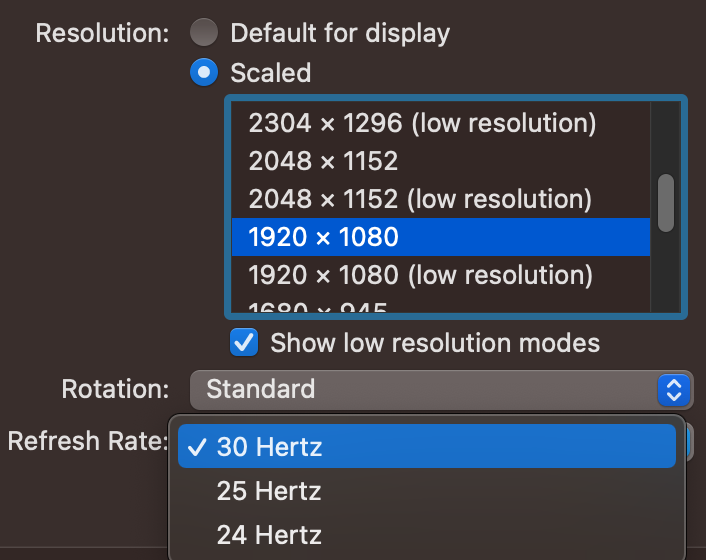
  • change resolution to the only resolution that allows 60Hz, 1280x720 (the monitor menu and also system information both declared Resolution 2560x1440 with UI looks like 1280x720@60Hz)
  • closed all windows
  • restarted display settings and switched to scaling 1080
  • screen went blank (normal, since refresh rate and native resolution changed)
  • check monitor menu and also system information again and they show 3840x2160 with UI 1920x1080@30Hz.


Completely ran out of ideas :(

step1


step2, 60Hz is simply not available above 720p
This thread has been closed by the system or the community team. You may vote for any posts you find helpful, or search the Community for additional answers.

Big Sur 11.1 - 30hz External Monitor on 2019 MacBook Pro

Welcome to Apple Support Community
A forum where Apple customers help each other with their products. Get started with your Apple Account.


