Watch shows wrong time

i have two watches: one for me, and one for my child. My watch shows correct time, but my child’s does not. It is Stuck in Cupertino time. I’ve removed Cupertino from the watch’s world clock, but that only took Cupertino off of the world clock, it didn’t change the main clock’s time.


I’ve also tried changing settings on my phone. And I’ve reset the watch several times.


Under Settings> Clock on the watch, it doesn’t allow me to change the Set Automatically option or the time zone, which is set to Cupertino. I can’t figure out how/where I can change that.


Help!

Apple Watch Sport

Posted on Dec 27, 2020 6:09 AM

Reply
Question marked as Top-ranking reply

Posted on Jan 8, 2021 9:03 AM

I had this exact problem! Just got off a chat with Support and wanted to share my experience in case it helps anyone:

On my child's watch, under Settings/Clock - scroll to the bottom - the toggle for "Set Timezone Automatically" was greyed out and the wrong time zone was there.


On my phone (used to manage my child's watch) I turned off Screen time for my child:

Settings/Screen time/ scroll down to select family member / Turn off Screen Time


After a moment, my child could set the time zone on the watch!

Then I turned on Screen Time again, and everything still worked.


Hope this works for you!

5 replies
Question marked as Top-ranking reply

Jan 8, 2021 9:03 AM in response to Apple-Help-Me-

I had this exact problem! Just got off a chat with Support and wanted to share my experience in case it helps anyone:

On my child's watch, under Settings/Clock - scroll to the bottom - the toggle for "Set Timezone Automatically" was greyed out and the wrong time zone was there.


On my phone (used to manage my child's watch) I turned off Screen time for my child:

Settings/Screen time/ scroll down to select family member / Turn off Screen Time


After a moment, my child could set the time zone on the watch!

Then I turned on Screen Time again, and everything still worked.


Hope this works for you!

Dec 28, 2020 7:23 PM in response to Apple-Help-Me-

Hello Apple-Help-Me-,


Thank you for participating in the Apple Support Communities! We understand that the time on an Apple Watch used by your child is incorrect. We'd be happy to help take a closer look at steps to take next.


To start with, are you able to change the time following the steps here:


Change the watch face on your Apple Watch - Apple Support


"

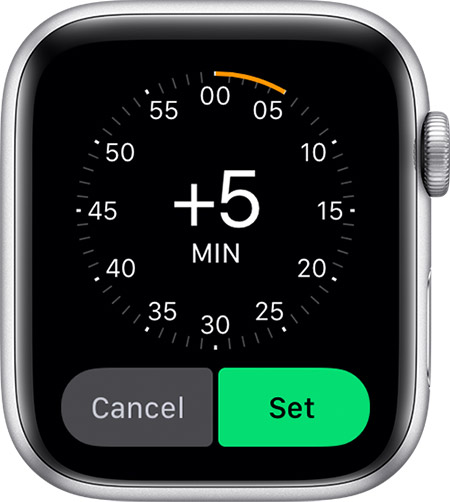
How to change the time shown on your Apple Watch

  1. Open the Settings app on your watch, then tap Clock.
  2. Tap +0 min. 
  3. Turn the Digital Crown and choose how far ahead to set your watch. 
  4. Tap Cancel or Set.

You can only set the time shown on the watch face ahead. Your alarms, notifications, World Clock, and any other times will still match the actual time."


If you're both part of Family Sharing, you may also want to check that there's no Screen Time restrictions for your child that could cause this behavior, such as "Don't Allow Changes" for Location Services. Keep us posted on the results.


Cheers!

This thread has been closed by the system or the community team. You may vote for any posts you find helpful, or search the Community for additional answers.

Watch shows wrong time

Welcome to Apple Support Community
A forum where Apple customers help each other with their products. Get started with your Apple Account.