How do I create a DVD that can be watched on my TV from a .cdr file?

I created Cdr files some time ago from video recordings that I had taken of my late mother & her sister. I now wish to create DVD's that my sisters and I can watch using a standard DVD player and TV.


This is not a commercial DVD question - it is my own film of my family.


Could someone please give me some easy to follow instructions on how to do this? We want to see and hear them again.


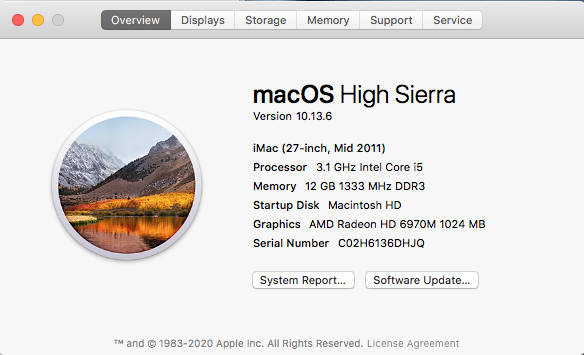
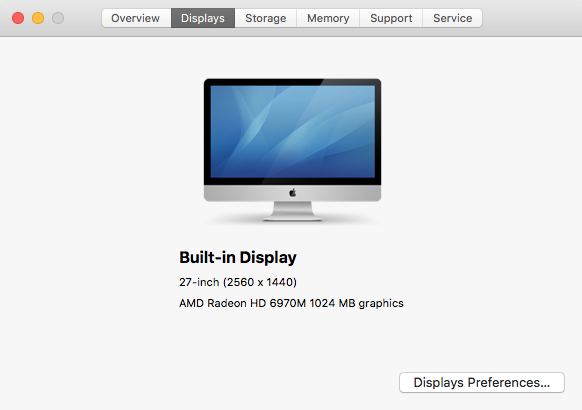
I have an iMac that is mid-2011, running OS High Sierra 10.13.6


Many thanks, James


iMac Line (2012 and Later)

Posted on Jan 12, 2021 7:24 AM

Reply

Similar questions

14 replies

Jan 12, 2021 8:02 AM in response to chachafrisk

Welcome!


Did you mean "CD-R?"


I have an iMac that is mid-2011, running OS High Sierra 10.13.6


Frankly I believe this is the perfect opportunity to use a transcribing service instead of spending time getting the right software that still runs on a decade-old Mac.


If you are in the US, Costco and other stores offer that service and even put it on sale fairly often. We had a number of old VHS-C casetttes (real odd-balls) of videos of our children when they were little. Costco did an awesome job of making them into DVDs. Quality was excellent and the turnaround was only a few days.


I am pretty geeky and have some very nice Macs at hand but, for me, but the decision to "farm out" was a complete no-brainer. You can spend a lot of money simply trying to find decent blank DVD-R disks and still not be able to do what you want.


I am a DIY guy so I understand if you want to handle this. However, before starting, test the optical drive in the iMac if that is what you intend to use. Slot-load optical drives get filthy and old ones can just stop working, even if clean.


This may involve importing the video files from the CD-R to your computer and using iDVD (if you still have it) or iMovie to export them to a DVD. I've not used those so you may want to surf the iMovie forums for additional suggestions:


iMovie for Mac - Apple Community

Jan 12, 2021 8:00 AM in response to Limnos

Hi, thanks for your reply.


It's a file that has been created on my Mac, I don't have CorelDraw, so it's an Apple file - I understand they hold folders and files in a single archive for the purpose of burning data to a disc, much like the ISO format used within Windows.


To be honest I don't know about the DVD player's capabilities, and I doubt my sister will. She has a Windows laptop though, and if it can be played on that, that will be fine.

Jan 12, 2021 8:12 AM in response to Allan Jones

Thanks, no it's a .cdr file, which the Mac created after I input from a video recorder to the Mac, via iMovie.


I am in UK, and while I get what you mean about outsourcing the job, I know I have managed to create playable DVD's from this type of file before, I cannot recall how I did it now.


I've been thinking it's time I got a new iMac, maybe now is the time, but I am sure this is possible - and there is not much else to do atm.....

Jan 12, 2021 8:41 AM in response to Limnos

Just did a Burn to DVD of the .cdr file and it burnt a .mov file to it. It is playable on the Mac, but it now says I don't have permission to view it! I did a Get Info and am able to watch it via Preview, but that's all so far.


It looks like burning the .cdr file is all I need to do, if I can crack the permission problem. I have not tried it on a Windows PC or DVD player yet, but it feels like some sort of progress.

Jan 12, 2021 9:09 AM in response to chachafrisk

"No permission to view it" how? In preview again? It is kind of hard to do all this without seeing exactly what is going on. I have never had a permissions issue with a file on a burned optical medium. You may be able to simply copy the file to the computer to get around the issue.


.mov is a somewhat Apple-specific format. It is also a format that is not ready for burning to an authored DVD like the kind of DVD you buy in the store. It is really a computer-ready format. If you can get the file onto a thumb drive you could then plug that into the laptop and use VLC which is a free and very versatile media player to play the .mov.


If you're determined to get this onto a tv-ready DVD it will involve a lot more work and we will need to know more about your computer setup. What will be available will depend strongly upon that and how much you are willing to spend.


Jan 12, 2021 9:51 AM in response to Limnos

I changed all users' permissions to Read & Write on the .cdr file before I burnt the DVD this time. Now it has created a .mov file which plays fine on my Mac, so at least I can watch it on here. I will try it on a PC later - the Sony DVD player doesn't like the format, so that's a no go. I do have VLC, and it plays fine through that. I may try something to create another file type.


Is all of this a lot simpler on a new iMac?

Jan 12, 2021 10:03 AM in response to chachafrisk

I don't know what you are using for hardware or software. I use a 2012 iMac with Mavericks.


I kind of doubt it would be easier on a new Mac but we haven't been provided with much information about your equipment or the file. I don't know what "new" means to you. I still have a computer from 1998 in the basement so I can still read floppy disks if need be. Apple tends to be be "with the times" and, for example, recently dropped support for old movie encoding formats in the recent iMovie. However, all computer technology advances and you need to make sure that anything you want to keep stays updated or it will eventually become inaccessible. Black and white photos from the early 1900s are still the same quality and as viewable today as 100 years ago. Color photos from the 1960s are viewable but washed out. Who knows how much longer .jpeg will be viewable? Apple software can still read it but their default is to save as .heic so maybe in 10 years Macs won't open .jpg anymore too?

Jan 12, 2021 3:06 PM in response to Limnos


I am thinking of buying a new iMac. I switched to Apple in 2011 with an iMac that then had display issues and they replaced it. They replaced it again 3 years ago when it had more display problems, so it is my third but still a 2011 model. In replacing it, they erroneously deleted my Aperture purchase (I got to mainly for photography), and then refused to acknowledge I have a licence, so I can't get the last upgrade. I am heavily invested in Aperture, so that's a big issue for me. I have also done a lot of work on video editing using iMovie, but that still holds a lot of mysteries for me, and my version 9.0.9 has just started to refuse loading as it's incompatible with the OS. I tried the newer version but don't like it as much, so I may keep this iMac on an older OS and just run iMovie 9.0.9 and Aperture on it, while I try to move ahead with more up to date software. I have tried partitioning, but it's a pain when starting up, so I undid it after a while.


I take your point re advances: I started in computing as a programmer probably before you were born, in 1973! I worked on a Honeywell GE115 with 8k (yes, 8k!) of memory with no storage devices at all, on a machine that needed a huge air conditioned room. Input was via punched cards (on a machine that I operated for patches), and the only output was a line printer on green & white lined paper. I followed programmes' progress via two switch lights on the front panel, and diagnosed any problems via machine code in a memory dump. I spent over 40 years in IT, developing first on-line systems, designing & installing one of the first digital networks, installed early PC's, and managed and developed hundreds of staff, in companies that I part owned and managed. I have tried to keep a semblance of technical expertise but would be the first to admit that I still struggle at times to understand some of the nuances of Apple technology. A good deal of my career success was down to always surrounding myself with good technical people, and valuing them highly ..... and not being afraid to ask for help. Hence my presence here, and I thank you and all others who have replied for your help, much appreciated.


This thread has been closed by the system or the community team. You may vote for any posts you find helpful, or search the Community for additional answers.

How do I create a DVD that can be watched on my TV from a .cdr file?

Welcome to Apple Support Community
A forum where Apple customers help each other with their products. Get started with your Apple Account.
