how to see your iPhone IMEI from your Macbook.

i lost my phone and i am asked for the IMEI. I need this number ASAP. i can only see the last digits.

iPhone 6, iOS 12

Posted on Jan 31, 2021 11:50 AM

Reply
Question marked as Top-ranking reply

Posted on Jan 31, 2021 1:26 PM

Find the serial number or IMEI on your iPhone, iPad, or iPod touch - Apple Support


If you don't have your device


There are several places to check that might show the serial or IMEI/MEID number.


  1. Go to appleid.apple.com in a web browser on your computer.
  2. Sign in with the Apple ID that you use on your device. 
  3. Scroll down to the Devices section. To see the serial and IMEI/MEID number, select the device.


If you still need help, here's what to try next:


  • Do you have a different device with iOS 10.3 or later that's
  • signed in to your Apple ID? On that device, go to Settings > [Your
  • name]. Scroll down to see any devices signed in with your Apple ID. To
  • view the serial and IMEI/MEID number, tap the device name.
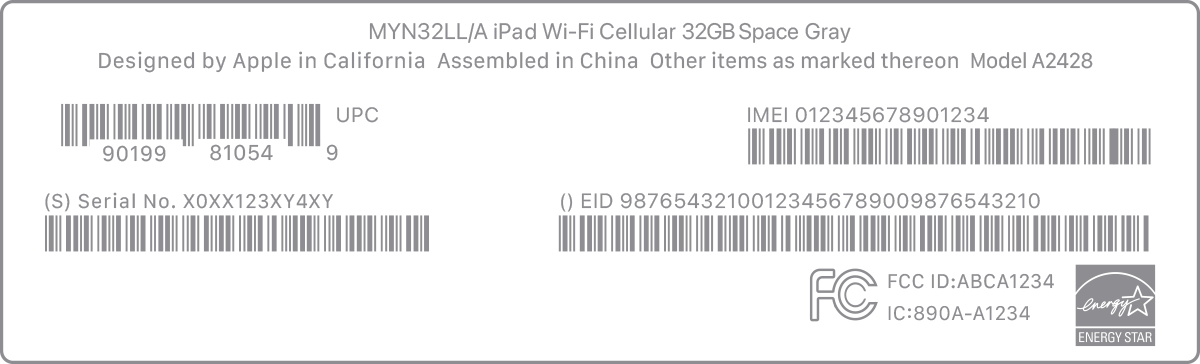
  • Do you still have your device's original package? Find the serial number and IMEI/MEID on the barcode:

  • Still can't find the number that you need? Contact Apple Support by selecting your device from this list:


1 reply
Question marked as Top-ranking reply

Jan 31, 2021 1:26 PM in response to estherapuy

Find the serial number or IMEI on your iPhone, iPad, or iPod touch - Apple Support


If you don't have your device


There are several places to check that might show the serial or IMEI/MEID number.


  1. Go to appleid.apple.com in a web browser on your computer.
  2. Sign in with the Apple ID that you use on your device. 
  3. Scroll down to the Devices section. To see the serial and IMEI/MEID number, select the device.


If you still need help, here's what to try next:


  • Do you have a different device with iOS 10.3 or later that's
  • signed in to your Apple ID? On that device, go to Settings > [Your
  • name]. Scroll down to see any devices signed in with your Apple ID. To
  • view the serial and IMEI/MEID number, tap the device name.
  • Do you still have your device's original package? Find the serial number and IMEI/MEID on the barcode:

  • Still can't find the number that you need? Contact Apple Support by selecting your device from this list:


This thread has been closed by the system or the community team. You may vote for any posts you find helpful, or search the Community for additional answers.

how to see your iPhone IMEI from your Macbook.

Welcome to Apple Support Community
A forum where Apple customers help each other with their products. Get started with your Apple Account.