Hi phoenix,
Add a column to the main table to contain an index, giving each row a distinct datum which can be searched.
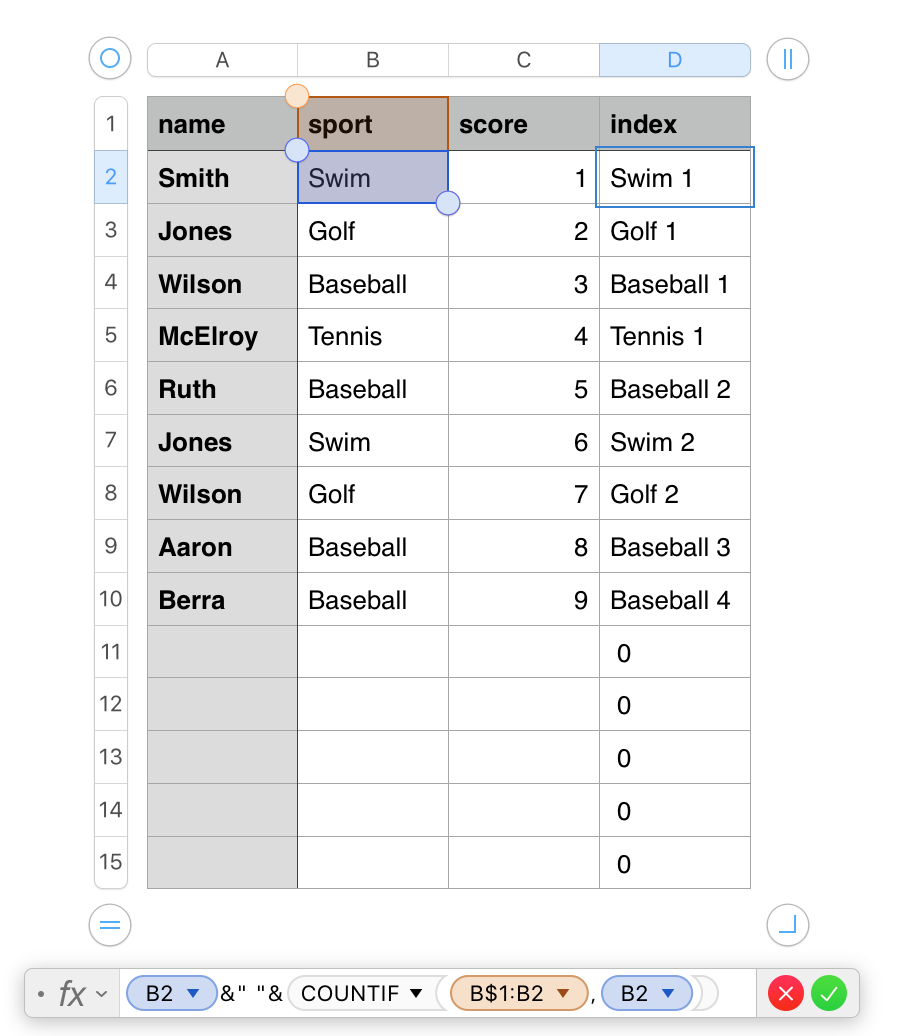
The formula shown below the table is entered in D2, then filled down to the end of that column.
B2 gets the value in 'this row' of column B.
COUNTIF counts the occurrences of the value in 'this row' of column B in the (expanding) range of B1 to 'this row' of B.
The concatenation operators ( & ) join the contents of B2, a space, and the count returned by COUNTIF into a single string, and return that string to the cells containing the formula.

The formula shown in entered in B2 of the smaller table to the left, and is filled down to the end of that column.
The same formula, with "Table 1::C" replaced by "Table 1::A" is placed in cell A2 and filled down.
The second small table is a copy of the selected one, with a different sport entered in cell A1.
The core formula here is the part beginning with INDEX
A1 gets the sport name, Row gets the row number of 'this row', one is subtracted from it. The sport name, a space and the number are joined to form a search value (Swim 1) for MATCH.
MATCH looks for that value in column D of Table 1, and returns a number indocating it's position in the list in that column.
INDEX takes the number and returns the value in that row of column C of Table 1.
Search values not found will cause an error message from MATCH. This is trapped by the IFERROR function in which the core formula is wrapped, and IFERROR returns a null string, which appears 'blank' in the cell.
Regards,
Barry

