Hey manu232,
We understand that you want to view your heart rate from what is read by your external heart monitor versus what your Apple Watch reads. If your external heart monitor has an accompanying app and uses Bluetooth, you can install that app on your iPhone and allow it to share data with the Health app, as seen in this article: Share health and fitness data in Health on iPhone
Here is additional information that might be helpful, which is from this article: Manage Health data on your iPhone, iPod touch, or Apple Watch
The Health app takes similar data from different sources, like steps recorded from your iPhone and activity from your Apple Watch, and organizes it based on where it comes from. By default, Health prioritizes data in this order:
- Health data that you enter manually.
- Data from your iPhone, iPod touch, and Apple Watch.
- Data from apps and Bluetooth devices.
When you add a new data source, it appears above all other apps and devices that contribute data in Health. You can change the order of sources at any time.
Here's how to see which devices and apps update specific health categories:
- Open the Health app and tap the Browse tab.
- Tap a category, like Activity. If you don't see the category, swipe down to reveal the search bar, then enter a category.
- Tap a subcategory, like Steps.
- Scroll down, then tap Data Sources & Access. Only the sources that contribute to that data type will appear.
Here's how to see all of your sources for the Health app:
- Open the Health app.
- Tap your profile picture in the upper-right corner
 .
. - Scroll down to Privacy, then tap Apps or Devices.
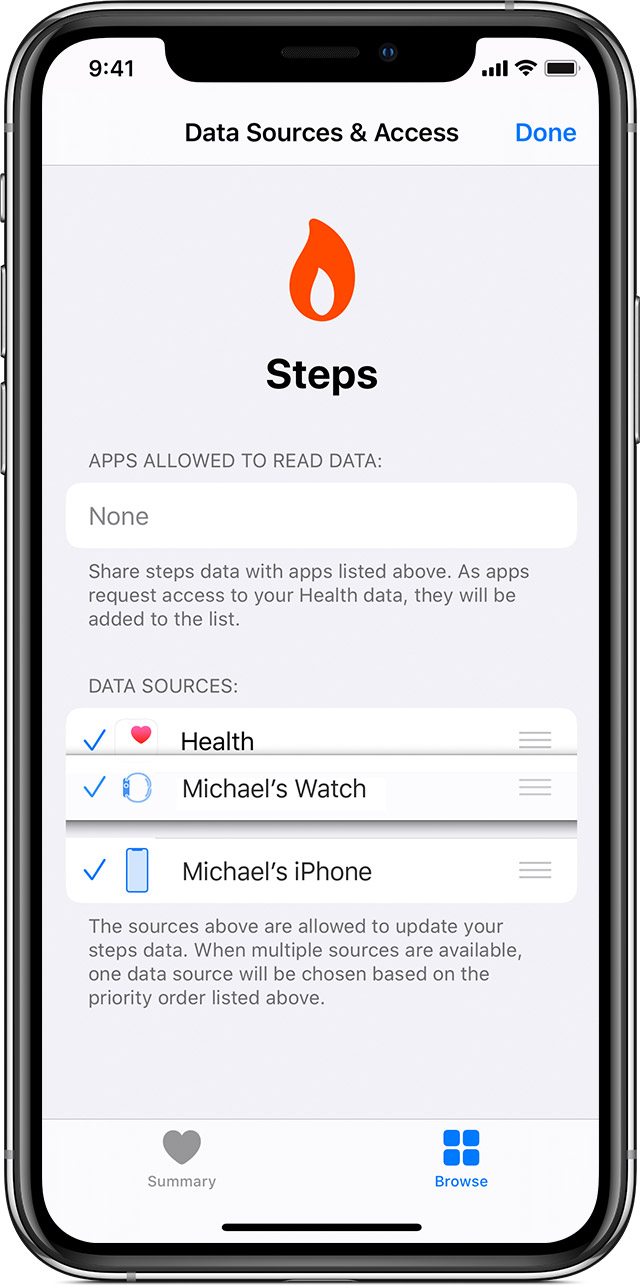
Here's how to choose the sources that Health uses first:
- Open the Health app, then tap the Browse tab.
- Tap a category, then tap a subcategory.
- Scroll down, then tap Data Sources & Access.
- Tap Edit.
- Touch and hold the Change Order button
 next to a data source, then drag it up or down in the list.
 - To turn off a data source so that it doesn't contribute any more data for that category, tap the checkmark next to the source.
- Tap Done.
If multiple sources contribute the same data type, then the data source at the top will take priority over other sources. Any new apps or devices that you add go to the top of the list automatically, above your iPhone or iPod touch."
If you have any issues, you can contact Apple Support for further assistance here: Contact Apple Support
We hope that information helps. Take care!

