JVC Mini Dv to MacBook Pro Transfer on Big Sur

Hi All. I need to transfer some old Mini DV tapes to my 2016 MacBook Pro (Touch Bar) from an old JVC Mini DV camcorder. Not to got a clue what type of cable to use. I had a dongle to attach the normal USB to mini DV cable to the Camera and it didn't recognise it. Can anyone recommend a cable or 3rd party bit of kit and if iMovie will pick it up order do I need some software.


Many thanks, greatly appreciate any assistance.

MacBook Pro 13″, macOS 11.1

Posted on Feb 20, 2021 2:12 AM

Reply
Question marked as Top-ranking reply

Posted on Feb 21, 2021 1:33 PM

The only output port that will do what you require is the FireWire 4 pin output shown here.


The cable that you plug into your camcorder is this one, called a FireWire 400 4 pin to Firewire 800 9 pin cable shown here.


The big end of the cable above, FireWire 9 pin , goes into the first adaptor here,

https://www.apple.com/uk/shop/product/MD464ZM/A/thunderbolt-to-firewire-adapter


and then as you have USB-c ports on your Mac you will need this extra adaptor to go from the adaptor I just mentioned above into your Mac's USB-c port.

https://www.apple.com/uk/shop/product/MMEL2ZM/A/thunderbolt-3-usb-c-to-thunderbolt-2-adapter

See more here

https://discussions.apple.com/thread/251304950

As mentioned , it is getting more difficult to capture mini DV tape into iMovie with newer OS and newer hardware so if you have access to an older Mac then use that.

The S-Video output of your camcorder is analog so is of no use to you in this particular case for import into iMovie.

17 replies
Question marked as Top-ranking reply

Feb 21, 2021 1:33 PM in response to Nik7676

The only output port that will do what you require is the FireWire 4 pin output shown here.


The cable that you plug into your camcorder is this one, called a FireWire 400 4 pin to Firewire 800 9 pin cable shown here.


The big end of the cable above, FireWire 9 pin , goes into the first adaptor here,

https://www.apple.com/uk/shop/product/MD464ZM/A/thunderbolt-to-firewire-adapter


and then as you have USB-c ports on your Mac you will need this extra adaptor to go from the adaptor I just mentioned above into your Mac's USB-c port.

https://www.apple.com/uk/shop/product/MMEL2ZM/A/thunderbolt-3-usb-c-to-thunderbolt-2-adapter

See more here

https://discussions.apple.com/thread/251304950

As mentioned , it is getting more difficult to capture mini DV tape into iMovie with newer OS and newer hardware so if you have access to an older Mac then use that.

The S-Video output of your camcorder is analog so is of no use to you in this particular case for import into iMovie.

Feb 20, 2021 8:30 AM in response to Nik7676

Hi,


Take a look at this thread and the links within it for a good discussion of your issue:


https://discussions.apple.com/thread/251412711


You would need a Firewire cable (not USB) from your camcorder to your Mac. If your Mac does not have a firewire slot, then you would use what ever adapters necessary to complete the connection. For example: FW>Thunderbolt 1>Thundebolt 2>Thunderboldt 3 (USB-c). You should use a direct connection rather than through a hub.


Importing from DV tape can be somewhat unreliable with iMovie 10. No guarantee that it will be successful, although most do work. Often the cables and adapters are the problem, so I would use Apple adapters even though they probably will be a bit more expensive.


-- Rich


Mar 16, 2021 1:11 AM in response to Nik7676

We appear to be confusing each other.

My last 2 posts were on the basis that you had borrowed an old mac with a FireWire port and you were asking what cable was needed between Mac and camcorder.The cable needed for this set up is the 9 pin to 4 pin FireWire cable pictured earlier above.

No other cables or adapters are required and no "drivers" either.


First questions; Did you try to import into the old borrowed Mac using the FireWire cable? If you did what was the result.?

Did you try capturing using Quicktime Player and iMovie.?

What OS is it running and what version of iMovie? Or have you abandoned the idea of using the old Mac?


Now back to your new Mac.


"It’s a USB-C to USB adapter and I’m on Big Sur. I do have the other 2 adapters as well but to no avail. "

Can you send picture of USB-c to USB adapter . The only 2 adapters you need for your new Mac are these 2 numbered 1 and 2 in this picture.

Neither of them is a USB-c to USB adapter.
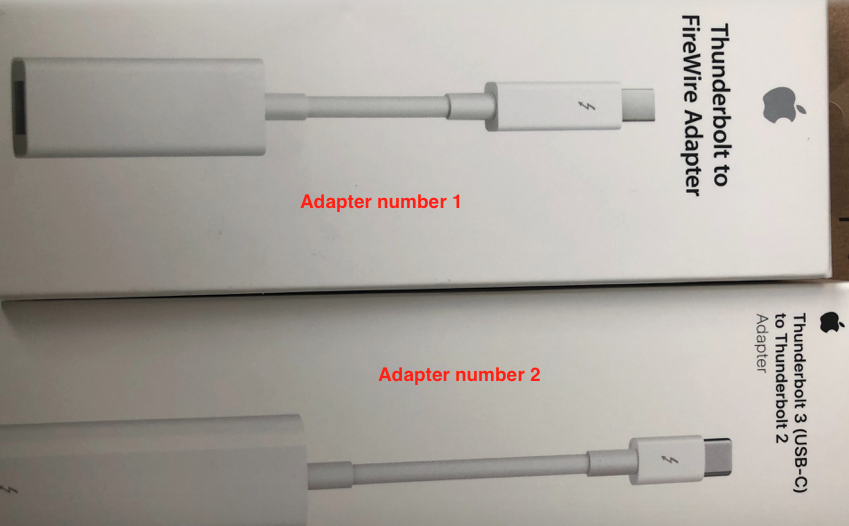


These 2 adapters are used together with the 9 pin to 4 pin FireWire cable pictured in previous post.


It has been stated that capturing tape with newer Macs and newer OS appears to have become more unreliable .

It certainly works for some but not all . The old Mac should be OK.

When you reply can you be certain to indicate which answers refer to the old Mac and which refer to your new Mac?



Feb 21, 2021 9:15 AM in response to Nik7676

Ideally, you use a firewire cable from your camcorder to the firewire slot in your Mac. Newer Macs do not have firewire slots, but instead have Thunderbolt 1, 2, or 3 (USB-c) slots. So you need to use adapters to make the connection. Do not use a dongle. Do not use USB. Start by reading your camera's user manual to see what cables that they recommend for transferring media to a computer. Use the cable that came with your camera. I'm guessing, but probably you would use the S-video outlet from your camera and then use the necessary adapters to connect the cable to your Mac. The thread link that I provided in my earlier post will show what adapters that you need.


Here's an Apple help link that explains the process:


https://help.apple.com/imovie/mac/10.1/#/mov6af9c94c1


Here's a help link re cables:


https://help.apple.com/imovie/mac/10.1/#/mov50a336efa


-- Rich

Mar 15, 2021 8:50 AM in response to thesurreyfriends

Getting there. Cables/adapters bought. Spoke to Apple as as much as the Mac now recognises the camera (when you hit Option and click the apple logo) it can't see it as a device in finder/Imovie/Quicktime /Image Capture. According to them I may need drivers alas I'm searching for JVC GR DV300 drivers and I've hit a complete wall. My thinking is maybe buy another camcorder that has it's drivers updated and exist. Can't think of another solution :-(

Mar 16, 2021 10:54 AM in response to Nik7676

OK. Shame the old Mac does not have iMovie. All Macs come with iMovie installed, so perhaps it has been deleted.

You can try this on old Mac and new Mac.

Connect Mac to camcorder and power up the camcorder and set it up ready for playing back the tape.

Launch QuickTime Player and go up to File >New Movie Recording and you should get this


Click on the options arrow and you should see your JVC camcorder listed. Select your camcorder and also select it for the audio input.

For the quality option in the options, select High. Click on red Record button and set tape to play. Click on this same button ( it won't be red now) when you have finished capture.

If successful you will get one long clip saved to your desktop.Play it through in QTP and check that the audio in in sync with the video .

Can you say what OS the old Mac is running please and year of Mac? To do this click on Apple logo top left and click on About This Mac.

Mar 16, 2021 9:55 AM in response to thesurreyfriends

Ok. So with the old Mac tethered with the just the 9 pin to the 4 pin it’s picked it up as follows. However, in image capture it doesn’t recognize the device. QuickTime is open and the power is on on the camera, (hence in system info it shows). Not got iMovie on it. Where and how would QuickTime pic it up if for example I’m not looking at it in finder (to find directories. I’m getting there really appreciate this.

This thread has been closed by the system or the community team. You may vote for any posts you find helpful, or search the Community for additional answers.

JVC Mini Dv to MacBook Pro Transfer on Big Sur

Welcome to Apple Support Community
A forum where Apple customers help each other with their products. Get started with your Apple Account.