
Apple Watch friend

Suddenly I cannot see the activity for my Apple Watch friend. Also, I am unable to remove her as a friend. What can I do?

Posted on Mar 28, 2021 6:01 PM

Reply
Question marked as Top-ranking reply

Posted on Mar 29, 2021 1:36 AM

Hello there!

Your friend has hidden his/her activity from you.

You can remove him/her by doing this: (Read all of them)


  1. Open the Activity app on your Apple Watch.
  2. Swipe to the Sharing screen. 
  3. Tap your friend, then scroll to see their progress. 


Stop sharing

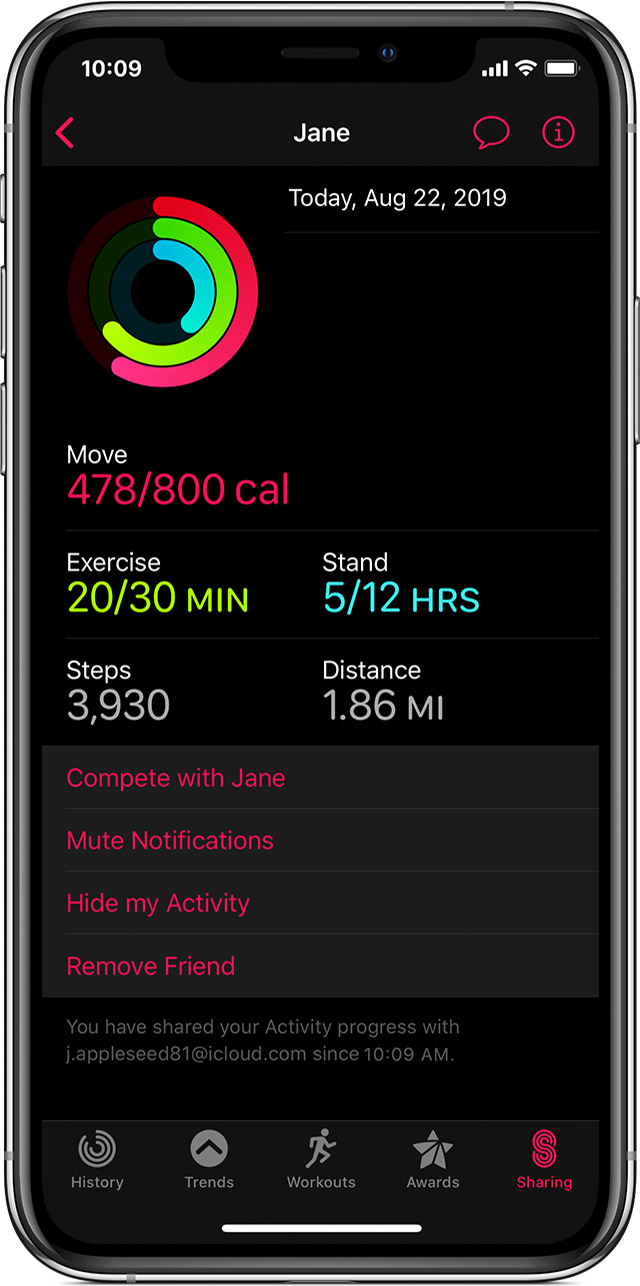
If you want to stop sharing, you can mute notifications, hide your progress, or remove a friend. 
Mute notifications

  1. Open the Activity app on your iPhone.
  2. Tap the Sharing tab, then tap your friend.
  3. Tap Mute Notifications. To get notifications again, tap Unmute Notifications.


Hide your progress

  1. Open the Activity app on your iPhone.
  2. Tap the Sharing tab, then tap the friend that you want to hide your activity from. 
  3. Tap Hide my Activity. You can still see your friend's activity, but they won't see your activity. You can't hide your activity from a friend that you're competing with.
  4. To start sharing again, tap Show my Activity.


Remove a friend

  1. Open the Activity app on your iPhone. 
  2. Tap the Sharing tab, then tap your friend. 
  3. Tap Remove Friend. After you remove a friend, they can't see your activity, and you can't see their activity. To start sharing again, send your friend a new invite.


2 replies
Question marked as Top-ranking reply

Mar 29, 2021 1:36 AM in response to IDonna

Hello there!

Your friend has hidden his/her activity from you.

You can remove him/her by doing this: (Read all of them)


  1. Open the Activity app on your Apple Watch.
  2. Swipe to the Sharing screen. 
  3. Tap your friend, then scroll to see their progress. 


Stop sharing

If you want to stop sharing, you can mute notifications, hide your progress, or remove a friend. 

Mute notifications

  1. Open the Activity app on your iPhone.
  2. Tap the Sharing tab, then tap your friend.
  3. Tap Mute Notifications. To get notifications again, tap Unmute Notifications.


Hide your progress

  1. Open the Activity app on your iPhone.
  2. Tap the Sharing tab, then tap the friend that you want to hide your activity from. 
  3. Tap Hide my Activity. You can still see your friend's activity, but they won't see your activity. You can't hide your activity from a friend that you're competing with.
  4. To start sharing again, tap Show my Activity.


Remove a friend

  1. Open the Activity app on your iPhone. 
  2. Tap the Sharing tab, then tap your friend. 
  3. Tap Remove Friend. After you remove a friend, they can't see your activity, and you can't see their activity. To start sharing again, send your friend a new invite.


This thread has been closed by the system or the community team. You may vote for any posts you find helpful, or search the Community for additional answers.

Apple Watch friend

Welcome to Apple Support Community
A forum where Apple customers help each other with their products. Get started with your Apple Account.
