subscription trial is over and need to remove that subscription off my account, how do I remove it completely?

Apple account subscription trial is over and need to remove that subscription off my account, how do I remove it completely? It reflects expired as of yesterday. Thanks


iPhone 11 Pro Max

Posted on Apr 9, 2021 10:38 AM

Reply
2 replies

Apr 11, 2021 11:21 AM in response to RwaAT

Hi RwaAT,


We understand you'd like to cancel a subscription. We're happy to help.


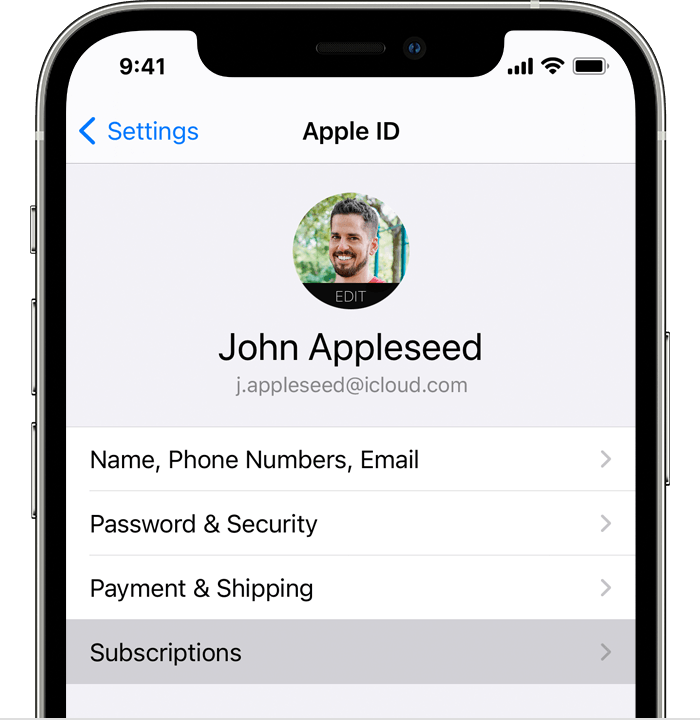
You can use these steps to access and cancel your subscriptions:


  1. Open the Settings app. 
  2. Tap your name. 
  3. Tap Subscriptions.

4. Tap the subscription that you want to manage. Don't see the subscription that you're looking for?

5. Tap Cancel Subscription. (Or if you want to cancel Apple One but keep some subscriptions, tap Choose Individual Services.) If you don’t see Cancel, the subscription is already canceled and won't renew.


How to cancel a subscription from Apple


We hope this helps. Take care!


This thread has been closed by the system or the community team. You may vote for any posts you find helpful, or search the Community for additional answers.

subscription trial is over and need to remove that subscription off my account, how do I remove it completely?

Welcome to Apple Support Community
A forum where Apple customers help each other with their products. Get started with your Apple Account.