
Fraud
Has anybody gotten this message on their phone?
Has anybody gotten this message on their phone?
This is a very normal iMessage.
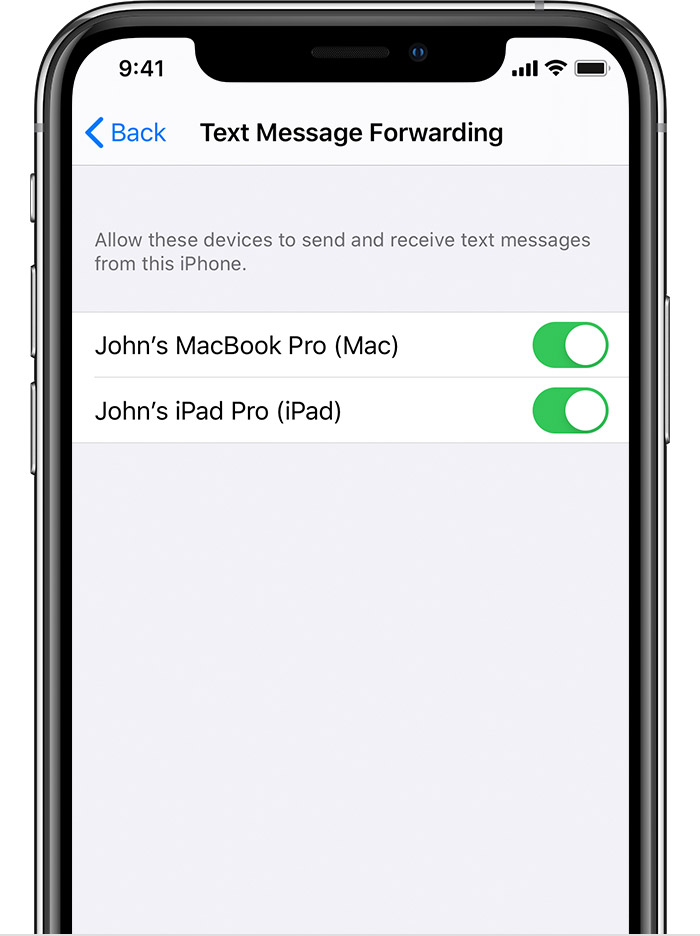
If you have multiple devices and have enabled iMessage text forwarding into other devices then this message will appear every time you activate iMessage.
Set up text message forwarding

This is a very normal iMessage.
If you have multiple devices and have enabled iMessage text forwarding into other devices then this message will appear every time you activate iMessage.
Set up text message forwarding
There is no place to report an incident like this unless you know who is responsible; in that case contact the police. Do you share an Apple ID with anyone? Did you ever share an Apple ID with anyone?
You can go to Settings and tap on your name at the top. At the bottom of the screen will be a list of devices that can access your Apple ID. You can find the same information by logging in to https://appleid.apple.com.
There may be less here than meets the eye. Is this the first time you have unlocked the phone since you restarted it? Is your phone named “iPhone”? Did you just sign in to your Apple ID? Did you just update iOS on your phone? If any of these is true the message is about your action.
https://support.apple.com/en-ca/HT204145
If you only have one device, then this means an unauthorized person is using your Apple ID. Secure it ASAP.
Go to Settings/General/About. Do the ICCID (that’s the SIM number) and the IMEI that you have match your phone?
What fraud has taken place? How much money did you lose?
It does match but I did have another device on my phone that did not match and Apple had me delete it
I do not have multiple devices
I did call Apple went through all the steps changed my Passwords. Who do I file a fraud complaint with?
Identity fraud somebody using my Apple ID and my phone number. No money is lost.
Unless you can show some loss or damages no one is going to take your case since you have resolved the problem.
I do not have a specific name or person but I have the SIM number and IMEI number.
Thank you for your input!!
The correct move. Do you know who’s device it was? Might it have been a previously used phone of yours?
I think you are on to something. I let grand kids play with my phone and an old phone and it sounds like somehow they tried to sync the two of them.
Fraud



