
error occurred while installing Rosetta on my macbook pro 2020 m1
error occurred while installing Rosetta on my macbook pro 2020 m1, I cannot install Rosetta to use applications
error occurred while installing Rosetta on my macbook pro 2020 m1, I cannot install Rosetta to use applications
A number of things >>
1 - The MBP M1 came with Big Sur pre-installed and as pert of the Big Sur, Rosetta 2 was already installed. That is fact.
2 - Based upon that fact - there is not need to Try and Installed Rosetta 2 as it is already installed.
3 - Proof of that is, If there are any Applications written for Intel Based Computer installed on the computer and you try to launch that application - Rosetta 2 would automatically intervene and activate and allow the App to function.
4 - Second Proof >> About this Mac >> System Report >> Scroll down to " Installations " Category and look for Rosetta 2 as being listed.
5 - In # 4 above - there might be addition listing of Installation regarding Rosetta2 indicating several updates to the Rosetta 2
In conclusion - think you might be looking for an Application residing in the Applications Folder called Rosetta 2 - As it is part of the Big Sur and Not a Standalone Application - it will Not Appear in the Applications folder and never will be.
A number of things >>
1 - The MBP M1 came with Big Sur pre-installed and as pert of the Big Sur, Rosetta 2 was already installed. That is fact.
2 - Based upon that fact - there is not need to Try and Installed Rosetta 2 as it is already installed.
3 - Proof of that is, If there are any Applications written for Intel Based Computer installed on the computer and you try to launch that application - Rosetta 2 would automatically intervene and activate and allow the App to function.
4 - Second Proof >> About this Mac >> System Report >> Scroll down to " Installations " Category and look for Rosetta 2 as being listed.
5 - In # 4 above - there might be addition listing of Installation regarding Rosetta2 indicating several updates to the Rosetta 2
In conclusion - think you might be looking for an Application residing in the Applications Folder called Rosetta 2 - As it is part of the Big Sur and Not a Standalone Application - it will Not Appear in the Applications folder and never will be.
What version of Big Sur is Installed >> Apple Icon on Desktop >> About this Mac. Then advise what it is saying. If computer is Totally up-to-date - it should be reading Big Sur 11.4.
If it shows anything less - there are additional updates still be be installed. This may resolve your issue.
Start up your Mac in safe mode and choose the Intel or M1 version. It does a repair Disk, clears cache files and Only Loads Apple Software, extensions and Fonts. This will load slowly - Normal.
The above is being used to eliminate all this party software from loading at all and identify is this is a System Wide issue of third party software interfering with the Rosetta 2 update process.
Suggest downloading the Application Etrecheck directly from a Trusted Developer and well Respected ASC Contributor. The application is free or paid from added features. Run the application with Full Disc Access ( Security & Privacy - Full Disc Access ). It will take a Snap Shot - both the hardware and software. The Report will Not Reveal Any Personal Information. Post back the Full Report - copy and paste - using the Additional Text Icon ( 3rd Icon to last )
We can have a look at the report for possible issues and may have possible suggestions to resolve the issues.
Any Third Party Applications that will interfere with the normal operation of the OS, alter, modify, remove or delete or attempt to do so is an invitation for disaster and may require a Reinstallation of the OS.There are no known Viruses in the wild that self replicate and affect macOS. There are Malware and Adware that does affect macOS and are often times downloaded as part of an Application from Third Party UnTrusted Site and get installed along with the Application.
Is it possible to reinstalled the OS Big Sur and the issues got resolve with the reinstallation of OS.
bellow is report generated by Etrecheck:
Time Machine backup not found.>>> Not a Good Idea to not have a Rescue Plan
2021-06-20 VPN Proxy Master (2.6.5) Don't use VPN services. Interferes with the Normal Operation of the OS and May have something to do with Rosetta2 not installing
2021-06-20 UltraVPN (1.2.1) >>> Don't use VPN services.
Point # 7 - Do I have a Rescue Plan In-Place. This comprises having 3 Backups using 2 methods and 1 Off Site incase of Theft, Loss or Natural Disasters. A Time Machine Backup is very useful and can be used to Revert to Previous Working macOS. For addition purposes - two Tested Bootable Clones each to separate external drives. This is insurance incase the upgrades goes sideways. At least one Tested Clone and / or Time Machine Backup should be Off - Site
I couldn't find Rosetta 2 in installation list as you mentioned in point 4, the only think I could find the Rosetta 2 updater in Application list under software Category but when i run ROSETTA 2 UPDATER, it show me an Error msg.
If you need to install Rosetta on your Mac
Rosetta 2 enables a Mac with Apple silicon to use apps built for a Mac with an Intel processor.
If you have a Mac with Apple silicon, you might be asked to install Rosetta in order to open an app.
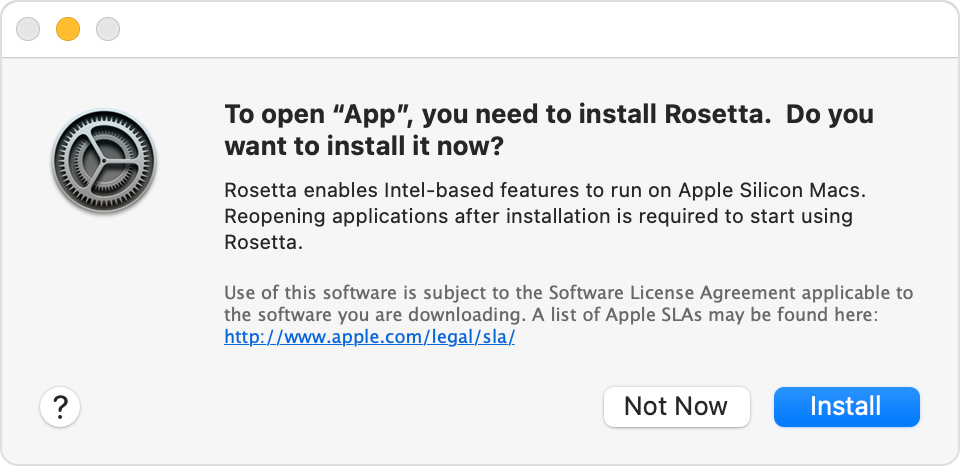
Click Install, then enter your user name and password to allow installation to proceed. Rosetta will then be available for any of your apps that need it.
About Rosetta
Rosetta 2 works in the background whenever you use an app built only for Mac computers with an Intel processor. It automatically translates the app for use with Apple silicon.
In most cases, you won't notice any difference in the performance of an app that needs Rosetta. But you should contact the app developer to inquire about a version that can natively use the full power and performance of Apple silicon.
Which of your apps need Rosetta?
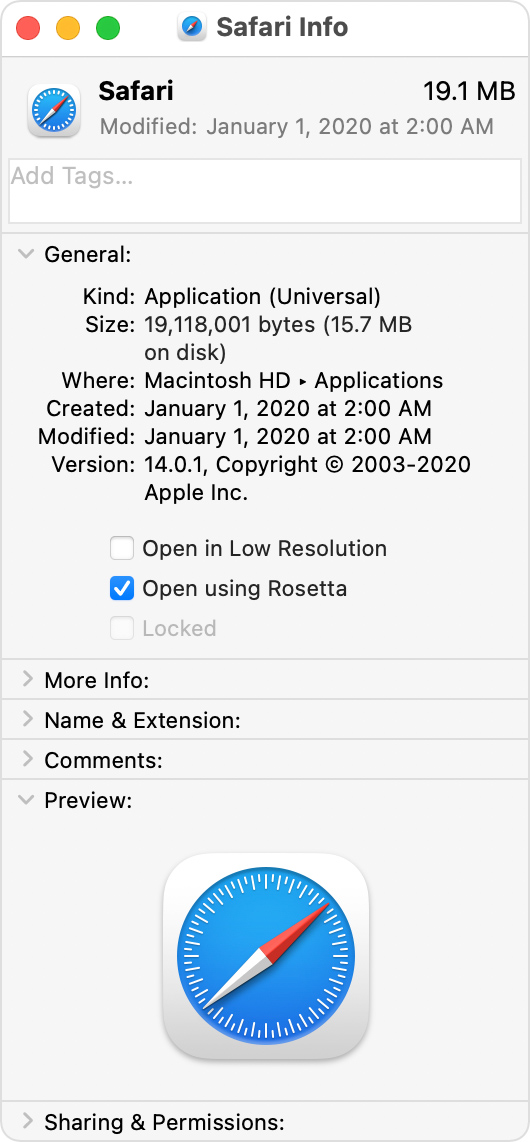
You can use Get Info to identify apps that need Rosetta or can use Rosetta:
The Info window for universal apps includes the setting “Open using Rosetta.” It enables email apps, web browsers, and other apps to use add-ons that haven't been updated to support Apple silicon. If an app doesn't recognize a plug-in, extension, or other add-on, quit the app, select this setting, and try again.
Published Date: January 15, 2021
Thanks for reply,
I tried many ways, but I am getting this error while installing
Thank You Sir,
I have tried installing the rosetta in safe mode but still I am getting the same error as previous, I would appreciate if you help me out here.
Thanks in advance.
Big Sur is updated, its 11.4 version but still I am getting same error.
It could be that with the advent of the 24 inch iMac the servers are busy. I would keep trying. (You should have downloaded it about 2 weeks ago.) 8^)
About 2 days ago I updated Big Sur from 11.1 > 11.4, but it didn't fix my Rosetta problem, still I am getting the same ERROR.
Thanks for your reply.
Thanks you for your response,
I installed the VPN if it could solve my problem, but it didn't.
Is there any other way to solve my Rosetta problem or I have to change my OS or reinstall it?
error occurred while installing Rosetta on my macbook pro 2020 m1

