
On an M1 Mac In startup recovery utility, I don't have the option to change external boot settings.
In Big Sur, I don't have the option to change external boot settings. They are not there. How do I get them to appear?
MacBook Air (2020 or later)
In Big Sur, I don't have the option to change external boot settings. They are not there. How do I get them to appear?
MacBook Air (2020 or later)
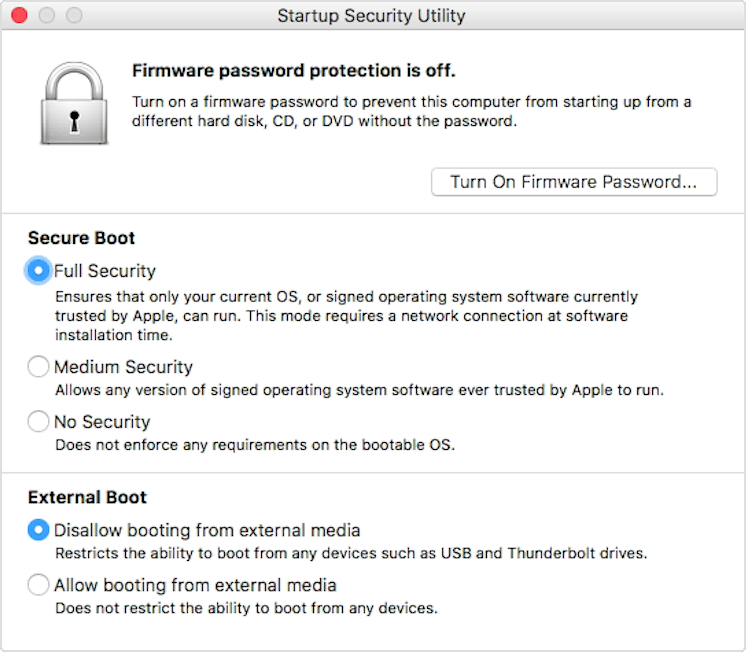
In the " Secure Boot " section of the picture above - Lower the Level of Security to Medium or No Security. Am pretty sure the External Boot options will appear.
Read the detailed Apple Support Document on this subject
I should appear like this picture below. Otherwise - are you logged in as the Admin Account with Full Privileges or Standard Account ?
Thanks for replying. The problem is the feature is not showing up. I only get the secure boot options.
It's an admin account with full privileges.
Ok Admin Account - good. So what you are saying is in Recovery Mode the below picture is Not What you are seeing ? If Yes, return the unit asap.
Is this machine a M1 or Intel With the Touch ID / Fingerprint Reader
To answer both of your questions, it's an M1 Macbook Air. I see the secure boot options but the external boot options are missing.
On an M1 Mac In startup recovery utility, I don't have the option to change external boot settings.
