Macintosh HD - Data taking up all my space

Hi Apple community,


Can I get some help with this?


Not sure this looks correct that there are two Macintosh HDs. This leaves me with 2.72GB of free space.


Here are some screenshots.


MacBook Pro 13″, macOS 10.15

Posted on Jul 3, 2021 10:47 PM

Reply
Question marked as Top-ranking reply

Posted on Jul 4, 2021 2:40 AM

This looks perfectly normal. In Catalina and Big Sur, there are two separate volumes, called (by default) "Macintosh HD" and "Macintosh HD - Data". The first contains the OS and the second all the applications and user files.

The Finder, however, hides these details from view, and presents the user with what appears to be only one volume, as was traditionally the case.


Nothing wrong there. Now, your drive is very small, and it may really be full. It could also be the case that there are a lot of purgeable space.

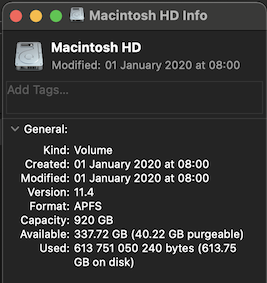
In Finder, select your drive and press Command-I to open the Info window. What does it say, regarding free and purgeable space?

It will look similar to the image below. It remains to be seen if the available space includes a lot or "purgeable". If that is the case we can try to reclaim some of it.



3 replies
Question marked as Top-ranking reply

Jul 4, 2021 2:40 AM in response to technoloki

This looks perfectly normal. In Catalina and Big Sur, there are two separate volumes, called (by default) "Macintosh HD" and "Macintosh HD - Data". The first contains the OS and the second all the applications and user files.

The Finder, however, hides these details from view, and presents the user with what appears to be only one volume, as was traditionally the case.


Nothing wrong there. Now, your drive is very small, and it may really be full. It could also be the case that there are a lot of purgeable space.

In Finder, select your drive and press Command-I to open the Info window. What does it say, regarding free and purgeable space?

It will look similar to the image below. It remains to be seen if the available space includes a lot or "purgeable". If that is the case we can try to reclaim some of it.



Jul 3, 2021 11:00 PM in response to technoloki

technoloki Said:

"Macintosh HD - Data taking up all my space: Hi Apple community, Can I get some help with this? Not sure this looks correct that there are two Macintosh HDs. This leaves me with 2.72GB of free space. Here are some screenshots."

-------


Two Drives:

Having two hard drives is intentional. So, no worries there.


Clear Space:

Saving space would most certainly speed things up. What to consider deleting:

  • Unneeded Items (i.e. iTunes MoviesTV Shows, and Music)
  • Extremely Large Files (i.e. Virtual Machines)
  • Clear: Temporary Internet Files (cookies and cache). 
  • Empty: the Trash
  • Move Files: to an external drive

Jul 4, 2021 4:35 AM in response to technoloki

This looks like a 128 GB SSD that is getting dangerously close the being totally full. If not attend to very quickly, the computer will even stop booting up at all. Strongly suggest getting and external drive and start removing / moving files that are under your direct control ( documents, movies, videos, music, pictures, old iPhone backups etc ) off the drive. Then inventory what application are Not Used or Needed and remove as per Developers Instructions. Also, if Time Machine Backup is used make a Backup asap. This should remove older Snapshots stored on the Internal Drive and move the the TM Backup drive.

This thread has been closed by the system or the community team. You may vote for any posts you find helpful, or search the Community for additional answers.

Macintosh HD - Data taking up all my space

Welcome to Apple Support Community
A forum where Apple customers help each other with their products. Get started with your Apple Account.