Hi, Tom; thought I might hear from you. Thanks for your response.
What's even odder is that (I've just discovered) the macOS version of the "Hindi – Transliteration" keyboard does include the /ñ/ character:
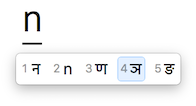
I've never used it, as the "Devanagari - QWERTY" keyboard in macOS covers my needs. But there is no "Devanagari - QWERTY" keyboard in iOS, so I tried the "Hindi – Transliteration" keyboard, which works okay except for this missing letter. Actually the coverage of Indic scripts seems somewhat chaotic, different in macOS vs. iOS. For instance, iOS (12.5 on my iPad Air) offers a keyboard for Marathi, which also uses the Devanagari script with (so far as I know) only slight differences from Hindi (and Sanskrit); but macOS (10.12) doesn't list Marathi at all, leaving it up to the user to understand that Devanagari is found under Hindi.
I get the feeling Apple has always paid more close attention to the Chinese than to the Indian market. Maybe whoever was transferring the keyboards from macOS to iOS is not really familiar with the languages, and just missed that letter? Maybe it's been corrected in later versions? Just checked my iPhone (iOS 13.4): still missing.
Anyway, I solved (more or less) the problem by activating the Hindi keyboard on the iPad, which I otherwise wouldn't use as of course its layout is totally different than the standard Latin QWERTY. So I have the word I wanted:
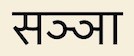
Saññā: perception, mental label; one of the five khandhas (aggregates, Skt. skandhas), "physical and mental phenomena as they are directly experienced" in the Buddha's teaching (Buddha Sāsana). (Dhammatalks.org)
As for the "Content in post not permitted" errors, that's even odder. Especially considering that India and Korea are perhaps the two places where English is most prevalent outside of the Anglosphere itself, thus where people would be most likely to mix English and the local language. In India, where English is the de facto national language, there's even a "language" called Hinglish, which mixes English words with Hindi – and there's a keyboard for it in both macOS and iOS. Wonder why the prohibition?
Thanks again,
Andrew Main

