
iPad locked
iPad has locked up my iPad after using voice over. It won’t let me put my pass code in.
iPad Pro 9.7-inch WiFi, Cellular
iPad has locked up my iPad after using voice over. It won’t let me put my pass code in.
iPad Pro 9.7-inch WiFi, Cellular
If it is frozen, try a "forced" restart of your iPad, using these instructions:
If your iPad is disabled:
Given that to remove the existing passcode you must connect your device via USB to a computer (a Windows PC running the latest iTunes version, or a Mac, which can run iTunes or Finder, depending on the macOS installed on it), and keeping in mind that if you don't have a backup all data will be lost on that device (except those that you eventually synced to iCloud), pay attention to the specific gestures that you need to perform while connecting your device to the computer.
These are the instructions to re-gain access to your iPhone/iPad:
If it is an iPhone:--> If you forgot your iPhone passcode - Apple Support
If it is an iPad:--> If you forgot the passcode on your iPad, or your iPad is disabled - Apple Support
Or, watch this support video about the same matter (for both iPhone and iPad):
https://www.youtube.com/watch?v=7s8-zLG9ySQ
Regards
Giulio
If it is frozen, try a "forced" restart of your iPad, using these instructions:
If your iPad is disabled:
Given that to remove the existing passcode you must connect your device via USB to a computer (a Windows PC running the latest iTunes version, or a Mac, which can run iTunes or Finder, depending on the macOS installed on it), and keeping in mind that if you don't have a backup all data will be lost on that device (except those that you eventually synced to iCloud), pay attention to the specific gestures that you need to perform while connecting your device to the computer.
These are the instructions to re-gain access to your iPhone/iPad:
If it is an iPhone:--> If you forgot your iPhone passcode - Apple Support
If it is an iPad:--> If you forgot the passcode on your iPad, or your iPad is disabled - Apple Support
Or, watch this support video about the same matter (for both iPhone and iPad):
https://www.youtube.com/watch?v=7s8-zLG9ySQ
Regards
Giulio
If iPad isn’t responding, do one of the following:
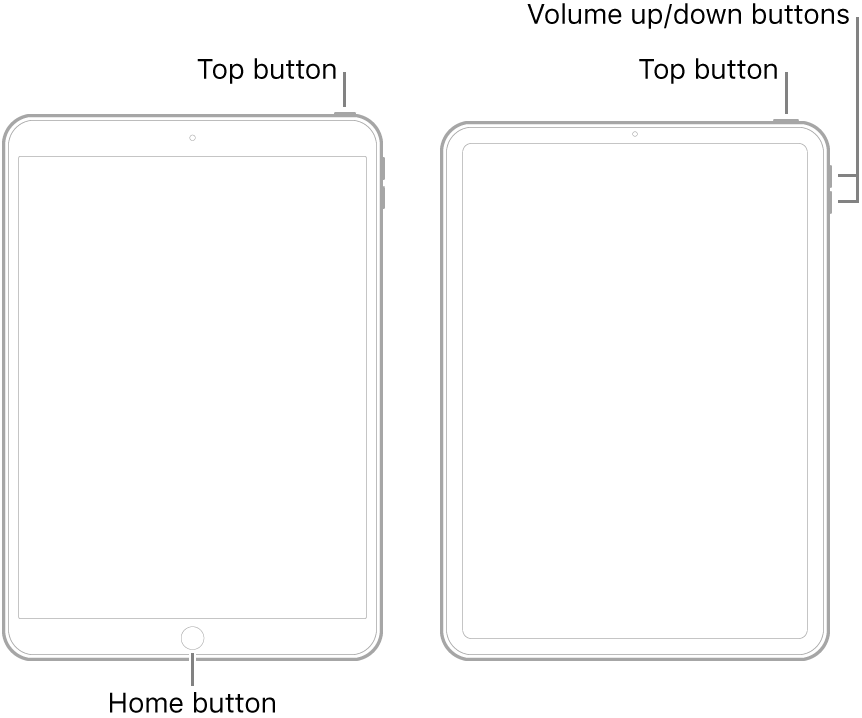
If iPad still doesn’t turn on, or if it gets stuck during start up, see the Apple Support article If your iPad won’t turn on or is frozen. Or if your iPad isn’t working correctly after you restart it, see the iPad Support website.
iPad locked

