iPad messages fails to send photos

If I take photos on my phone or iPad, then try and send them on my iPad via messages they don’t go.

if I then send the same photos on my iPhone, they go fine.


been happening for a week or two now.


(done the usual reset and checked data mms etc)


any thoughts, advice?

iPad Pro 11-inch Wi-Fi, Cellular

Posted on Sep 11, 2021 7:00 PM

Reply
Question marked as Top-ranking reply

Posted on Sep 12, 2021 1:39 PM

You are probably trying to do SMS messages from iPad.


Here is how to forward it-

  1. On your iPhone, iPad, or iPod touch, go to Settings > Messages > Send & Receive. On your Mac, open Messages, choose Messages > Preferences, then click iMessage. Make sure that you're signed in to iMessage with the same Apple ID on all your devices.
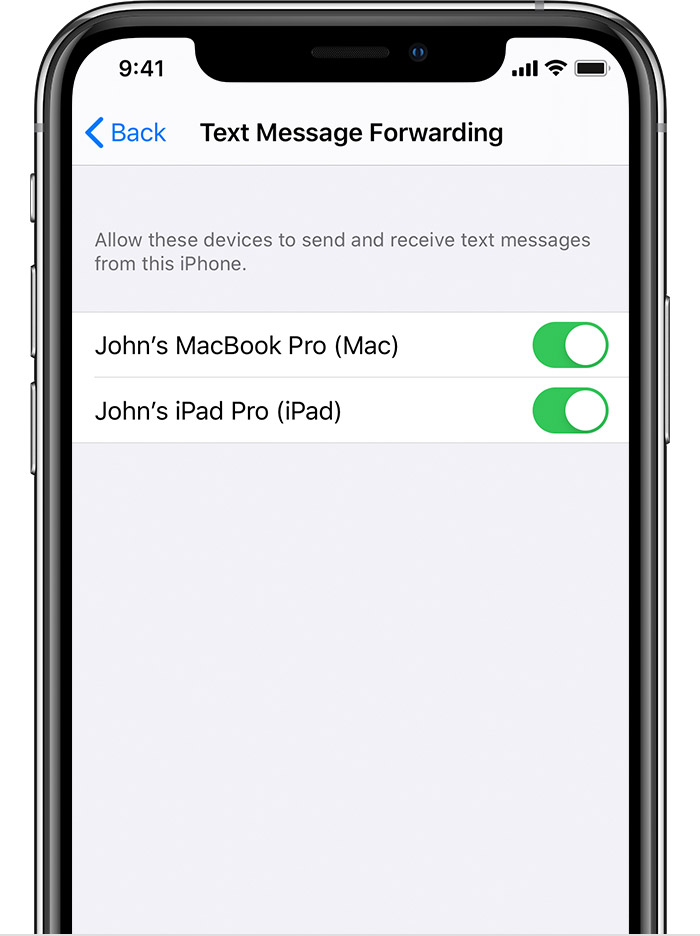
  2. On your iPhone, go to Settings > Messages > Text Message Forwarding.*

  3. Choose which devices can send and receive text messages from your iPhone. If you're not using two-factor authentication for your Apple ID, a verification code appears on each of your other devices: enter that code on your iPhone.

As long as your iPhone is turned on and connected to Wi-Fi or a cellular network, new SMS/MMS texts can be sent and received on the devices that you added.

iCloud now keeps your entire messages history updated and available on all your devices — even when you set up a new device. Learn how to keep all your messages in iCloud.


I hope this helps. Have a great day.

2 replies
Question marked as Top-ranking reply

Sep 12, 2021 1:39 PM in response to buy720

You are probably trying to do SMS messages from iPad.


Here is how to forward it-

  1. On your iPhone, iPad, or iPod touch, go to Settings > Messages > Send & Receive. On your Mac, open Messages, choose Messages > Preferences, then click iMessage. Make sure that you're signed in to iMessage with the same Apple ID on all your devices.
  2. On your iPhone, go to Settings > Messages > Text Message Forwarding.*

  3. Choose which devices can send and receive text messages from your iPhone. If you're not using two-factor authentication for your Apple ID, a verification code appears on each of your other devices: enter that code on your iPhone.

As long as your iPhone is turned on and connected to Wi-Fi or a cellular network, new SMS/MMS texts can be sent and received on the devices that you added.

iCloud now keeps your entire messages history updated and available on all your devices — even when you set up a new device. Learn how to keep all your messages in iCloud.


I hope this helps. Have a great day.

Sep 12, 2021 1:22 PM in response to buy720

Hi buy720,


Thanks for reaching out about sending photos on your iPad. We can help with this. Are you able to send any photos on your iPad with Messages? Do you have text message forwarding set up?


Use this article to make sure it's set up correctly: How to forward SMS/MMS text messages from your iPhone to your iPad, iPod touch or Mac


Also, do you have your iPad sending messages from your phone number or your Apple ID?


Take care.

This thread has been closed by the system or the community team. You may vote for any posts you find helpful, or search the Community for additional answers.

iPad messages fails to send photos

Welcome to Apple Support Community
A forum where Apple customers help each other with their products. Get started with your Apple Account.