Family sharing location

HI, I'm sharing my location with my family buy the thing is I wanted to share only one device with them, however, I found that all my other devices locations are being shared with them! I mean devices that are linked to my iCloud account!


How I can customises the sharing of each device?

MacBook, macOS 10.15

Posted on Sep 21, 2021 5:32 AM

Reply
Question marked as Top-ranking reply

Posted on Sep 22, 2021 7:05 AM

Hello saraalism,


Thanks for posting in Apple Support Communities!


We understand that you'd like to choose which device you're sharing your location from with your family. We'd be happy to help.


Take a look at Share your location with your family specifically the section under "Choose which device to share your location from."


Have a nice day.

9 replies
Question marked as Top-ranking reply

Sep 22, 2021 7:05 AM in response to saraalism

Hello saraalism,


Thanks for posting in Apple Support Communities!


We understand that you'd like to choose which device you're sharing your location from with your family. We'd be happy to help.


Take a look at Share your location with your family specifically the section under "Choose which device to share your location from."


Have a nice day.

Sep 22, 2021 10:42 AM in response to saraalism

saraalism,


Are you the family organizer of your group? When you tap on Family Sharing in Settings, then > Location Sharing > Share My Location > From, do you see the option to choose your devices here? If not, what do you see?


Do you share an Apple ID with anyone else in your family?


Take a look at "Change your sharing device" in Find friends and share your location with Find My.


Cheers.


Sep 23, 2021 9:42 AM in response to saraalism

Then something is very, very wrong. As I said the only location that is shared is the one from the device that has the active location sharing in the Find My settings and only when you actively share it.

All other devices cannot and should not appear on anybody else's Find My screen but your own unless you share an Apple ID.


When. sharing location with Family Sharing the map should only show the Person's picture and not individual devices:
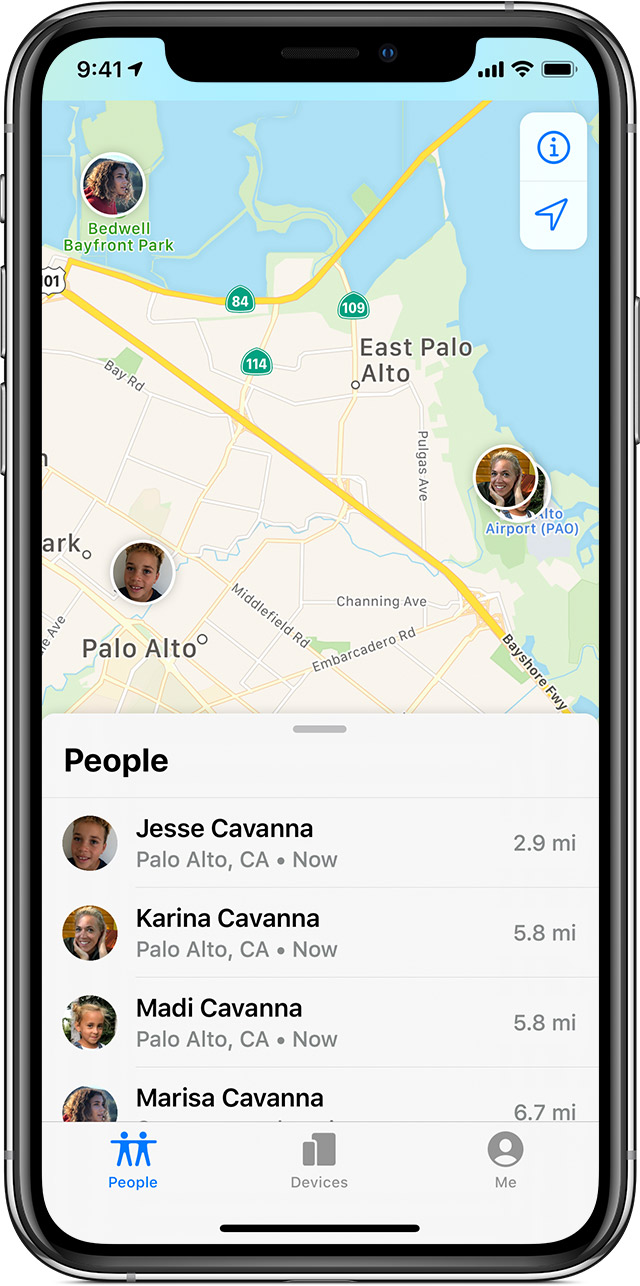

I would check the iCloud account being used on your devices and your sibling's devices to make sure they are not the same.

Also how are you seeing your devices on your sibling's devices exactly? Where are you going to, or what App are you opening to see them on your siblings device?



Sep 22, 2021 2:08 PM in response to saraalism

Only the device identified as "This device" in your screen shot is sharing that location. Nothing else shares the location nor do hey appear on the Map for anyone but yourself. Also you can't share a location from a device that you don't have physical access to.


Locations must be shared from devices that are with you. There is no longer an option to fake your location by sharing it remotely from a different device.


Only when you choose to Share a location through Messages and Find My does the shared location show up for other people.


Sep 22, 2021 10:11 AM in response to mario49

Thank you for your reply..


However, there is no option for choosing a device..and all my devices are being shared..


I wanted to share my iPhone's location..but I've found that my all other devices are being shared too! and If I turned off the sharing from the other device the main device's location will be turned off as well!


Can I choose which device I want to join the family sharing from? without removing other devices from my iCloud?

This thread has been closed by the system or the community team. You may vote for any posts you find helpful, or search the Community for additional answers.

Family sharing location

Welcome to Apple Support Community
A forum where Apple customers help each other with their products. Get started with your Apple Account.