
I can not delete an app on my phone.
App cannot access or delete
iPhone SE, iOS 14
App cannot access or delete
iPhone SE, iOS 14
Hi Jhhhhhhhhhhggggggg,
Thank you for posting in Apple Support Communities. We understand you're having problems deleting an app on your iPhone.
What happens when you follow the steps found in the resource you came to us from?
Delete apps on your iPhone, iPad, and iPod touch
"How to delete an app
 .
.
Keep in mind that some built-in Apple apps can't be deleted from your device, so you might not see the option to delete an app. Here’s a list of built-in Apple apps you can delete from your device. If you can't delete an app that's not made by Apple, disable parental controls, then try deleting the app again.
If you touch and hold an app from the Home Screen and the apps start to jiggle:
 in the upper-left corner of the app.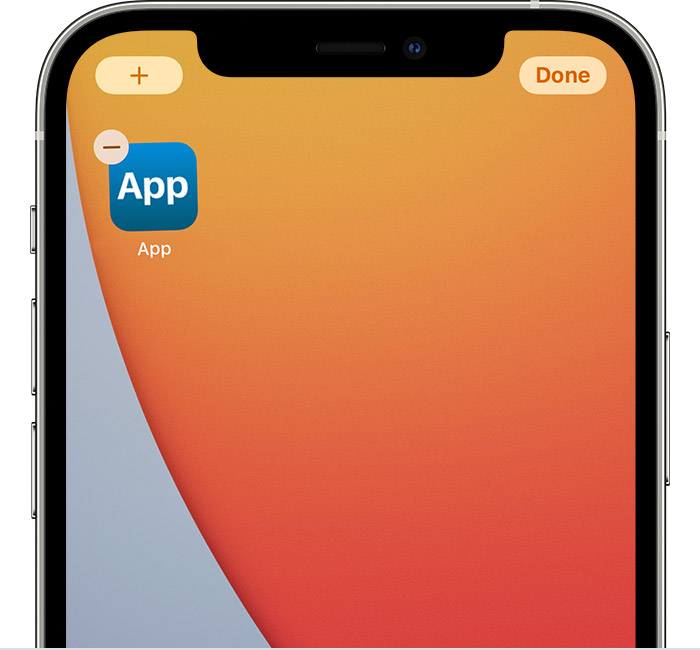
Tell us more about exactly what happens when you follow these steps.
Cheers!
Hi Jhhhhhhhhhhggggggg,
Thank you for posting in Apple Support Communities. We understand you're having problems deleting an app on your iPhone.
What happens when you follow the steps found in the resource you came to us from?
Delete apps on your iPhone, iPad, and iPod touch
"How to delete an app
.Keep in mind that some built-in Apple apps can't be deleted from your device, so you might not see the option to delete an app. Here’s a list of built-in Apple apps you can delete from your device. If you can't delete an app that's not made by Apple, disable parental controls, then try deleting the app again.
If you touch and hold an app from the Home Screen and the apps start to jiggle:
in the upper-left corner of the app.Tell us more about exactly what happens when you follow these steps.
Cheers!
I can not delete an app on my phone.

