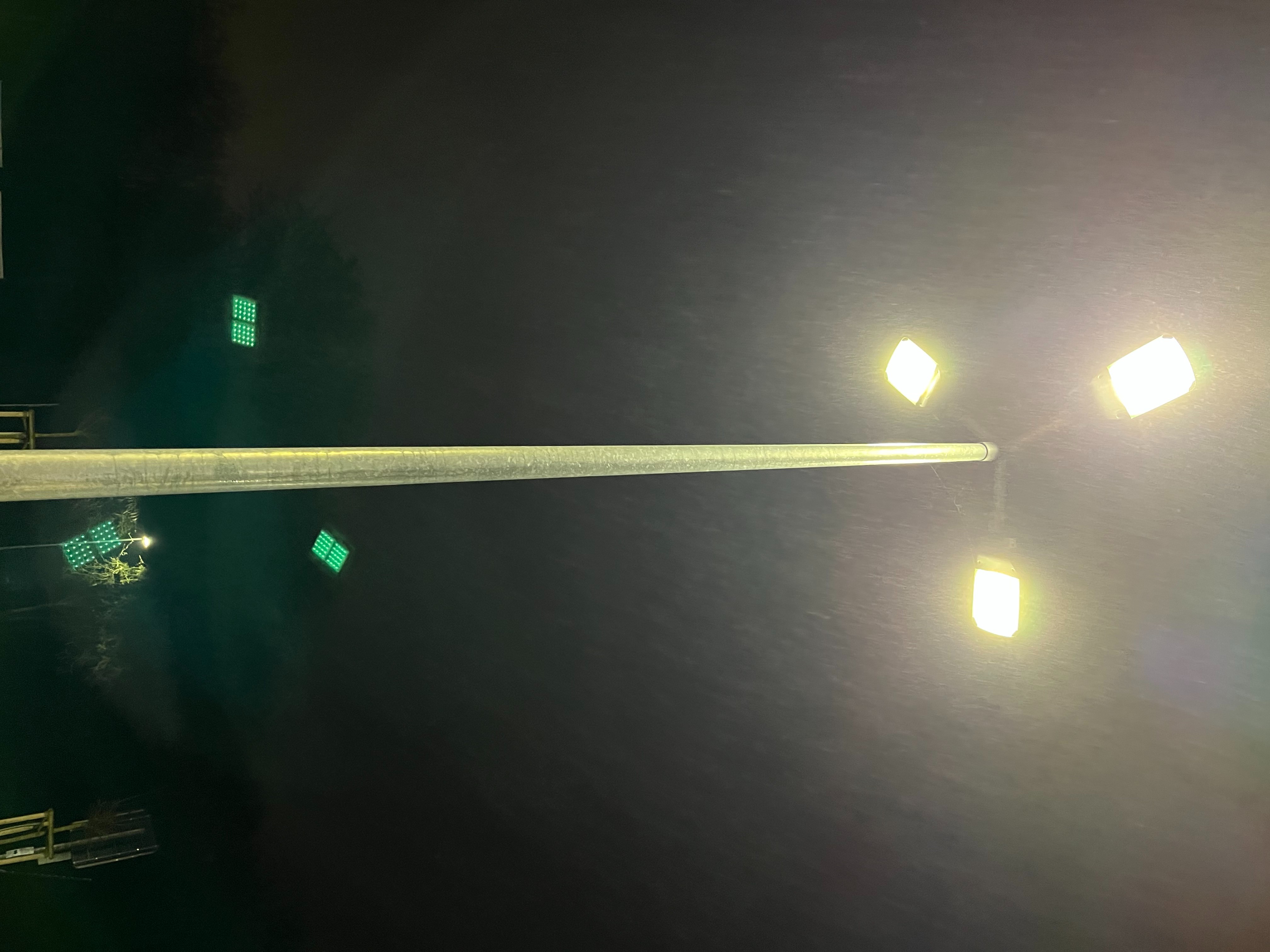
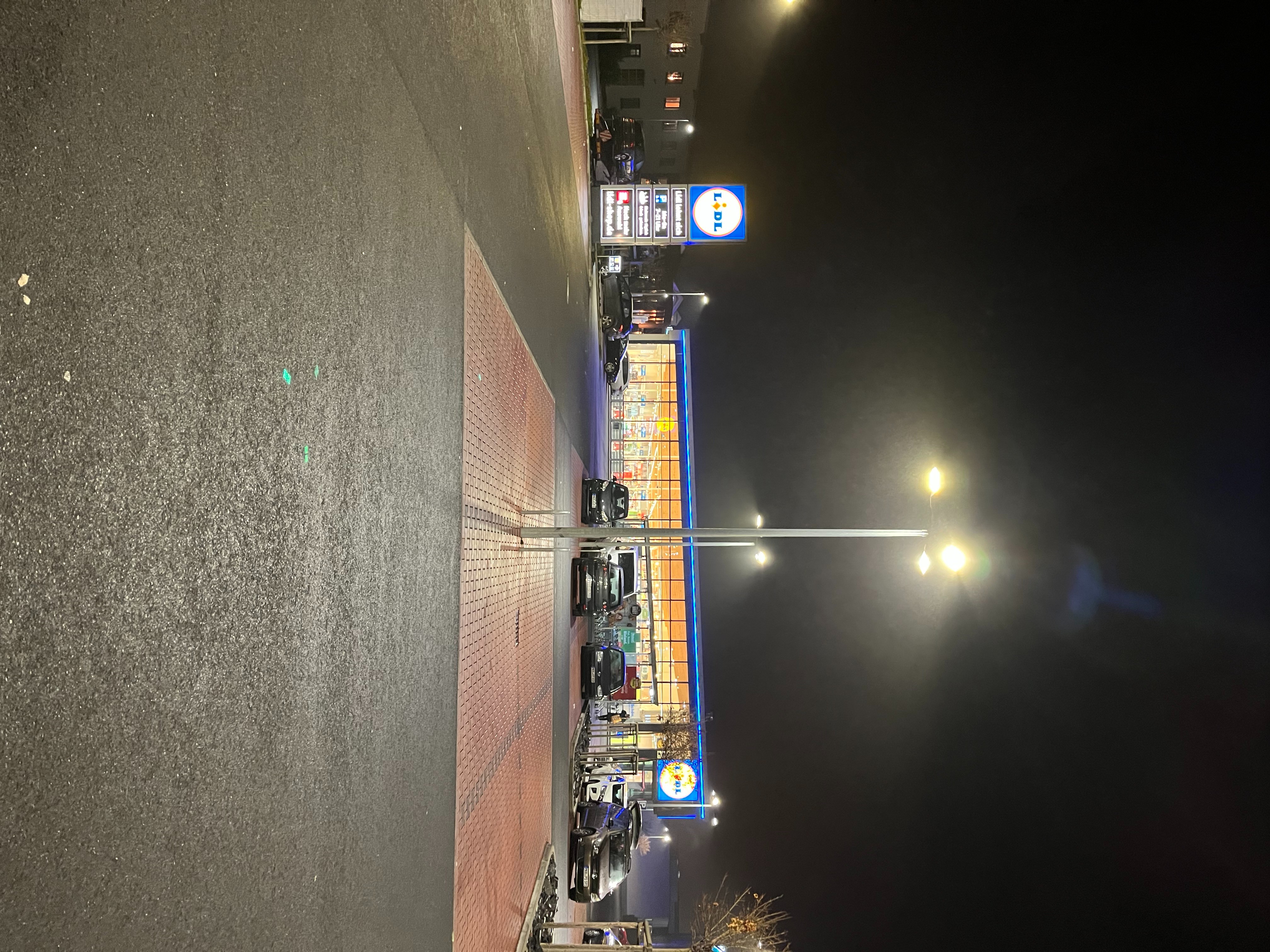
iPhone 13 pro lens flare

Are these signs of camera defects with my iPhone 13 Pro Max? I keep getting these lens flares when taking photos and videos with bright sources of light. Happens allot with the sun during day and bright lights during night.

iPhone 13 Pro Max, iOS 15

Posted on Sep 29, 2021 2:11 PM

Reply
Question marked as Top-ranking reply

Posted on Sep 29, 2021 2:38 PM

Yes and they're normal. Before you take the photo, you can easily see the flares on the screen. Alter the angle of the phone relative to the bright lights and you can eliminate the flares.


While these two photos were taken on iPhone 12 Pro Max, you can see what I'm talking about.


This photo show lens flare:


Simply angling the camera differently without moving at all produced this photo:


323 replies

Oct 27, 2021 9:27 AM in response to Fresnogreg

Yes, I had the same problems from the iPhone 6 all the way up to the 13 Pro Max and they have gotten progressively worse. I've been a photographer since 1985 and what I experienced was, I have a Nikon set up and would have to go out of my way to have lens flare in my shots for artistic reasons not by just panning the camera a slight amount. I called Apple on it and they tell everyone that they don't know what they are talking about.

Oct 28, 2021 1:04 AM in response to Dogcow-Moof

I agree all cameras have lens flare, but I've never seen it this bad on the iPhone. And I have complained to Apple, like many other people, Apple tells them that they didn't know there was a problem. There are many times I've used lens flare with my DSLRs for different effects I wanted without having to deal with it in post. But I do understand where you are coming from.

Dec 2, 2021 11:37 AM in response to Salvida

I also am disappointed with Lens Flare when I am in a high light ( sun/ moon) situations. The tips of angling are often useless and I find it difficult to understand why engineers don’t pay more attention to this flaw. To be told it’s “ “normal” is just an excuse. I can remove the flare from photos but not from videos or live feeds. I look forward to the day when Apple recognizes that This is resolved.

Dec 10, 2021 1:35 PM in response to Dæniøl

I'm actually a professional photographer and doc maker who went to the Rhode Island School of Design.

I know my way around many, many different types of cameras and genres.

I've done newspaper front covers. I've done TV art documentaries. I've done art gallery shows. I've been very fortunate.


This is the worst flaring/ghosting I've ever seen - I genuinely thought people had been walking behind me with laser pointers when I reviewed the footage.


There is clearly some issue with the lens/coatings.

Dec 14, 2021 3:32 PM in response to Salvida

No. If the dots were there before you took the photo, when you actually took the photo, you without realizing it angled the camera a slightly bit different in the process of tapping the shutter button. Apple software does not now, nor has it ever analyzed images to remove artifacts from photos we take. I would be extremely upset if they did. But trust me, they don't. And they likely won't ever do something like that. I don't want anyone to decide what data to keep in photos I take. If I take a photo with artifacts, I can either delete the photo and take it over - OR - I can use any of the photo editing tools I have access to fix a photo after it's taken. But that would be ME, making the decision to alter the photo. I have the right to do that. Apple, nor anyone else has the same right.

Dec 16, 2021 8:31 AM in response to Lawrence Finch

I already seen that link many times, not sure what you are trying to say with this? I know what flares are and how it works, what you need to understand is that sometimes you get unwanted flares, and the camera app in iOS 15 is now able to somehow remove some of them automatically when it think it shouldnt be there. You can't test it our for yourself, sooner or later you will see what I mean and that what im saying is true. Don't take my word for it test it out yourself is not that hard to do :)

Dec 16, 2021 10:18 AM in response to Dogcow-Moof

The camera app in iOS 15 is clever enough in some cases to understand what is a natural light source and what is an unwanted flare. This of course by looking at the flare itself and how it looks, so you can say the app needs to do some guessing. All I know is what I saw last night when I took some photos outside, some flares were clearly there as the photo was taken, and I know that I couldnt angle my way out of it to remove them, and I held the phone as still as I could plus took some with tripod also using remote blutooth control. A few times the flares were on the screen in the live view and then gone when I checked the photo after it was taken. If this was because the phone moved a little bit during the shot like you guys say is the reason, then I should have been able to angle my way out of it myself to make them go away before I pressed the shutter button but I could not. So if I couldnt remove them myself by moving the camera a little bit, then there is absolutely no way this could be the reason for the flares to be gone like I saw. This is simple logic.


[Edited by Moderator]

Dec 25, 2021 3:06 PM in response to deggie

Well then I too must have some rare old iPhones as none of my previous iPhones (and I’ve owned many) have ever had lens flares this extreme.

Three weeks ago I purchased the new iPhone 13Pro and I took a picture of our Christmas tree. This was the first time I have ever seen these flares and I’ve taken a pic of our tree on every phone.

It’s actually a bit comforting to read that my camera on my new phone is not defective but a feature that Apple introduced.

Jan 3, 2022 6:13 AM in response to Dæniøl

Hello guys,


I'm following this thread and read it as much as I was capable to.

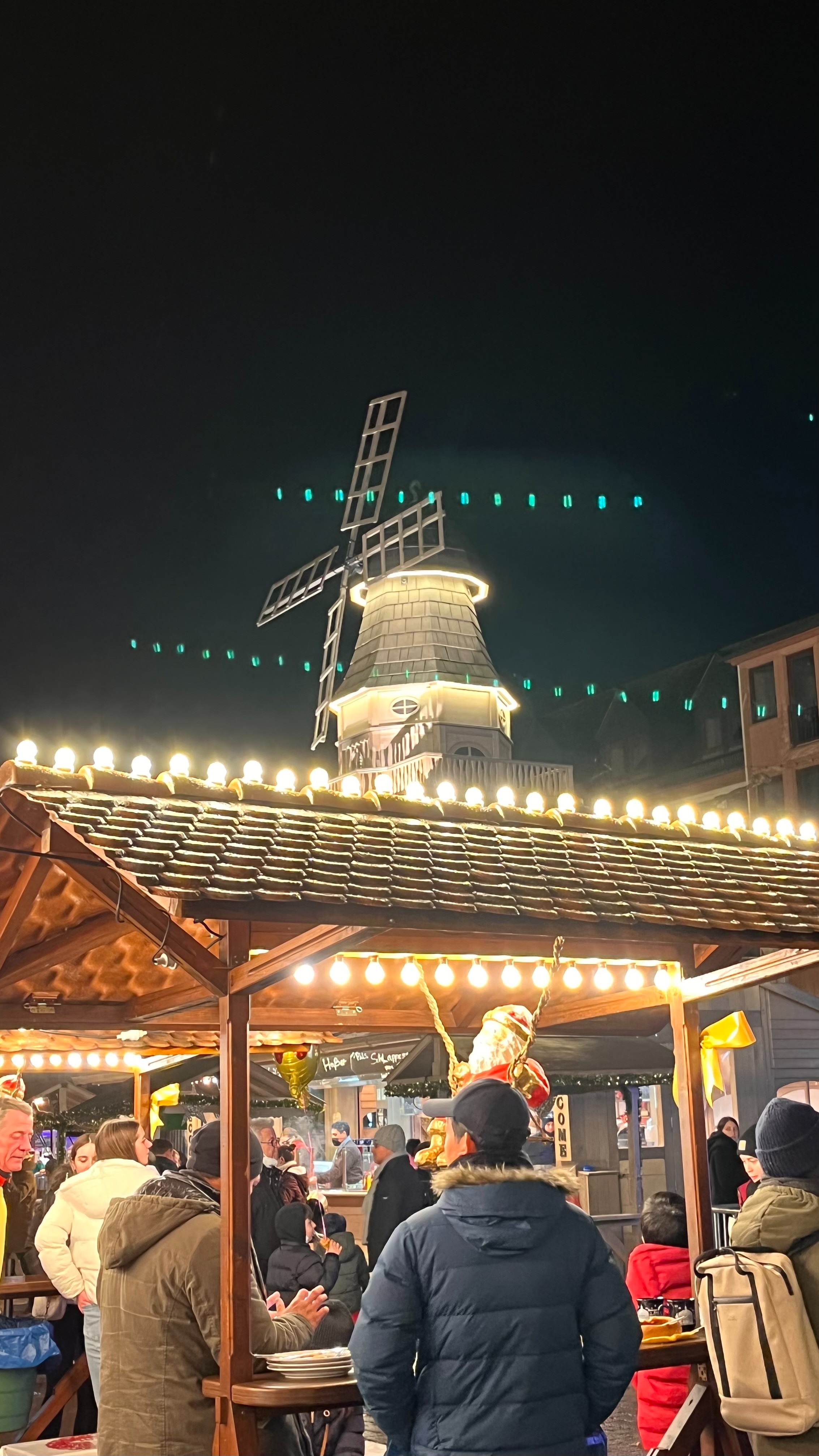
I got my first iPhone, a 13, about 3 weeks ago. I made some shots at a Christmas market and a friend of mine saw them first and said: this looks not normal. I'm referring to the annoying green (LED-like) chains of green light. Since then I'm trying to find out why these ugly green dots appear. Yes I have other cameras, also a Nikon Z6, had a Nokia 8 Sirocco before and I also never had such big issues. I understand that lens flares are something common BUT how they look in my example they don't look natural. It appears in photos and on videos it looks like an annoying laser pointer, depending on the situation it is simply not possible to avoid or even detect the source of the noise. In other words I cannot make any video against the sun with this 1000$ phone?


So if many users in this thread claim this is normal and say it is because of apple's great architecture then I think most of the user's like me find it irritating since apple makes products for a wide audience. However my understanding of lens flares is to have a natural effect and on these images I see it as highly artificial, especially the colour, "other" lense flares at least adopt the colour and gradient of the true environment.


Jan 4, 2022 7:14 AM in response to Lawrence Finch

Some of you say it’s normal physics on lenses and it’s always been there , some say it’s new and we’ve never seen it before. I for one have owned most the iPhones and never seen lens flares like this on a iPhone.

Regardless, it is obvious something new otherwise there wouldn’t be so many people mentioning it and this thread would probably not be this long. Consider that.

This thread has been closed by the system or the community team. You may vote for any posts you find helpful, or search the Community for additional answers.

iPhone 13 pro lens flare

Welcome to Apple Support Community
A forum where Apple customers help each other with their products. Get started with your Apple Account.