iPad Air frozen on Home Screen

My iPad is used exclusively as a communications device for my special needs son, it stays in guided access all the time. Today on waking it, it was locked on the Home Screen, no matter how I have tried to triple click or touch the screen, nothing works. All the icons are grayed. I tried plugging to in to restart, holding down the on button, and even find My device lost activation. Now it’s stuck on a passcode screen but won’t recognize any touch, so I can’t enter a passcode. Also of note.. the battery icon is full but not green… yellow color. Please help me!

Posted on Oct 11, 2021 3:43 AM

Reply
2 replies

Oct 11, 2021 3:55 AM in response to Omnisseem

You should attempt a forced restart of your iPad:


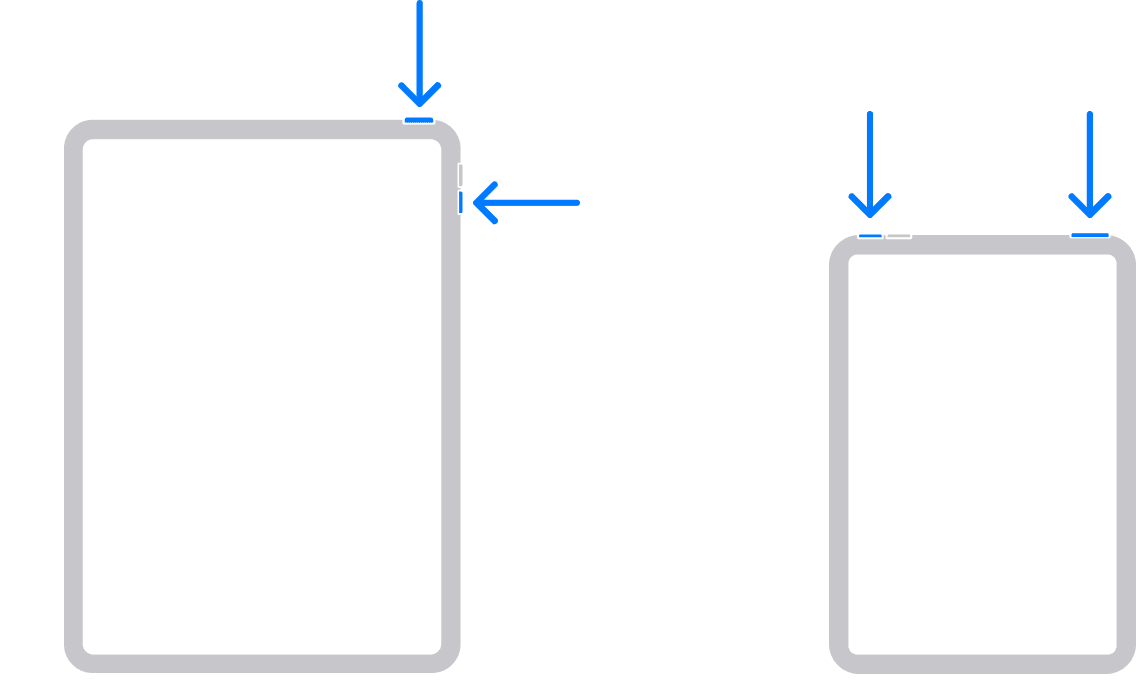
iPad without a Home button

Press and hold either volume button and the top button until the power off slider appears.


Drag the slider, then wait 30 seconds for your device to turn off. If your device is frozen or unresponsive, force restart your device.


To turn your device back on, press and hold the top button until you see the Apple logo.


Restart an iPad with a Home button

Press and hold the top button until the power off slider appears.


Drag the slider, then wait for 30 seconds for your device to turn off. If your device is frozen or unresponsive, force restart your device.


To turn your device back on, press and hold the top button until you see the Apple logo.


Can't restart?

See >>> Learn what to do if your iPad is frozen, doesn't turn on, or doesn't respond.


Battery Icon

The battery icon indicates that your iPad, running iPadOS15, is currently in Low Power Mode (yellow battery icon). This feature can be enabled or disabled from iPad Settings:


Settings > Battery > Low Power Mode - set to ON or OFF as required

This thread has been closed by the system or the community team. You may vote for any posts you find helpful, or search the Community for additional answers.

iPad Air frozen on Home Screen

Welcome to Apple Support Community
A forum where Apple customers help each other with their products. Get started with your Apple Account.