
After I set up my new phone, how to activate it
I have set up my new phone but don’t see how to activate new phone
iPhone 13 mini, iOS 15
I have set up my new phone but don’t see how to activate new phone
iPhone 13 mini, iOS 15
Hi PapaC71,
It appears you're wondering how to activate your new iPhone. While doing through the Setup Assistant, you should come to a screen where your iPhone gets activated. Check out the information below, from the following article, which should help: Set up your iPhone, iPad, or iPod touch - Apple Support
"3 Activate your device
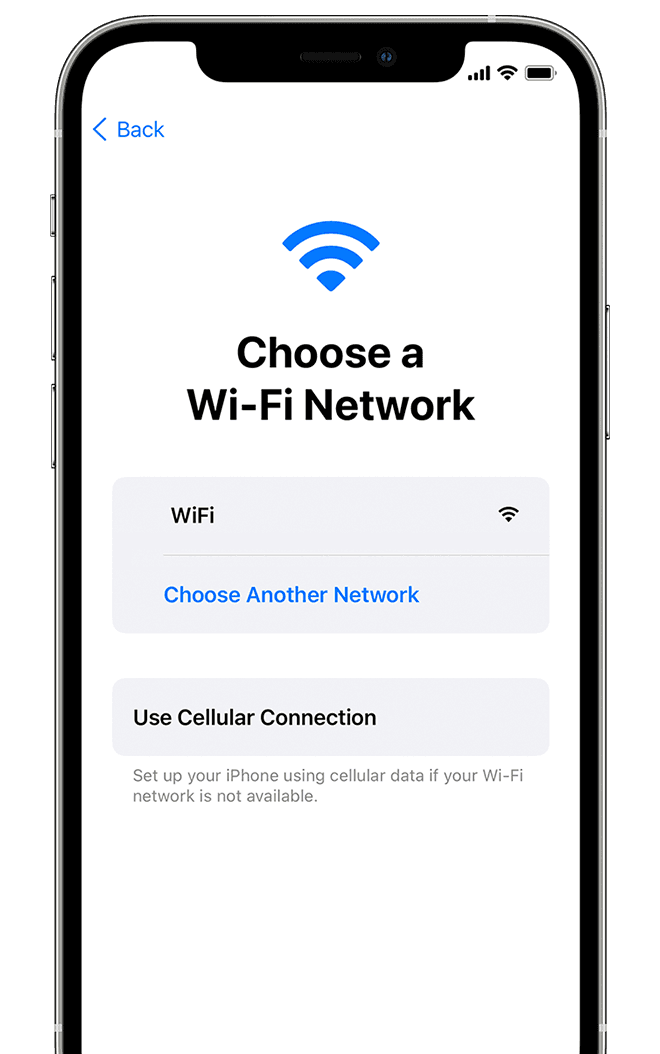
You need to connect to a Wi-Fi network, a cellular network, or iTunes to activate and continue setting up your device.
Tap the Wi-Fi network that you want to use or select a different option. If you're setting up an iPhone or iPad (Wi-Fi + Cellular), you might need to insert your iPhone SIM card or iPad SIM card first.
Get help if you can't connect to Wi-Fi or if you can't activate your iPhone.
 "
"
If you're unable to activate your iPhone, please check out the steps in this article: If you can't activate your iPhone - Apple Support
Best wishes!
Hi PapaC71,
It appears you're wondering how to activate your new iPhone. While doing through the Setup Assistant, you should come to a screen where your iPhone gets activated. Check out the information below, from the following article, which should help: Set up your iPhone, iPad, or iPod touch - Apple Support
"3 Activate your device
You need to connect to a Wi-Fi network, a cellular network, or iTunes to activate and continue setting up your device.
Tap the Wi-Fi network that you want to use or select a different option. If you're setting up an iPhone or iPad (Wi-Fi + Cellular), you might need to insert your iPhone SIM card or iPad SIM card first.
Get help if you can't connect to Wi-Fi or if you can't activate your iPhone.
"
If you're unable to activate your iPhone, please check out the steps in this article: If you can't activate your iPhone - Apple Support
Best wishes!
After I set up my new phone, how to activate it

