
Apple Watch complication
Why “Tide” selection cannot be found anymore in apple watch complication. I used to select it before but after unpairing/pairing my apple watch with iPhone it cannot be located anymore. Any idea?
Why “Tide” selection cannot be found anymore in apple watch complication. I used to select it before but after unpairing/pairing my apple watch with iPhone it cannot be located anymore. Any idea?
Not all complications are available for the chosen watch face. See if it’s on another face.
But I already used “Meridian” face watch before for my apple watch 6 series choosing: today’s date, temperature, wind and tide as complications. But after unpairing/pairing my apple watch with iphone, using the same Meridian face watch, only today’s date, temperature and wind complications remain but “Tide” complication cannot be found anymore.
Here’s what’s available:
Meridian
This full-screen watch face, available only on Apple Watch SE and Apple Watch Series 4 and later, features a classic look with four subdials.
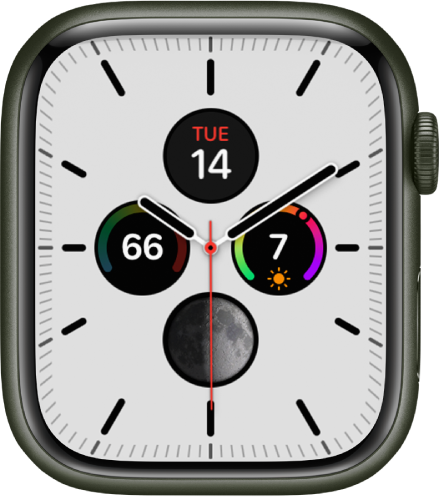
Apple Watch faces and their features - Apple Support - *This may differ by country. I was shown Canada
I am using now my apple series 6 watch with a Meridian face with today’s date, temperature, wind and elevation as complications. I use elevation in lieu of tide complication. I’m from U.S. Thanks for the conversation.
We’re you using an app that provided this? I can’t find Tide on mine
Yes, there was a time complication i used for meridian face watch specifically and some other face watch, but after unpairing/pairing I cannot find any in all of face watch right now.
Apple Watch complication
