
Pro res
my iphone 13 pro max does not have Prores. I have 15.1 on my phone
iPhone 13 Pro Max, iOS 15
my iphone 13 pro max does not have Prores. I have 15.1 on my phone
iPhone 13 Pro Max, iOS 15
Hello jay4u007,
Welcome to Apple Support Communities!
If we understand your post correctly, your iPhone 13 Pro Max doesn't have ProRes. We'd like to help!
The article that you came from, About Apple ProRes on iPhone 13 Pro, provides the steps on how to turn this feature on and off.
"Apple ProRes enables multistream, real-time editing performance while delivering professional image quality. With iOS 15.1 or later, your iPhone 13 Pro or iPhone 13 Pro Max can record videos in the Apple ProRes format in the Camera app using any of its cameras in Video mode.* You can edit Apple ProRes in the Photos app or iMovie for iPhone, and in video editing apps for Mac, iPad, and iPhone that support ProRes.
* You can't use ProRes with Cinematic mode, slo-mo, or time-lapse video.
Turn on ProRes
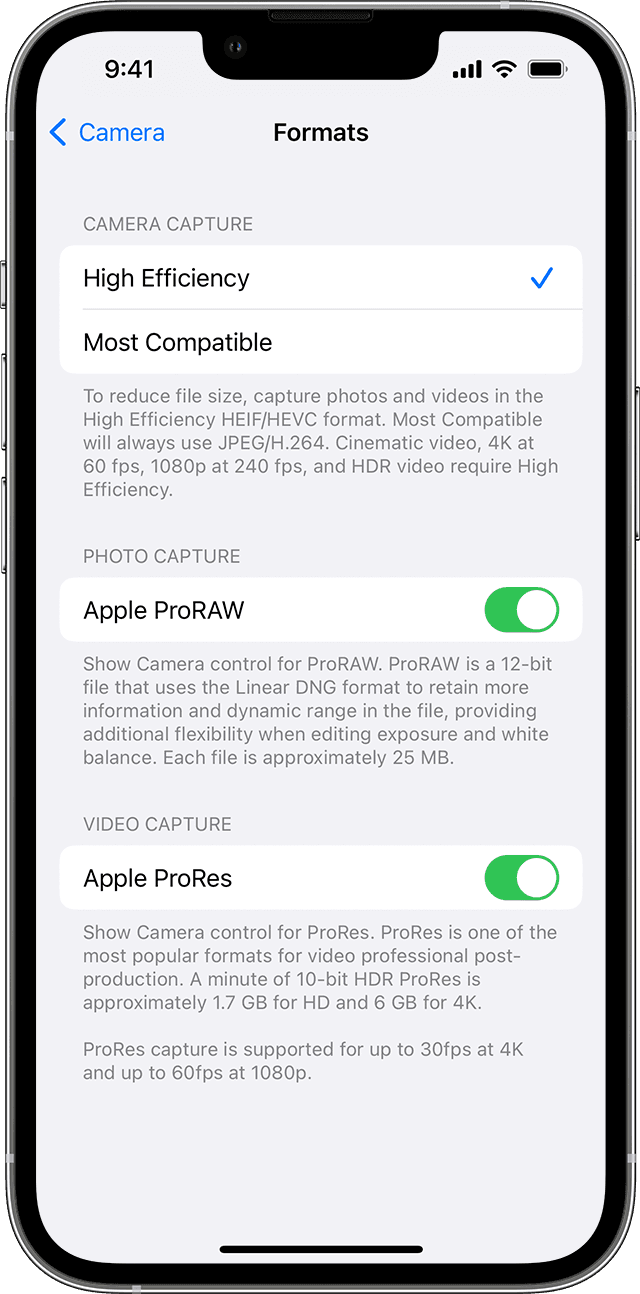
To enable your iPhone to record videos in ProRes, go to Settings > Camera > Formats, then turn on Apple ProRes under Video Capture. To record a ProRes video, tap ProRes  in the Camera app, then record your video.
iPhone 13 Pro supports ProRes recording in HDR using the HLG format or in SDR, and supports these resolutions and frame rates:
If you turn ProRes off in the Camera app, the format of the video defaults to the format you set under Camera Capture in Settings > Camera > Formats: either High Efficiency (HEVC) or Most Compatible (H.264)."
What are you seeing in Settings > Camera > Formats?
Thank you for using Apple Support Communities.
Take care!
Hello jay4u007,
Welcome to Apple Support Communities!
If we understand your post correctly, your iPhone 13 Pro Max doesn't have ProRes. We'd like to help!
The article that you came from, About Apple ProRes on iPhone 13 Pro, provides the steps on how to turn this feature on and off.
"Apple ProRes enables multistream, real-time editing performance while delivering professional image quality. With iOS 15.1 or later, your iPhone 13 Pro or iPhone 13 Pro Max can record videos in the Apple ProRes format in the Camera app using any of its cameras in Video mode.* You can edit Apple ProRes in the Photos app or iMovie for iPhone, and in video editing apps for Mac, iPad, and iPhone that support ProRes.
* You can't use ProRes with Cinematic mode, slo-mo, or time-lapse video.
Turn on ProRes
To enable your iPhone to record videos in ProRes, go to Settings > Camera > Formats, then turn on Apple ProRes under Video Capture. To record a ProRes video, tap ProRes in the Camera app, then record your video.
iPhone 13 Pro supports ProRes recording in HDR using the HLG format or in SDR, and supports these resolutions and frame rates:
If you turn ProRes off in the Camera app, the format of the video defaults to the format you set under Camera Capture in Settings > Camera > Formats: either High Efficiency (HEVC) or Most Compatible (H.264)."
What are you seeing in Settings > Camera > Formats?
Thank you for using Apple Support Communities.
Take care!
it's not showing up on my 13 pro either and i've enabled it as per instructions
Pro res


