
How to turn off auto-rotate on iPad?

I found an outdated article https://support.apple.com/guide/ipad/change-or-lock-the-screen-orientation-ipad997da805/ipados however I have a new model and that symbol does not appear in Control Center. What is the new method to disable the annoying auto-rotate? Also, can we remove or update these old articles that are on the web?


[Re-Titled by Moderator]

Posted on Nov 27, 2021 4:58 PM

Reply
Question marked as Top-ranking reply

Posted on Nov 27, 2021 5:17 PM

The article Change or lock the screen orientation on iPad - Apple Support is for the latest iPadOS 15 and is accurate for my iPad that is running the current version of iPadOS 15.1


The only reason I can think of for the orientation lock not appearing in Control Center would be if you have an older model iPad that has a side switch. See the following from Rotate the screen on your iPad - Apple Support


Check to see if your iPad has a side switch


If you don't see the Rotation Lock button , check to see if your iPad has a side switch. If you have an iPad with a side switch, you can set the side switch to work as a rotation lock or mute switch.
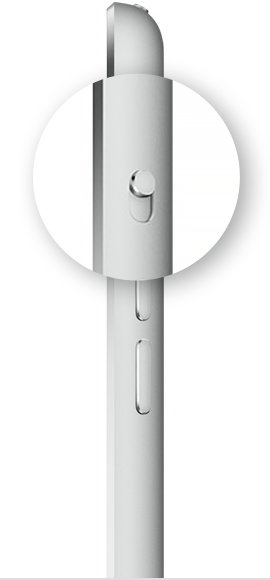

Go to Settings > General. Under Use Side Switch To, select the option that you want.

4 replies
Question marked as Top-ranking reply

Nov 27, 2021 5:17 PM in response to cupboy

The article Change or lock the screen orientation on iPad - Apple Support is for the latest iPadOS 15 and is accurate for my iPad that is running the current version of iPadOS 15.1


The only reason I can think of for the orientation lock not appearing in Control Center would be if you have an older model iPad that has a side switch. See the following from Rotate the screen on your iPad - Apple Support


Check to see if your iPad has a side switch


If you don't see the Rotation Lock button , check to see if your iPad has a side switch. If you have an iPad with a side switch, you can set the side switch to work as a rotation lock or mute switch.

Go to Settings > General. Under Use Side Switch To, select the option that you want.

Nov 27, 2021 5:21 PM in response to FoxFifth

Mine is a current model with version 15.1. The only buttons on the device are on the top of it. My older iPad has a switch on the side but this one does not. Since that symbol with the lock inside the circle with the arrow does not exist on my unit, is there an alternate method to turn off the auto rotate? I find it amazing that Apple lost this feature somehow. Maybe during a software update.

This thread has been closed by the system or the community team. You may vote for any posts you find helpful, or search the Community for additional answers.

How to turn off auto-rotate on iPad?

Welcome to Apple Support Community
A forum where Apple customers help each other with their products. Get started with your Apple Account.