
How do I free up space on ipoone 6s with 16GB
How do I free up space on ipoone 6s with 16GB
iPhone 6s, iOS 13
How do I free up space on ipoone 6s with 16GB
iPhone 6s, iOS 13
azeem120 wrote:
Storage 16 GB fill
16 GB is about enough for iOS and maybe a few small apps, and not much else.
You’re never not going to be managing storage on this iPhone 6s.
The above replies describe some ways to fit a little more on and to offload what doesn’t.
But… the storage here is insufficient for your current and likely future needs.
You cannot increase the storage of an iPhone. However, you can optimize iPhone Storage by using iCloud Storage. Save space on your device
Settings > [your name] > iCloud Tap Photos > Choose Optimize [device] Storage Set up and use iCloud Photos - Apple Support
You can buy iCloud Storage. --> Buy more iCloud storage - Apple Support
You can manage your storage --> How to check the storage on your iPhone, iPad, and iPod touch
Manage your Storage --> Manage your photo and video storage - Apple Support
Your photos are always available for both iPhone and iCloud. You delete it on the iPhone it is gone from iCloud and vice-versa. To save space on your iPhone use optimized iPhone storage. Remember, if you delete in one it is deleted everywhere.
Get started with iCloud Photos:
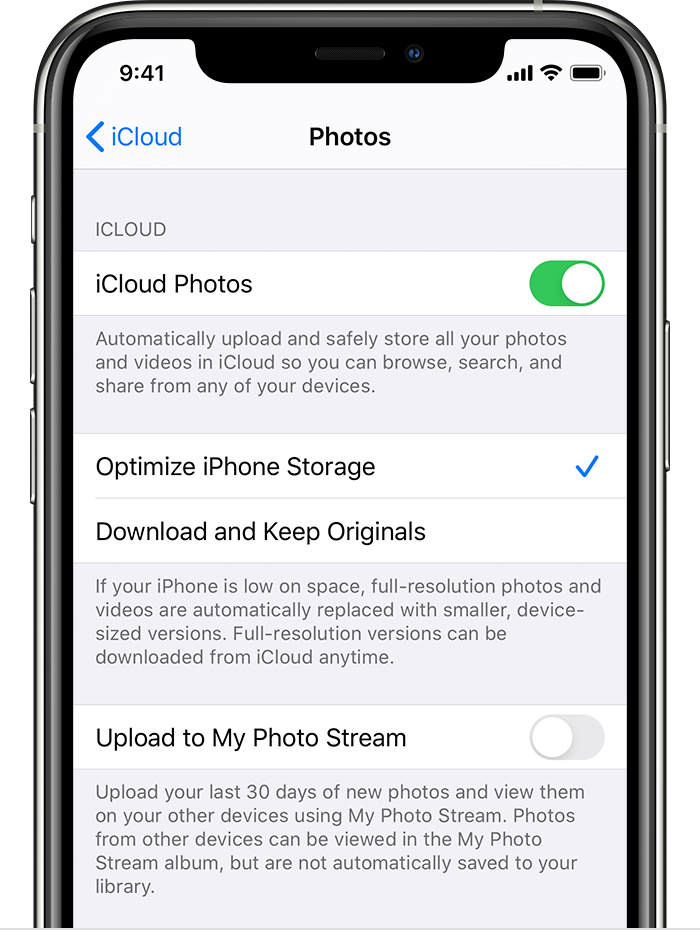
With Optimize Storage, smaller, space-saving photos and videos are kept on your device while all of your original, full-resolution versions are stored in iCloud. And as long as you have enough space in iCloud, you can store as many photos and videos as you want.
How to check the storage on your iPhone, iPad, and iPod touch
Storage 16 GB fill
How do I free up space on ipoone 6s with 16GB

