How to check my balance?

my payment deatail


[Re-Titled by Moderator]


iPhone 11 Pro Max, iOS 15

Posted on Dec 14, 2021 2:05 AM

Reply
Question marked as Top-ranking reply

Posted on Dec 14, 2021 2:14 AM

Check your Apple ID balance


  1. Open the App Store app.
  2. Tap your photo or the sign-in button  at the top of the screen. You might be asked to sign in with your Apple ID.
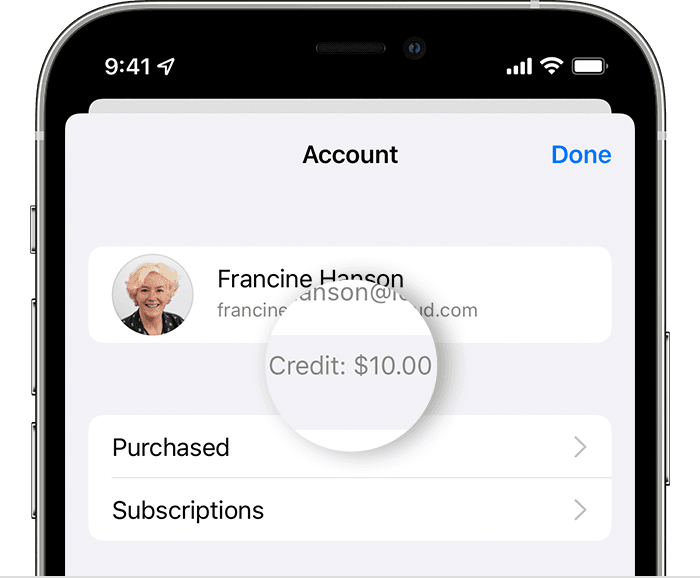
  3. If you have a balance, the amount appears. If you don't see an amount, you don't have a balance.


Check your balance on your Mac


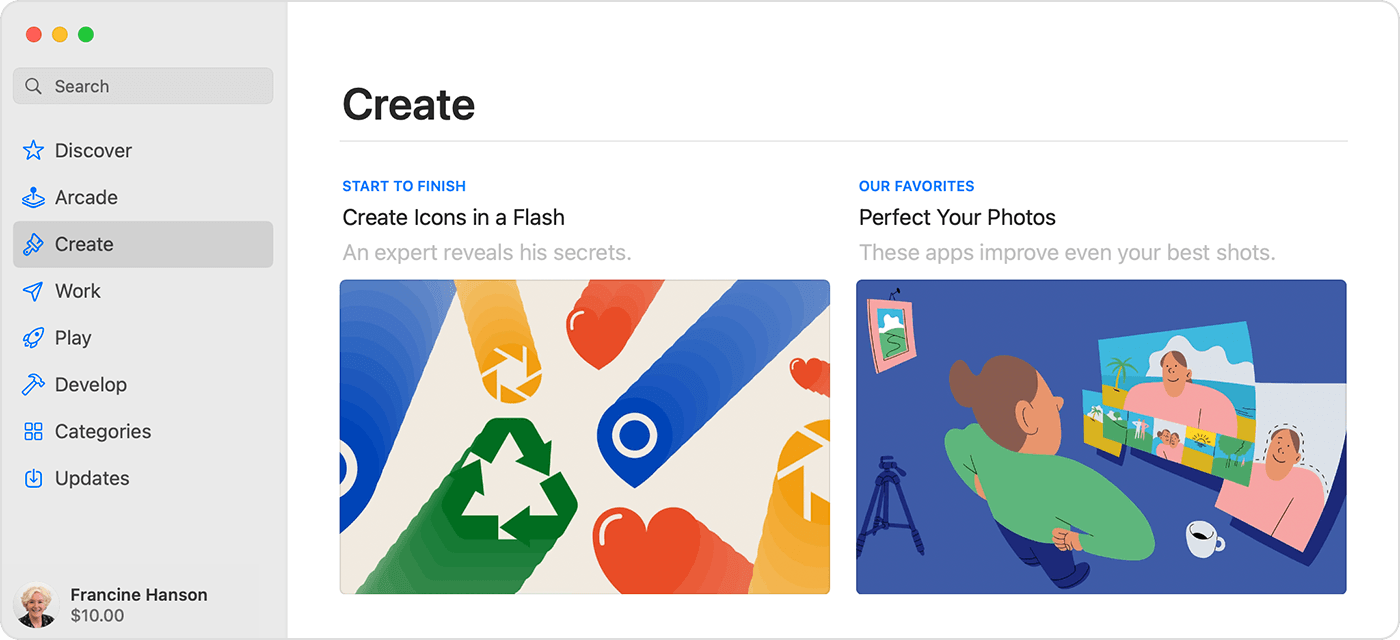
  1. Open the App Store. If you see the sign-in button at the bottom of the sidebar, click it and sign in with your Apple ID.
  2. If you have a balance, the amount appears below your name. If you don't see an amount, you don't have a balance.


Check your balance on your Windows PC


  1. Open iTunes for Windows. If you're not signed in, sign in with your Apple ID.
  2. At the top of the iTunes window, click Store.
  3. If you have a balance, the amount appears below your name. If you don't see an amount, you don't have a balance.


If your Apple ID balance seems incorrect


  • If you think that your Apple ID balance is incorrect, sign out of the App Store or iTunes Store. Then sign in and check the balance again. 
  • If you still think that the balance is incorrect, check your purchase history to see whether you bought an item or a subscription renewed.


If you plan to delete your Apple ID or change your country or region


Before you can delete your Apple ID or change your Apple ID country or region, you must spend all of your Apple ID balance. You might also have to wait for any pending refunds to process. If your balance is less than the cost of a single item, contact Apple Support.


👉🏼 Learn how to delete your Apple ID.

👉🏼 Learn how to change your Apple ID country or region.


If you have Apple ID balance that you can't use


You can't redeem or return Apple Gift Cards, App Store & iTunes Gift Cards, or unused Apple ID balance for cash, except as required by law. If your jurisdiction allows for refund of redeemed gift balances, you can contact Apple Support to request a refund. When you contact Apple, include the following information:

  • Your Apple ID.
  • The refund amount.
  • Your current shipping address.
1 reply
Question marked as Top-ranking reply

Dec 14, 2021 2:14 AM in response to Noorsatkhan

Check your Apple ID balance


  1. Open the App Store app.
  2. Tap your photo or the sign-in button  at the top of the screen. You might be asked to sign in with your Apple ID.
  3. If you have a balance, the amount appears. If you don't see an amount, you don't have a balance.


Check your balance on your Mac


  1. Open the App Store. If you see the sign-in button at the bottom of the sidebar, click it and sign in with your Apple ID.
  2. If you have a balance, the amount appears below your name. If you don't see an amount, you don't have a balance.


Check your balance on your Windows PC


  1. Open iTunes for Windows. If you're not signed in, sign in with your Apple ID.
  2. At the top of the iTunes window, click Store.
  3. If you have a balance, the amount appears below your name. If you don't see an amount, you don't have a balance.


If your Apple ID balance seems incorrect


  • If you think that your Apple ID balance is incorrect, sign out of the App Store or iTunes Store. Then sign in and check the balance again. 
  • If you still think that the balance is incorrect, check your purchase history to see whether you bought an item or a subscription renewed.


If you plan to delete your Apple ID or change your country or region


Before you can delete your Apple ID or change your Apple ID country or region, you must spend all of your Apple ID balance. You might also have to wait for any pending refunds to process. If your balance is less than the cost of a single item, contact Apple Support.


👉🏼 Learn how to delete your Apple ID.

👉🏼 Learn how to change your Apple ID country or region.


If you have Apple ID balance that you can't use


You can't redeem or return Apple Gift Cards, App Store & iTunes Gift Cards, or unused Apple ID balance for cash, except as required by law. If your jurisdiction allows for refund of redeemed gift balances, you can contact Apple Support to request a refund. When you contact Apple, include the following information:

  • Your Apple ID.
  • The refund amount.
  • Your current shipping address.

This thread has been closed by the system or the community team. You may vote for any posts you find helpful, or search the Community for additional answers.

How to check my balance?

Welcome to Apple Support Community
A forum where Apple customers help each other with their products. Get started with your Apple Account.