Create Subtables with filtered rows from a master table.

Hi,


I have a master sheet with Guest Names and table numbers/names.


I’m wanting to create sub tables for each table number/name that appears in the master list and have everyone’s name assigned to that table appear in the list.


Thanks!

Posted on Jan 8, 2022 6:58 AM

Reply
Question marked as Top-ranking reply

Posted on Jan 8, 2022 8:31 PM

Have you tried Add Category for ... ?


Result:


It's often easier to leave the data in the same table and just add/change names there. But if you need separate tables in the end just create a new table, select the cells you want from the data table, command-c to copy, click a cell the destination table, and command-v to paste.


Another way would be to use a Pivot Table to quickly set up separate tables.


Click in the data table and from the menu choose Organize > Create Pivot Table > On Current Sheet and set it up like this (just drag Table down into the Rows box and Name into the Values box):


The right-click (control click) a cell of the Pivot Table and choose 'Create Table for Data Source':
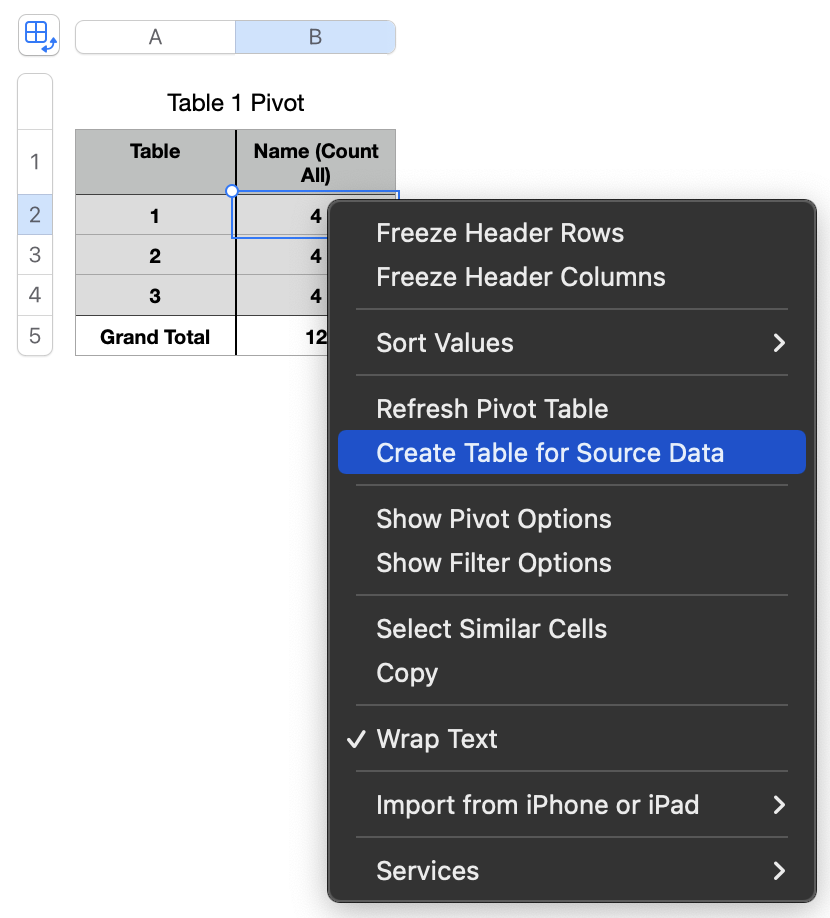


That gives you something like this:
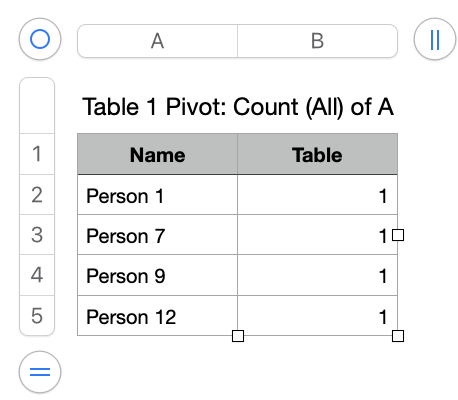


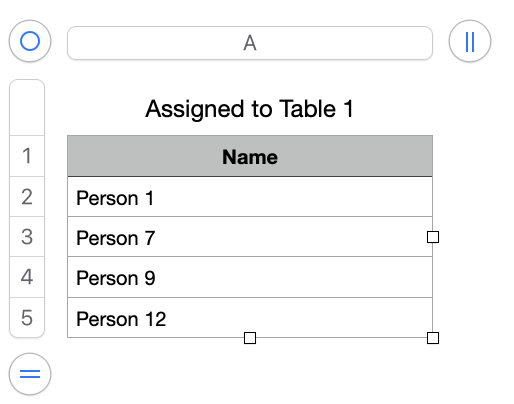
Which you can quickly clean up into something like this:


SG


1 reply
Question marked as Top-ranking reply

Jan 8, 2022 8:31 PM in response to Jackcross1403

Have you tried Add Category for ... ?


Result:


It's often easier to leave the data in the same table and just add/change names there. But if you need separate tables in the end just create a new table, select the cells you want from the data table, command-c to copy, click a cell the destination table, and command-v to paste.


Another way would be to use a Pivot Table to quickly set up separate tables.


Click in the data table and from the menu choose Organize > Create Pivot Table > On Current Sheet and set it up like this (just drag Table down into the Rows box and Name into the Values box):


The right-click (control click) a cell of the Pivot Table and choose 'Create Table for Data Source':


That gives you something like this:


Which you can quickly clean up into something like this:


SG



This thread has been closed by the system or the community team. You may vote for any posts you find helpful, or search the Community for additional answers.

Create Subtables with filtered rows from a master table.

Welcome to Apple Support Community
A forum where Apple customers help each other with their products. Get started with your Apple Account.