
My screen went black with the apple logo .
My screen went black with the apple logo .. doesn't turn on. why? how can I fix it? I can't lose everything I have
iPhone 11 Pro
My screen went black with the apple logo .. doesn't turn on. why? how can I fix it? I can't lose everything I have
iPhone 11 Pro
Try a Hard Reset:
If that didn’t work, it could be a hardware issue. ⚠️
Get expert service and support at the Genius Bar.
▷ Call 1-800-MY-APPLE or get help here.
Try a Hard Reset:
If that didn’t work, it could be a hardware issue. ⚠️
Get expert service and support at the Genius Bar.
▷ Call 1-800-MY-APPLE or get help here.
Put your phone on charging and then perform a force restart
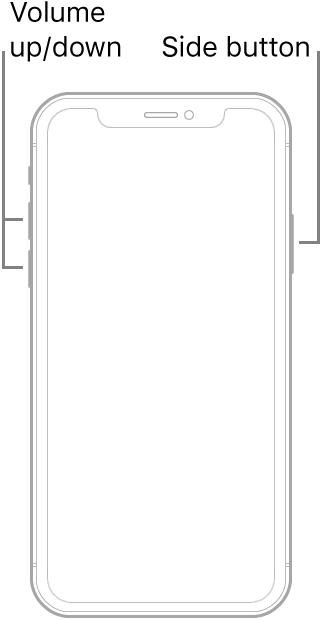
Force restart an iPhone with Face ID
To force restart iPhone X, iPhone XS, iPhone XR, iPhone 11, iPhone 12, or iPhone 13, do the following:
Press and quickly release the volume up button, press and quickly release the volume down button, then press and hold the side button. When the Apple logo appears, release the button.
My screen went black with the apple logo .

